What Is Vibe Coding and Why It Matters in 2026
Vibe coding is a way of building software where Andrej Karpathy coined the term in February 2025, and a developer describes the intent in natural language while AI generates most of the code. It spread fast enough that by November 2025 Collins Dictionary named it its Word of the Year, which tells you how quickly this once-casual practice turned into a real software label.
You're probably seeing it right now in two places at once. One is in the way people talk about building apps, the other is in the apps themselves, because a lot of modern sites leave the same fingerprints in the stack, the UI system, and the bundle. That's why understanding what is vibe coding matters for builders, reviewers, and anyone trying to tell a fast prototype from a durable product.
Table of Contents
- The Origin Story Behind Vibe Coding
- A Working Definition of Vibe Coding
- The Anatomy of a Typical Vibe-Coded Stack
- How Vibe Coding Changes the Developer Workflow
- How to Recognize a Vibe-Coded Website
- Where Vibe Coding Shines and Where It Breaks
- Practical Guidance for Using Vibe Coding Well
The Origin Story Behind Vibe Coding
The term landed because it came from the right person at the right time. Karpathy wasn't a hype account or a product marketer, he was already a serious AI voice, and that gave a playful phrase enough gravity to travel. The idea also fit the moment developers were living through, where writing software started to look less like line-by-line drafting and more like steering a model toward a result.
Why the phrase caught on
The early framing was memorable because it described a workflow, not just a tool. Karpathy's point was that the developer could keep the high-level intent in mind, speak in fragments, and let the model fill in the implementation. That made the label useful, because people could point at an existing behavior and say, “That's what we've been doing.”
Practical rule: a term spreads when it names work people already recognize but haven't had a good word for yet.
What made the phrase stick wasn't only the novelty. It also solved a cultural gap. Before that, teams had clumsy language for AI-assisted work, and none of it captured the relaxed, conversational feel of prompting a model to draft code while the human guides the direction. Once people had a name for it, they could argue about it, defend it, or reject it in public.
From novelty to category
The speed of adoption matters because it shows a shift in how software got discussed. Instead of treating code as something only humans write from scratch, vibe coding made intent, conversation, and machine generation part of the same loop. That's a big change in mental model, especially for product teams shipping prototypes, websites, and small apps with less emphasis on direct code inspection.
It also explains why the word moved so quickly from social media into broader developer conversation. Threads, posts, and write-ups didn't just repeat the phrase, they used it to describe a real pattern in modern app building. The result is a label that feels casual on the surface but marks a serious shift in how software gets made.
A Working Definition of Vibe Coding
At its simplest, vibe coding is a workflow where the developer states the goal in natural language, the AI produces code, and the human iterates by re-prompting instead of hand-editing every file. The developer might still inspect the output, but the center of gravity has moved from authoring syntax to shaping intent. That's why it feels different from older “AI-assisted coding” tools that mostly help you write faster while you still own every line.
Where it differs from traditional AI help
Traditional assistance usually looks like autocomplete, small refactors, or targeted code suggestions. Vibe coding is broader and looser, because the model is being treated as the primary author of structure, components, and glue code. In practice, that means the prompt becomes a kind of specification layer, with style, tone, and contextual constraints folded into the request.
The important distinction is accountability. In a conventional workflow, an engineer still reviews the diff, checks the architecture, and decides what stays. In vibe coding, the human may accept much of the generated result as a starting point, then steer with another prompt instead of rewriting the whole thing manually.
The spectrum is wider than the buzzword suggests
A lot of teams don't live at either extreme. Some use full vibe coding, where they trust the model heavily for a prototype or throwaway app. Others use vibe-assisted coding, where the AI drafts the scaffolding and the engineer performs targeted edits, reviews, and hardening. That middle ground is where many real teams end up once they move beyond demos.
Vibe coding is less about the tool and more about the control handoff.
Karpathy's own framing made the rough boundary clear. The idea was never that every software project should be built this way, only that it works well when speed matters more than precision and the outcome can tolerate iteration. That's why the definition has widened as teams began using it for client work, even if the original casual framing still fits the fastest, loosest end of the spectrum.
The Anatomy of a Typical Vibe-Coded Stack
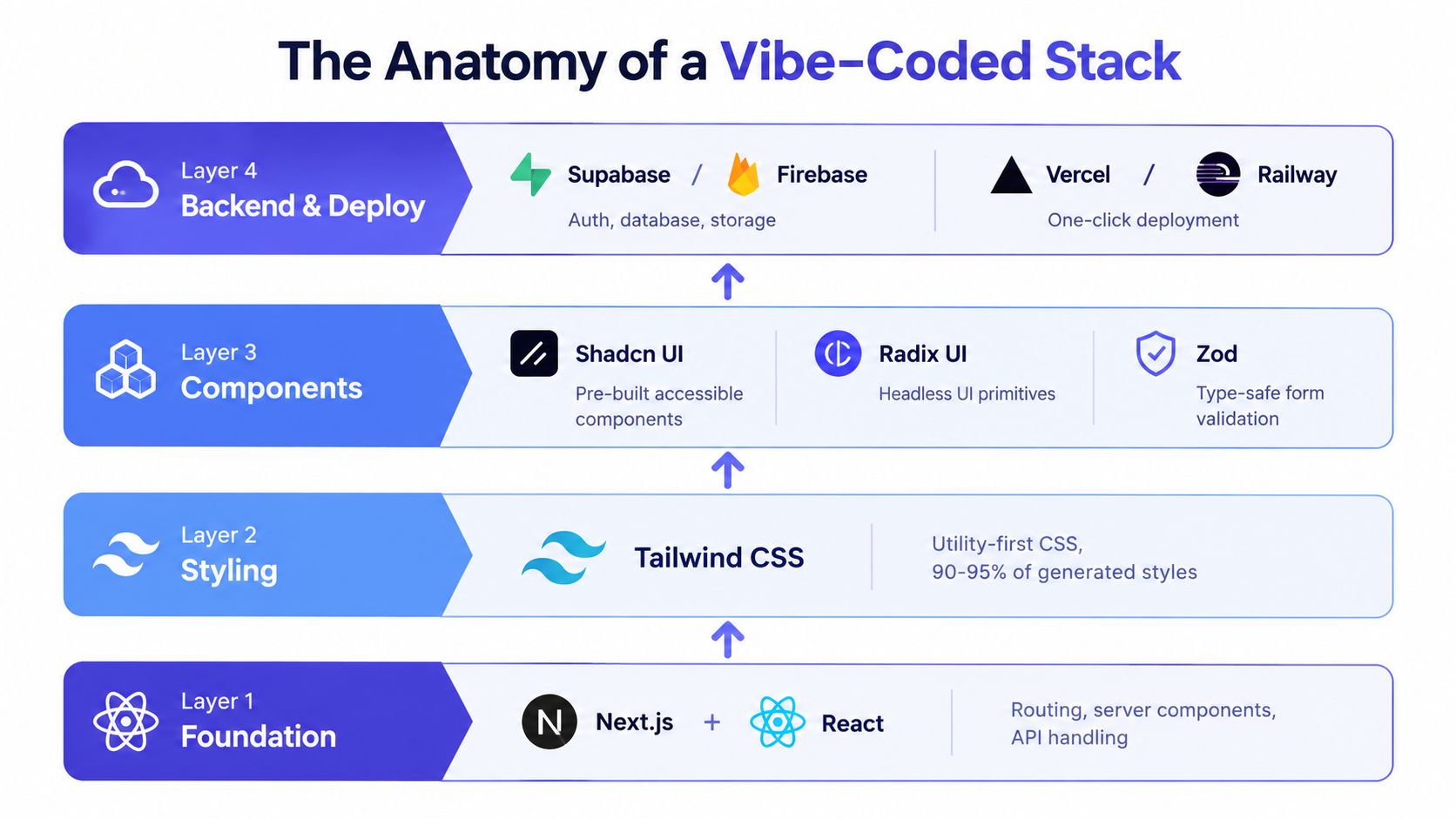
When people generate a vibe-coded app, the same stack keeps showing up because models favor tools with clear APIs, predictable patterns, and lots of examples in training data. The visible result is a familiar combination of Next.js, Tailwind CSS, Shadcn UI, Radix UI, and icon libraries such as Lucide or React Icons. That consistency is exactly why a detection tool can identify the stack even when the site doesn't advertise itself as AI-made.
Why the same tools keep appearing
Next.js tends to appear first because it gives the model a clean foundation for routing, server components, and API handling. Tailwind CSS comes next because utility classes are easy for a model to emit repeatedly without inventing custom stylesheet architecture. Then Shadcn UI and Radix UI fill in accessible components and headless primitives, while Lucide handles icons with simple, copy-paste-friendly usage.
That stack is practical for one more reason. It's well documented, typed, and easy to stitch together quickly, so the model can produce something that looks polished without needing much bespoke design work. The tradeoff is that the output starts to look similar across unrelated projects, which is why the “vibe-coded” look is recognizable on the open web.
What the human actually sees
A generated page often ships with almost no custom CSS, because the styling lives in inline Tailwind classes. You'll see reusable component patterns, consistent spacing, and standard responsive breakpoints, all of which are easy for a model to reproduce. If the app includes auth, persistence, or chat, the supporting layer often reaches for Supabase, Postgres, Vercel, or an AI SDK for generation features.
For engineers trying to understand the stack, the clue isn't just the framework names. It's the sameness of the implementation. When the layout, component structure, and dependency choices all line up in the same way, you're probably looking at a model-favored path rather than a hand-shaped design system.
For a deeper technical comparison of APIs and tooling that often sit around this layer, Python HTTP clients is a useful adjacent reference when you're evaluating how code gets wired to services.
How Vibe Coding Changes the Developer Workflow
The loop changes in a very specific way. A developer writes the intent, the model drafts the scaffold, the app runs, the human eyeballs the result, and the next prompt nudges the output forward. That means less time spent typing syntax and more time spent checking whether the generated implementation matches the product need.
The work moves from writing to steering
In a traditional workflow, the rhythm is usually read, write, test, repeat. In vibe coding, the rhythm becomes prompt, generate, verify, refine. That shift sounds small, but it changes where the attention goes, because the hard part is no longer producing code quickly, it's making sure the code makes sense in context.
Practical rule: the more stateful and interconnected the codebase, the more time you spend verifying model output.
That's where experience starts to matter. Juniors often feel the speedup immediately because they can ship visible UI faster. Seniors often spend more time auditing the edges, especially when prompts generate code that looks right but hides architectural mistakes. For a team that wants a more production-minded framing of AI workflows, production-ready AI agent architecture is a good companion read because it focuses on control loops, not just code generation.
What the productivity tradeoff looks like
Controlled evidence shows the upside and downside clearly. One summary of a METR controlled study reported GitHub Copilot made tasks 55% faster in earlier benchmark settings, while a later trial with 16 experienced open-source developers found AI access made them 19% slower on million-line repositories (source). The pattern is simple, AI can cut typing and speed up first drafts, but verification, correction, and prompt iteration can erase that gain on large systems.
| Stage | Traditional Coding | Vibe Coding |
|---|---|---|
| Planning | Human designs most of the structure first | Human states intent in natural language |
| Drafting | Developer writes files directly | AI generates the first implementation |
| Review | Engineer reviews self-written code | Engineer checks model output for fit and risk |
| Refinement | Hand edits and refactors dominate | More prompting and selective edits |
| Bottleneck | Syntax and implementation speed | Verification and context management |
The workflow change is real, but it's not magic. The human role shifts toward prompt quality, repo context, and review discipline, which means the bottleneck moves rather than disappears.
How to Recognize a Vibe-Coded Website
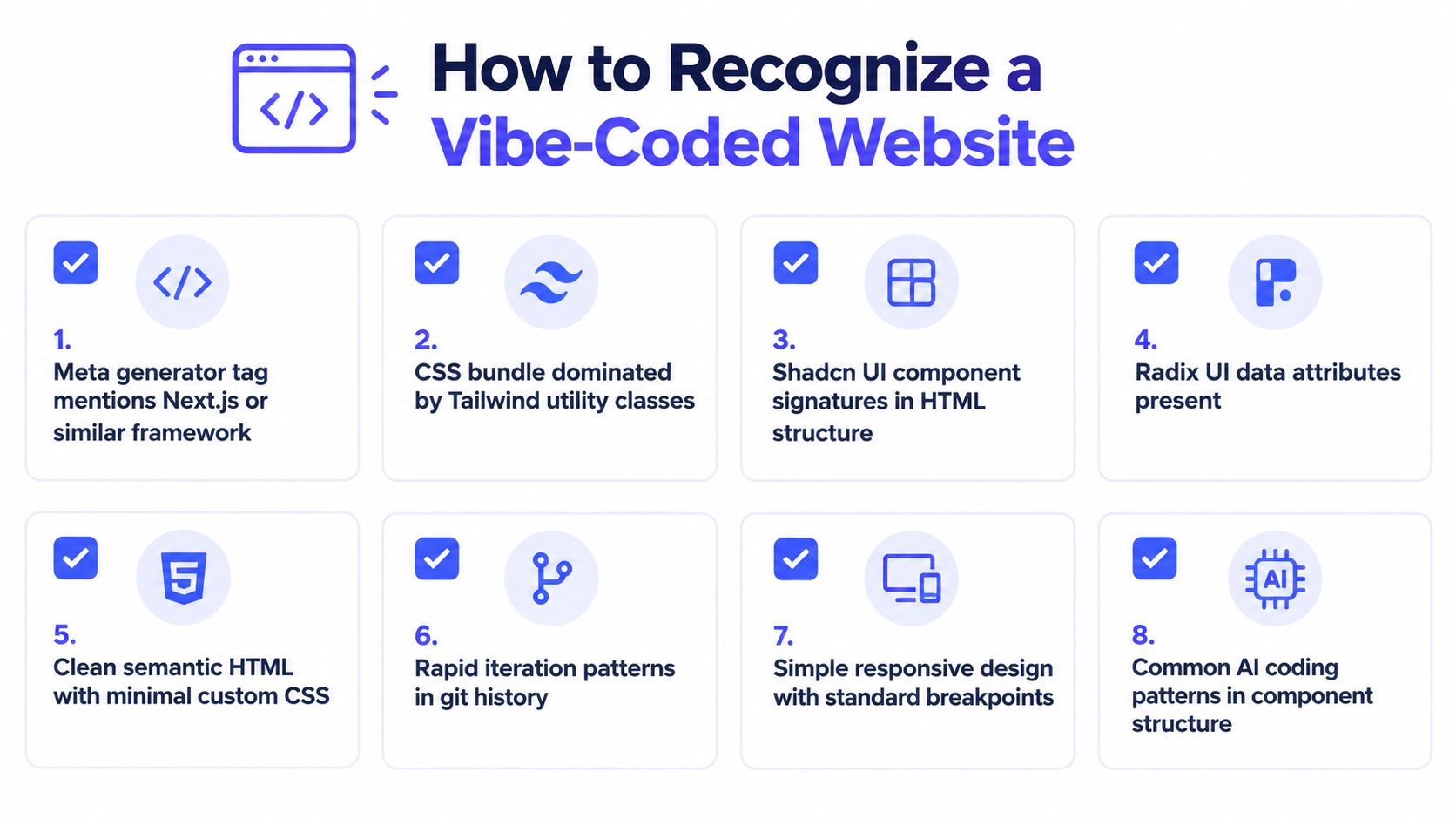
A detector starts with the public surface, not with guesswork. It looks at the code a browser can see and asks a simple question: do the same familiar building blocks show up again and again? Framework metadata, utility-class density, component signatures, and package names in bundles can all point to a site that was generated or heavily scaffolded with AI-friendly defaults.
The signals that stand out
A scan often begins with a meta generator tag that names Next.js or a similar framework, then checks for a CSS bundle dominated by Tailwind utilities. From there, it looks for component structures that resemble Shadcn UI and Radix UI, along with Radix data attributes in the rendered HTML. Bundle strings such as shadcn, lucide-react, or @radix-ui can reinforce the pattern, especially when the page leans on standard responsive breakpoints instead of custom CSS.
These are fingerprints, not proof.
That distinction matters. A careful developer can build the same stack by hand, and some teams choose it on purpose because it speeds up delivery. When several signals line up across markup, dependencies, and layout patterns, the odds rise that the site came from a vibe-coded workflow, or from a stack that AI tools strongly favor.
Why detectors care about consistency
The reason these clues work is repeatability. Vibe coding tends to produce familiar structure, so the same primitives show up across unrelated projects. That consistency lets a tool map the public surface of a site to the likely underlying stack without seeing private code.
The wider context helps explain why this matters. Y Combinator's reported startup batch data points to vibe coding reaching real production work, while GitClear's published code-change analysis suggests that review discipline still matters because repetitive generation can increase technical debt if teams do not keep up with it. The open-web fingerprints fit that pattern. Fast generation often leaves behind repeatable, lightly customized output, which can be a strength for speed or a warning sign for maintainability.
Where Vibe Coding Shines and Where It Breaks
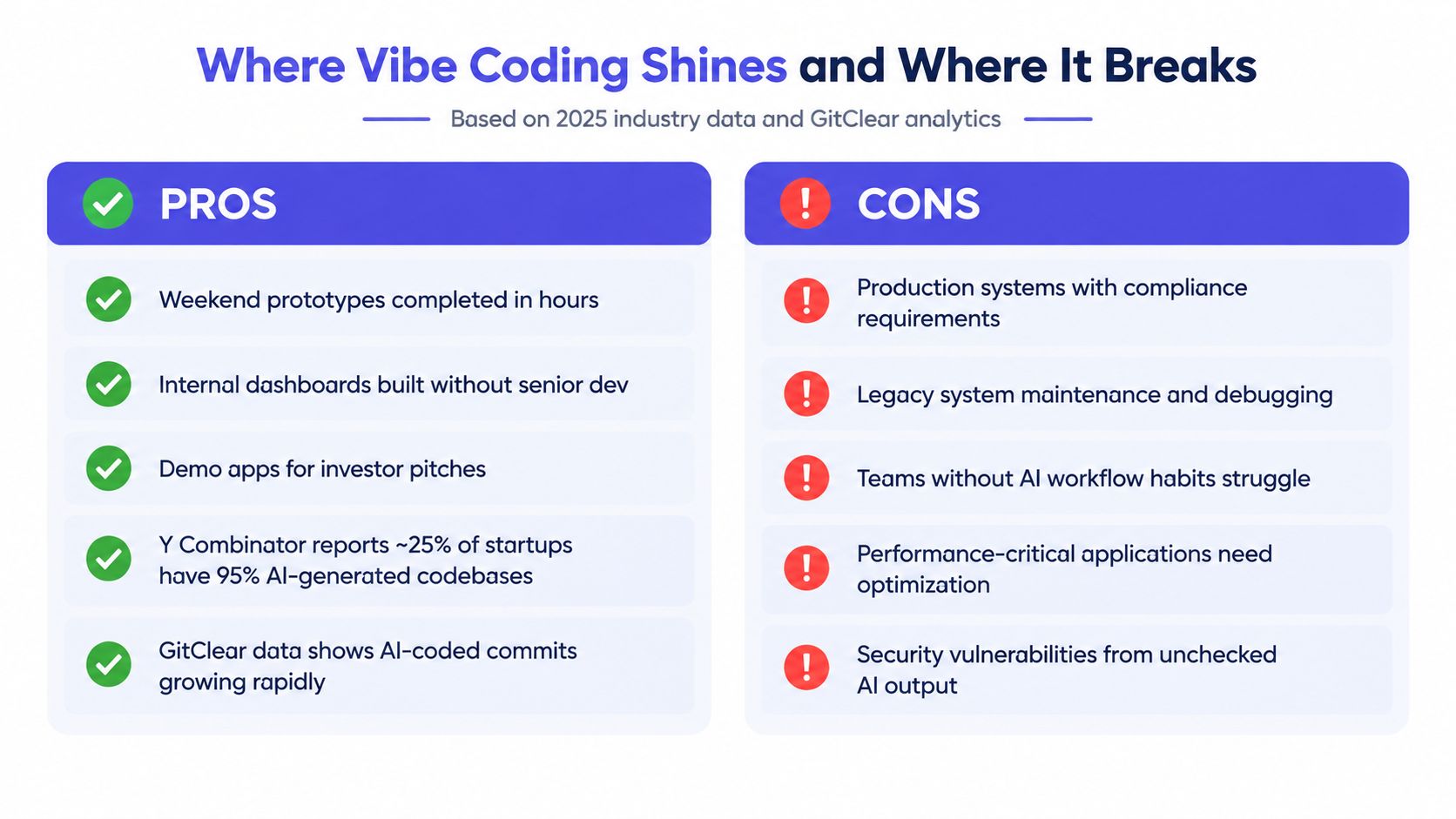
A vibe-coded workflow makes the most sense when speed matters and a rewrite would be cheap. Weekend prototypes, internal dashboards, and demo apps fit that shape because the team can scaffold the stack quickly, then tighten it later. That pattern has also shown up in startup settings, including Y Combinator's reported Winter 2025 batch data, where a share of startups were working with codebases that were mostly AI-generated.
Where it helps
For simple work, the payoff is easy to see. A founder can spin up a landing page, a product manager can mock an internal tool, and a designer can test a flow without waiting for a full engineering cycle. The model handles the boring scaffolding, which lets the team judge the idea instead of spending the first day assembling forms, routing, and layout.
That speed can also hide a tradeoff. GitClear's published analysis of code-change trends found that refactoring declined over time, while duplication increased and copied code became more common than moved code for the first time in years (source). The point is not that AI generation caused every shift. It does show how repeated, low-friction output can change code habits at scale.
Where it breaks
The first draft is rarely the hard part. The trouble starts after the app exists. Production systems with auth, payments, data privacy, or compliance rules need more than a plausible UI and working routes. A human still has to check security, accessibility, bundle size, state handling, and edge cases before anything reaches users.
Security research backs up that caution. Independent testing found AI-generated code was insecure in 45% of tested cases across 80 curated tasks and more than 100 LLMs, with no meaningful improvement in newer models, and another industry study found 20% of vibe-coded apps had serious vulnerabilities or configuration errors (source). Those findings do not make AI code unusable. They do show that unchecked output becomes risky fast once the application carries real responsibility.
The practical rule is straightforward. Use vibe coding where speed matters and the rewrite cost stays low. Pull back when the code will live for a long time, touch sensitive data, or sit behind obligations you cannot afford to guess about.
Practical Guidance for Using Vibe Coding Well
The safest way to use vibe coding is to rank the work by how painful a rewrite would be. Internal tools, throwaway prototypes, and design explorations are the best fit, because a generated Next.js + Tailwind + Shadcn scaffold gives you a fast starting point without pretending the result is final. Once the project starts serving real users, the bar changes.
A simple decision ladder
- Safest, green zone: internal tools, throwaway prototypes, and design explorations where the goal is learning, not permanence.
- Moderate, yellow zone: marketing sites, simple customer-facing MVPs, and technical blogs where speed matters but polish still counts.
- Risky, red zone: complex production systems, regulated work, and performance-critical applications where a bad assumption can stick around for years.
For the middle zone, a senior engineer should own the handoff. That means reviewing generated code for security, accessibility, and bundle weight before deployment, then tightening the architecture where the model made broad assumptions. If you skip that checkpoint, the app may look done long before it is ready.
A checklist that keeps the process honest
Before you start, decide who owns the codebase after generation. Define the maintenance horizon, because “we can rewrite it later” means something very different for a weekend demo than for a customer portal. Set a human review gate, and don't send proprietary data into a model unless your policy says that's allowed.
Good practice: vibe code what you can rewrite in a weekend.
That rule of thumb keeps the workflow honest. It lets teams enjoy the speed of AI-generated scaffolding without confusing a fast first draft with a reliable system, and that's the line most readers need to draw in 2026.
AI Website Detector can help you tell whether a site was built with an AI-first workflow by scanning for the tech fingerprints that vibe-coded stacks often leave behind. If you're comparing competitors, checking a contractor's delivery, or just trying to understand what's under the hood of a modern site, visit AI Website Detector and see how the stack, builder signals, and AI verdict come together in one scan.