
How to Choose a Website Builder: The 2026 Data-Driven Decision Guide
The Paradox of Choice: Why Selecting a Website Builder is Different in 2026
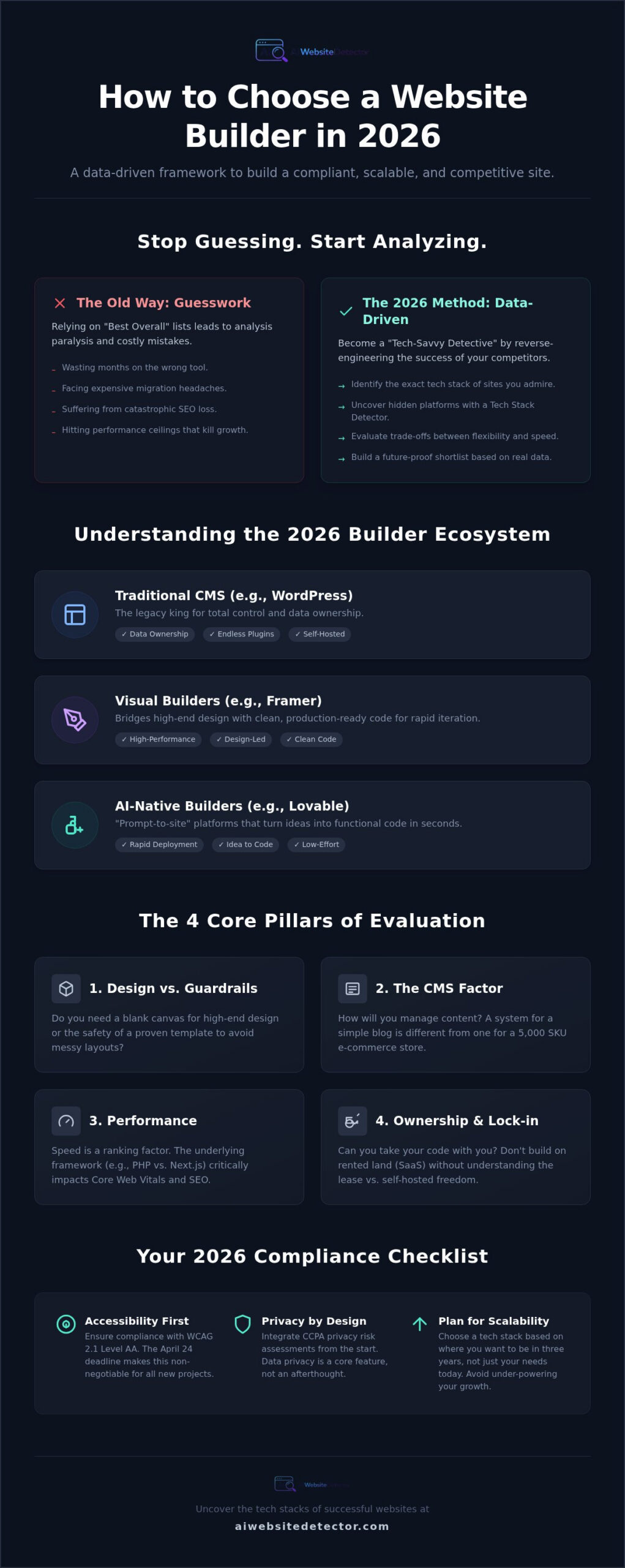
Choosing a website builder used to be simple. Now, it’s analysis paralysis. The market is a fractured landscape of traditional content management systems (CMS), slick visual builders, and disruptive AI-native platforms. This isn’t just about picking a theme anymore; it’s about choosing a foundational tech stack—the combination of programming languages, frameworks, and tools that will power your digital growth.
The generic “Best Website Builder” list is a marketing myth. The right choice for an e-commerce brand is a technical dead-end for a SaaS company. The cost of a wrong decision isn’t just a subscription fee; it’s lost SEO equity during a painful migration, performance ceilings that cap your growth, and hours wasted fighting a platform that wasn’t built for your goals.
To win in 2026, you need to stop thinking like a consumer and start thinking like a tech-savvy detective. Your goal isn’t to read reviews; it’s to uncover the data and reverse-engineer the success of websites you admire.
Traditional CMS vs. AI-Native Builders
The primary split in the market is between established players and AI-driven newcomers. WordPress, the legacy CMS, still commands massive market share due to its unparalleled flexibility and a plugin ecosystem built over decades. It’s a proven workhorse for content-heavy sites and complex SEO strategies.
On the other end are AI-native builders like Lovable, which are redefining deployment speed with “prompt-to-site” functionality. These tools are built for rapid prototyping and launching functional products in hours, not weeks. Bridging this gap are hybrid visual builders like Framer, which combine high-fidelity design control with powerful, performance-oriented frameworks like React and Next.js.
The 2026 Tech Maturity Scale
Your project’s complexity determines your needs. A simple landing page has vastly different technical requirements than a multi-layered SaaS application. In today’s market, “no-code” no longer means “no-technical-understanding.” You still need to grasp the fundamentals of what makes a site fast, scalable, and manageable.
Think of your tech stack as the foundation of your digital presence. A weak foundation will crack under the pressure of growth, while a solid one will support your business indefinitely. The key is choosing the right materials from the start.
The 4 Core Pillars: Evaluating Your Project’s Technical DNA
Before you look at any specific platform, you must first analyze your own project’s needs. Every builder makes trade-offs. Your job is to find the platform whose trade-offs align with your goals. We evaluate this across four core pillars.
- Design Freedom vs. Guardrails: Do you need a blank canvas to create a completely unique user experience, or do you prefer proven templates that guarantee a professional look with minimal effort?
- The CMS Factor: How will you manage content? Do you need simple blog posts, or will you be handling complex, relational data like product inventories, user profiles, or dynamic directories?
- Performance and Core Web Vitals: How critical is speed? The underlying framework—like the PHP that powers WordPress versus the Next.js foundation of many Framer sites—has a direct impact on load times and, consequently, your Google rankings.
- Ownership and Portability: What happens if the platform shuts down or you outgrow it? With some builders, you can export your code and move. With others, you are locked into their ecosystem, facing a complete rebuild if you need to leave.
Scalability and Performance Metrics
A builder’s impact on page speed and SEO is non-negotiable. Google’s Core Web Vitals are direct ranking factors, and a slow platform can kill your organic visibility before you even start. Modern visual builders like Framer emphasize “clean code” generation, meaning the platform produces efficient HTML, CSS, and JavaScript that browsers can render quickly.
You must also compare the maintenance burden. A self-hosted platform like WordPress offers total control but requires you to manage updates, security, and hosting. A Software-as-a-Service (SaaS) platform handles this for you but offers less direct control over the server environment.
The Hidden Costs of ‘Free’ or ‘Cheap’ Builders
The sticker price is rarely the final price. A “free” plan can quickly become expensive when you account for the hidden costs. Many builders rely on third-party app marketplaces for crucial functionality. These “bolted-on” features can break your budget with multiple monthly subscriptions.
For e-commerce, watch for transaction fees and platform taxes that take a percentage of your revenue on top of what payment processors like Stripe or PayPal charge. Finally, consider the value of your time. A platform with a steep learning curve might be cheaper in dollars but cost you hundreds of hours in lost productivity.
Framework Comparison: Matching Business Goals to Tech Stacks
With your project’s DNA defined, you can now compare specific frameworks. Forget marketing hype. This is about matching your core needs to the right technology. Based on our analysis of over 130,000 websites, a few clear patterns emerge for different business goals.
Here’s a data-driven breakdown of the top contenders in 2026:
- WordPress: The ‘Legacy King’ for maximum flexibility. Choose it for content-heavy sites like blogs, news portals, and complex directories. Its SEO tools are unmatched, giving you granular control over every aspect of your site’s organic presence.
- Framer: The gold standard for design-first companies. It’s the top choice for marketing sites, interactive portfolios, and startups that need to blend high-end design with rapid visual iteration. Its foundation on React/Next.js ensures top-tier performance.
- Next.js: The developer’s choice for performance and custom logic. This isn’t a builder but a framework. Choose it when you need lightning-fast speed, server-side rendering for complex applications, and the ability to write custom code without limitations.
- Lovable & AI Builders: The choice for speed-to-market. These platforms are best for startups and entrepreneurs who need to ship functional prototypes, landing pages, or MVPs in hours, not days. They excel at turning ideas into live sites with unprecedented speed.
When to Choose WordPress or Framer
The decision between WordPress and Framer often comes down to content versus design. If your business model is driven by publishing high volumes of content and deep SEO control is your primary concern, WordPress is the battle-tested choice. Its ecosystem of plugins and themes is vast, allowing you to add almost any functionality imaginable.
If your primary goal is to create a visually stunning, highly interactive marketing site that feels like a polished product, Framer is the superior option. It empowers designers to build production-ready websites without writing code, resulting in clean, performant sites that look and feel custom-built. Want to see which of your favorite design-forward sites use it? You can detect Framer websites with a quick scan to see its power in action.
The Rise of AI-Driven Development (Lovable)
AI-native platforms like Lovable are disrupting the traditional builder category entirely. Instead of dragging and dropping components, you use prompts to describe the site you want to build. The AI generates the layout, copy, and even imagery, creating a functional first draft in minutes.
This approach is incredibly powerful for validating ideas quickly. While they may not offer the pixel-perfect control of Framer or the deep plugin library of WordPress, their speed is a competitive advantage. For projects where getting to market first is the highest priority, prompt-based building often beats manual design.
The Detective Method: How to Choose by Reverse-Engineering Success
Stop reading generic reviews. The most reliable way to choose a website builder is to find out what technology powers the websites you already admire and compete with. This “Detective Method” moves you from a passive reader to an active investigator, using data to drive your decision.
- Curate Your Inspiration List: Find 5-10 websites in your niche that you love. Focus on sites that have the aesthetic, functionality, and performance you want to achieve. Include direct competitors and aspirational brands.
- Uncover Their Tech Stack: This is the crucial step. Use a technology detector to look under the hood of each site on your list. A good detector will identify the CMS, the underlying JavaScript framework, analytics tools, and hosting provider in a single click.
- Analyze Platform Trends: Once you’ve identified the platforms, check their market share. Are they growing or shrinking? Choosing a platform with a growing community and developer base ensures better support and future-proofing. You can check our AI builder market share report for the latest data.
- Look for AI Signals: As you analyze sites, pay attention to modern design patterns. Was the site likely generated by an AI tool or meticulously hand-coded? Our detector can help spot the fingerprints of AI-native builders, giving you insight into how your competitors are innovating.
How to Use a Tech Stack Detector
A tech stack detector works by analyzing a website’s code, network requests, and server headers to identify technological fingerprints. For example, it can spot the specific `wp-content` directory structure of a WordPress site or the unique JavaScript bundles associated with a Framer build.
In one click, you can go from “I wonder what they used” to a complete list of technologies. This instantly tells you if a competitor’s slick design is a custom build or an off-the-shelf template. Seeing that a site you admire was built with an AI platform can validate that choice for your own project.
Analyzing Competitor Stacks
Uncovering your competitors’ tech stacks is a form of competitive intelligence. Why did they choose that platform? If three of your top five competitors are on Shopify, it’s a strong signal that its e-commerce features are critical for your market. If another is on a blazing-fast Next.js site, you’ve just found a gap you can exploit by prioritizing performance.
Don’t just copy them—understand their choices. By analyzing their stack, you can find opportunities to outperform them on speed, SEO, or user experience. Ready to start your investigation? You can inspect any website’s tech stack right now and get the data you need to make an informed decision.
Making Your Final Choice: From Detection to Decision
You’ve moved from overwhelming choice to a data-driven shortlist. By analyzing the tech stacks of successful sites, you’ve replaced guesswork with evidence. The final step is to synthesize this information and commit to a platform for a “mini-build” sprint.
Your detective work has likely narrowed the field to two or three strong contenders. The emotional bias is gone, replaced by a clear understanding of which platforms are actually being used to succeed in your specific niche. Now it’s time to get hands-on.
Putting the Detector to Work: Your Final Checklist
Use the data you’ve gathered to make your final call. For your top 2-3 platforms, run through this checklist:
- Trial and Test: Sign up for a free trial for each platform on your shortlist. Don’t just click around—try to build one key page of your future website, like your homepage or a product page. This “mini-build” sprint will reveal more than any review ever could.
- Feature Verification: Does the platform actually have the one or two “must-have” features you identified in the Core Pillars stage? Don’t take the marketing page for granted. Test the functionality yourself.
- Assess the Learning Curve: How intuitive does the platform feel to you? A platform praised for being “easy” might not click with your workflow. The best builder is the one you can use efficiently.
Building for the Future
The web is constantly evolving. The rise of modular web design and deeper AI integration means the platform you choose today must be ready for tomorrow. Before you make your final commitment, consider these three factors: security, support, and scalability.
Ensure the platform has a strong security track record. Check their support options—is there a community forum, email support, or live chat? Finally, confirm that you can easily upgrade your plan as your traffic and business needs grow.
You’ve done the research. You have the data. The best builder is the one that empowers you to stop planning and start building. Make your choice with confidence and launch the damn thing.
Frequently Asked Questions
- How do I know if a website was made with an AI builder?
- AI builders often leave specific fingerprints in the website’s code, such as unique class names, script sources, or HTML structures. The easiest way to check is to use a specialized tool. You can run a free scan on our AI Website Detector to get an instant analysis.
- Is WordPress still the best choice for SEO in 2026?
- WordPress remains an exceptional choice for SEO, especially for content-heavy websites, due to its granular control and powerful plugins like Yoast or Rank Math. However, builders like Framer that are built on performance-focused frameworks like Next.js can often achieve better Core Web Vitals out of the box, which is also a major SEO factor.
- What is the difference between a website builder and a framework like Next.js?
- A website builder (like Framer or WordPress) is a complete platform with a user interface for building and managing a site. A framework (like Next.js) is a code library that developers use to build custom applications from the ground up. Builders are for users; frameworks are for developers.
- Can I switch website builders later if I make the wrong choice?
- Switching is possible but often difficult and costly. This process, called a site migration, usually involves manually rebuilding pages and moving content. It can also lead to a temporary drop in SEO rankings if not handled correctly. This is why making a data-driven choice upfront is so important.
- Which website builder has the fastest load times?
- Generally, sites built with modern frameworks like Next.js or Astro will have the fastest load times. Many Framer sites are built on Next.js, giving them a performance edge. However, a well-optimized WordPress site on a high-quality host can also be very fast. Performance depends on both the platform and how you use it.
- Are AI website builders like Lovable good for professional businesses?
- Yes, for specific use cases. AI builders are excellent for creating landing pages, validating business ideas, and launching initial versions of a product (MVPs) quickly. For complex, large-scale business sites, a more mature platform like WordPress or a custom-coded solution might be more appropriate in the long run.
- How can I tell what technology a competitor’s website is using?
- The most effective method is to use a tech stack detector. These tools analyze the site’s code and network traffic to identify the CMS, frameworks, plugins, and analytics tools being used. This gives you a complete blueprint of their digital strategy.
- What is the easiest website builder for a complete beginner?
- Builders like Squarespace and Wix are traditionally known for their user-friendly, drag-and-drop interfaces, making them very accessible for beginners. However, new AI builders are challenging this by allowing users to generate a site simply by describing it, which can be an even faster starting point.