AI Website Builder with Code: Clean Export and Full
Most advice about an AI website builder with code gets the order wrong. People start with the export button, then assume they've bought ownership, portability, and maintainability. In production, that's usually where the trouble starts, because code you can export is not always code your team can safely evolve.
The question is simpler and harsher. After launch, can an engineer understand the stack, patch it, extend it, and move it without fighting the builder's assumptions? If the answer is no, you've bought speed up front and debt on the back end.
| Builder Type | Export Format | Code Portability | Best For |
|---|---|---|---|
| Hosted AI builders | Often tied to the platform, with limited code access | Lower, because hosting and runtime stay coupled to the vendor | Fast marketing sites, small business launches, teams that want integrated publishing |
| Code-first AI builders | Standard front-end code, usually HTML, CSS, and JavaScript | Higher, because the output is meant to live in a normal editor and host | Developers, agencies, and teams that need control, handoff, or migration options |
| Design-centric hybrid builders | Partial export, often focused on visual editing first | Mixed, because parts of the stack are portable and parts stay locked in | Teams that need speed but still want some engineering oversight |
Table of Contents
- Why Code Export Is Not the Same as Code Ownership
- Hosted AI Builders Versus Code-First AI Builders
- Comparing AI Builders on Code Quality and Export Depth
- Performance, SEO, and the Hidden Cost of AI-Generated Sites
- Best AI Builders with Code by Real-World Use Case
- How to Validate Exported Code and Detect AI Influence
- Which AI Website Builder with Code You Should Choose
Why Code Export Is Not the Same as Code Ownership
A builder can hand you files and still leave you boxed in. If the output only works inside the vendor's runtime, your team has code artifacts, but not real control. That is why code ownership matters more than a simple export button.

Portability is the first test I look at. Playcode's comparison shows Replit with a full IDE and full code export, while Webflow exports only HTML/CSS/JS and stays closer to a design-centric builder than a full-stack code workflow, which is a useful signal when you are deciding whether the handoff belongs to marketing or engineering (Playcode comparison). That distinction matters because a marketing team can tolerate a locked environment longer than a product team can.
Practical rule: if the site may later need a new framework, a custom backend, or a different host, treat export as the start of the workflow, not the finish.
I also point teams to resources that ask the ownership question directly. A useful example is Webtwizz code ownership option, because it frames the choice around control, not just output. That mindset works better for founders and agencies that expect to revisit the codebase later.
The deeper issue is hidden technical debt. A generated project can look clean at first and still carry brittle component boundaries, awkward dependency choices, or nonstandard file organization. That debt does not show up in the homepage screenshot, but it becomes obvious the moment an engineer needs to change navigation logic, swap a provider, or clean up a build.
Ownership also has an exit test. If the builder disappears, pricing changes, or the workflow stops fitting your team, the exported code should still behave like normal software and remain maintainable. Code that only behaves like a product feature leaves the work inside the vendor's system.
Hosted AI Builders Versus Code-First AI Builders
Hosted AI builders optimize for speed, integrated publishing, and fewer decisions. Code-first builders optimize for access, flexibility, and the ability to treat the generated result like a real repository. That split affects review flow, deployment, and how much work stays inside the vendor's system versus your own.
Hosted AI Builders
Hosted systems usually start from a prompt, generate a site, and keep the whole stack inside one platform. Wix describes a four-step flow where users describe a vision, the AI builds a complete site with business tools, users fine-tune with drag-and-drop editing and Aria, then connect a domain and publish, with integrated SEO and marketing tools available after launch (Wix AI website builder). Builder.io describes the same general motion in more technical terms, plain-language input, pattern matching, generation in minutes, then follow-up prompts or visual editing (Builder.io explainer).
This model fits sites that act mainly as marketing assets. The trade-off is control. The code, hosting, and runtime often stay tied to the platform, which limits later refactors and makes the handoff to engineering less clean. That is acceptable for a brochure site that needs to ship fast, but it becomes expensive once product requirements start changing and the exported work still depends on platform-specific structure.
Code-First AI Builders
Code-first tools target engineers and technical teams. Playcode says its real-code output produces standard HTML, CSS, and JavaScript that can be opened in a code editor and deployed on any host, and users can manually edit every element of the generated site (Playcode code generation). Playcode also says its builder can create, host, and update sites without programmers, while clarifying that the flow still begins with plain-language prompts and AI clarification (Playcode AI website builder).
That matters because engineering teams need more than a finished page, they need something they can maintain. Code-first workflows fit better when the site sits inside a larger app, when design and engineering share a repository, or when the frontend is expected to outlive the first launch. If the code has to move between hosts, CI systems, or frameworks, code-first gives you more room to work. The broader choice between no-code or real code for apps usually comes down to how much ownership your team needs after launch.
Developers value builders that produce output they can open, understand quickly, and modify without platform-specific expertise.
Comparing AI Builders on Code Quality and Export Depth
The test starts after the first publish. Some builders export source that behaves like normal front-end code. Others hand you a polished page that still depends on the original platform for editing, deployment, or even basic structure. That difference shows up later, usually when the site has to be maintained by someone who did not build it.
What Code Quality Actually Means
Generated code does not need to be clever. It needs to be predictable, modular, and easy for another engineer to read without decoding the builder's habits. In practice, that means standard naming, clear component boundaries, editable assets, and no strange dependency maze that only the vendor understands.
Export depth and code quality are related, but they are not the same thing. A builder can produce files you can open in an editor and still leave you with awkward nesting, duplicated styling, or patterns that are hard to extend. The practical question is whether the output fits into a real repo without creating hidden cleanup work.
How I'd Read the Market
Hosted builders are strongest when the goal is to publish a branded site quickly and keep business features inside one platform. Code-first builders fit better when the site has to live inside a larger engineering workflow, share a repository with an app, or move between hosts without friction. Design-first hybrids sit between those two positions, useful for teams that want visual control and some exportability, but do not need full source ownership on day one.
Backend depth matters too. Some tools are front-end accelerators, while others behave more like app builders that happen to generate websites. If the site will later need auth, data flow, or product logic, the second group usually gives you more room to grow without starting over.
I also separate clean export from clean handoff. A repo can export without giving you code that ages well, and a site can run perfectly while still carrying obvious AI artifacts in class names, component repetition, or layout decisions that feel machine-made. That is where AI builder limitations you should check before export become visible in practice.
| Maintenance Area | Hosted AI Builders | Design-Centric Builders | Code-First AI Builders |
|---|---|---|---|
| Ownership after launch | Lower, because the platform usually stays in the middle | Medium, because some work can move out but some still stays tied to the tool | Higher, because the output is meant to be edited and deployed elsewhere |
| Long-term maintenance cost | More vendor dependence, more friction when requirements change | Moderate, with a mix of visual speed and manual cleanup | Lower for technical teams, because changes can happen in normal code workflows |
| AI artifacts after export | Usually hidden inside the platform, not always visible in source | Often visible in spacing, naming, or repeated layout patterns | Still present in places, but easier to spot and fix in code |
| Best fit | Fast landing pages, small business sites, quick launches | Teams that want design speed with partial engineering involvement | Developers, agencies, and product teams with long-term ownership needs |
For SEO-heavy projects, the generated site also has to support the work around it. The backlink profile, page structure, and content operations matter as much as the export format, which is why teams comparing options often end up reading the best AI driven SEO software guidance alongside the builder itself. The builder can only carry part of the load.
Performance, SEO, and the Hidden Cost of AI-Generated Sites
A site can look finished and still be undercooked. The first version often gets the layout right and the operational details wrong, which is why performance and SEO become the actual cost centers after launch. That's also where AI-generated sites often demand the most human cleanup.
Studio Slate notes that there still isn't an independent Core Web Vitals benchmark across these builders, so vendor speed claims deserve caution, not trust (Studio Slate review). The same review describes a benchmark approach that looked at prompt-to-publish time, Google PageSpeed mobile scores, SEO readiness, and scalability stress by adding 20+ pages, with initial prompt-to-publish times ranging from about 8 minutes for Hostinger to 14 minutes for Wix and a target of LCP under 2.5 seconds for load time (Studio Slate review). I'd treat that as a reminder that launch speed is not production readiness.
What Usually Slips
The first miss is often structure. AI tools can generate pages that render correctly but don't expose the clean semantic hierarchy SEO work depends on. The second miss is consistency, where one template or prompt path outputs better code than another.
If SEO is part of the plan, the generated site needs more than metadata fields. A useful companion resource is best AI driven SEO software, because end up using a separate SEO workflow after the builder does its first pass. That separation is normal. The site builder isn't usually the full optimization stack.
The hidden cost is rework. Teams spend time fixing headings, tuning performance, and rechecking the generated code after deployment. That's not a failure of AI by itself, it's the price of using a fast generation layer before the site is production-hardened.
For a broader cautionary read on platform limits, the internal analysis at https://aiwebsitedetector.com/blog/ai-builder-limitations/ is worth keeping close when you compare launch speed to long-term maintenance.
Best AI Builders with Code by Real-World Use Case
A founder, a solo developer, and an agency lead do not need the same builder. The right choice depends on what fails first, schedule, flexibility, or handoff. Use case beats feature checklist because code export means little if the exported site is hard to maintain.
Founders and small teams
If the site is mostly a marketing surface, speed matters more than full code control. Hosted builders fit teams that want publishing, business tools, and less setup overhead in one place. Wix works well for that profile, since it combines prompt-based generation with drag-and-drop refinement and built-in launch tools (Wix AI website builder).
Developers building apps or custom sites
If the site needs to sit beside application code, pick the system that produces standard code and leaves the runtime under your control. Replit's full IDE and full export, as described in Playcode's comparison, suit technical teams that care more about ownership than convenience (Playcode comparison). Playcode's own code-generation framing also matters here, because it supports manual edits in a normal editor and makes the exported output easier to inspect and adapt (Playcode code generation).
Agencies and client handoff
Agencies need code that another developer can inherit without decoding the builder. Partial export is often not enough, because client work usually comes back for maintenance, seasonal updates, and occasional platform migration. A builder can be fine for first delivery and still become a burden at renewal time.
The question is whether the output stays readable after the handoff. If the exported files are clean, modular, and easy to diff, the team can extend them without rebuilding the whole site from scratch.
Teams doing due diligence
If the question is whether a site was AI-assisted, the value is in the evidence, not the marketing page. A detector like AI Website Detector can analyze signals from the live site, surface the stack, and help teams verify whether a deployment looks AI-native, AI-augmented, or fully custom. That matters when a site mixes visual building, generated components, and hand-coded front end.
For comparison shopping, the internal builder directory at AI Website Detector builders is useful when you want to map tool choice to stack behavior instead of design polish alone.
If the handoff is likely to land on an engineer later, prioritize the builder that leaves behind the least surprise.
How to Validate Exported Code and Detect AI Influence
The best time to inspect generated code is after the happy demo, when you can be objective. A site that looks polished might still hide repetitive patterns, brittle dependencies, or a runtime that's hard to reproduce elsewhere. Start with the files, not the homepage.
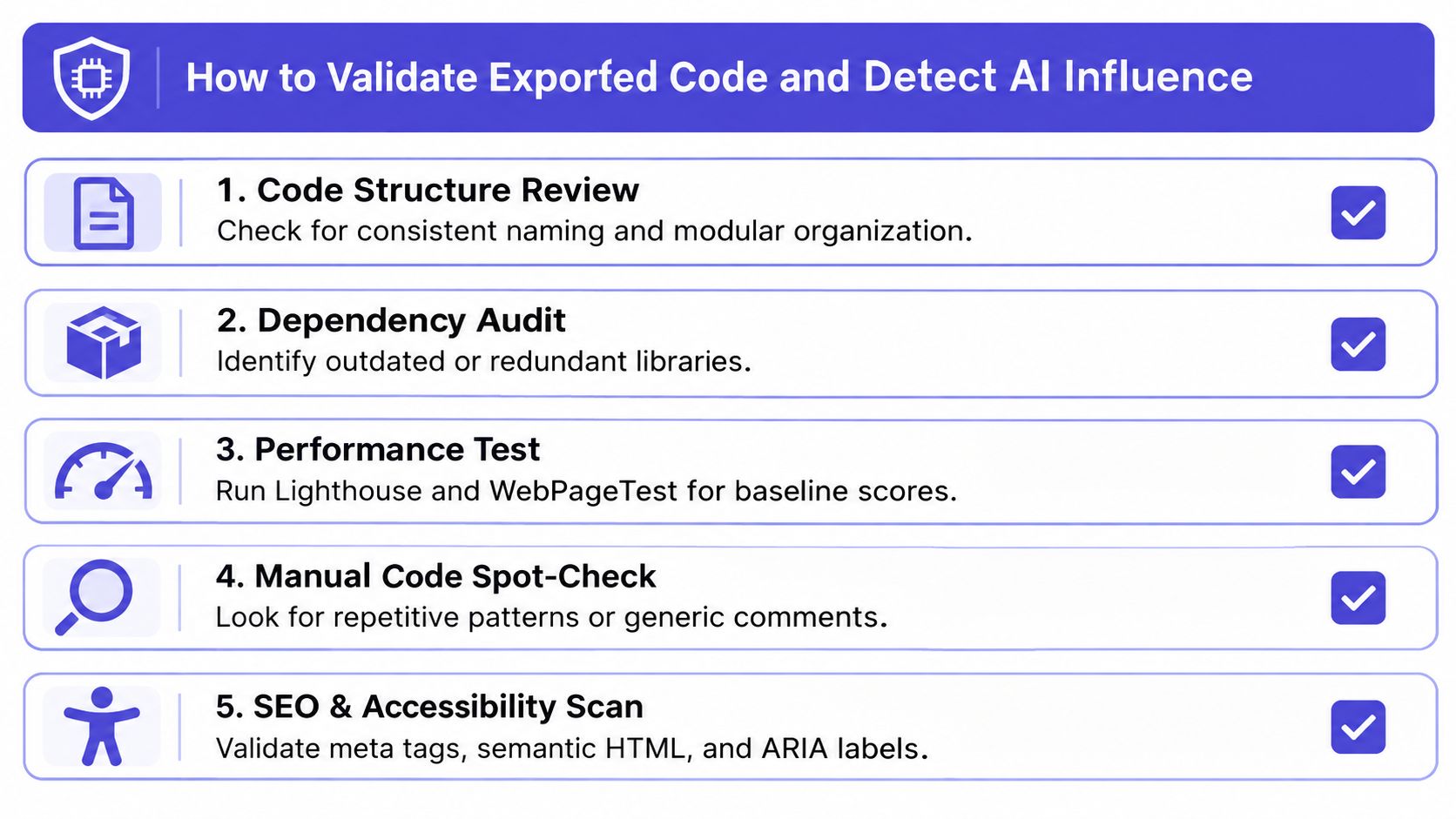
A practical validation pass
Code structure review. Look for consistent naming and modular organization. If every component feels autogenerated but the boundaries are messy, future edits will be expensive.
Dependency audit. Check whether the output is dragging in redundant libraries or odd versions. Generated projects often work because the bundle is forgiving, not because the dependency graph is elegant.
Performance test. Run Lighthouse and WebPageTest for a baseline. The point is not to chase a perfect score, it's to see where the generated site falls apart first.
Manual code spot-check. Read a few files closely. Repetitive patterns, generic comments, and copy-pasted sections usually tell you where the AI did the heavy lifting.
SEO and accessibility scan. Validate meta tags, semantic HTML, and ARIA labels. A site can be visually strong and still be weak where search and assistive tech matter.
For a deeper checklist on fingerprinting, the internal guide at https://aiwebsitedetector.com/blog/how-to-detect-if-a-website-built-with-ai/ pairs well with this review because it focuses on proving AI involvement rather than guessing.
The bigger point is evidence. Detecting AI influence in hybrid sites is no longer just about finding a named builder badge. Modern stacks can mix prompt-generated code, hand edits, and standard frameworks, so the audit has to look at artifacts, bundle signatures, and runtime behavior together.
Which AI Website Builder with Code You Should Choose
If you want the fastest path to a polished marketing site, use a hosted AI builder and accept the platform trade-off. If you need long-term ownership, engineering handoff, or the option to move hosts later, pick a code-first builder that outputs standard web code and stays legible outside its own interface.
For founders, the deciding question is whether the site will stay small and self-contained. For developers, it's whether the generated output can survive the next sprint without a rewrite. For agencies, it's whether the client can keep paying someone else to maintain the platform forever.
Do not buy the export button unless you've checked the shape of the code, the portability of the stack, and the cleanup work after launch. If those answers are fuzzy, the builder is selling convenience, not ownership.
AI Website Detector helps you see what a site is built with, not just what it looks like from the outside. If you're comparing an AI website builder with code, that kind of evidence makes the ownership conversation much clearer. Visit AI Website Detector to check the stack, detect AI influence, and separate clean export from hidden lock-in.