
What AI Builder Made This Website? How to Identify AI Tech Stacks Instantly
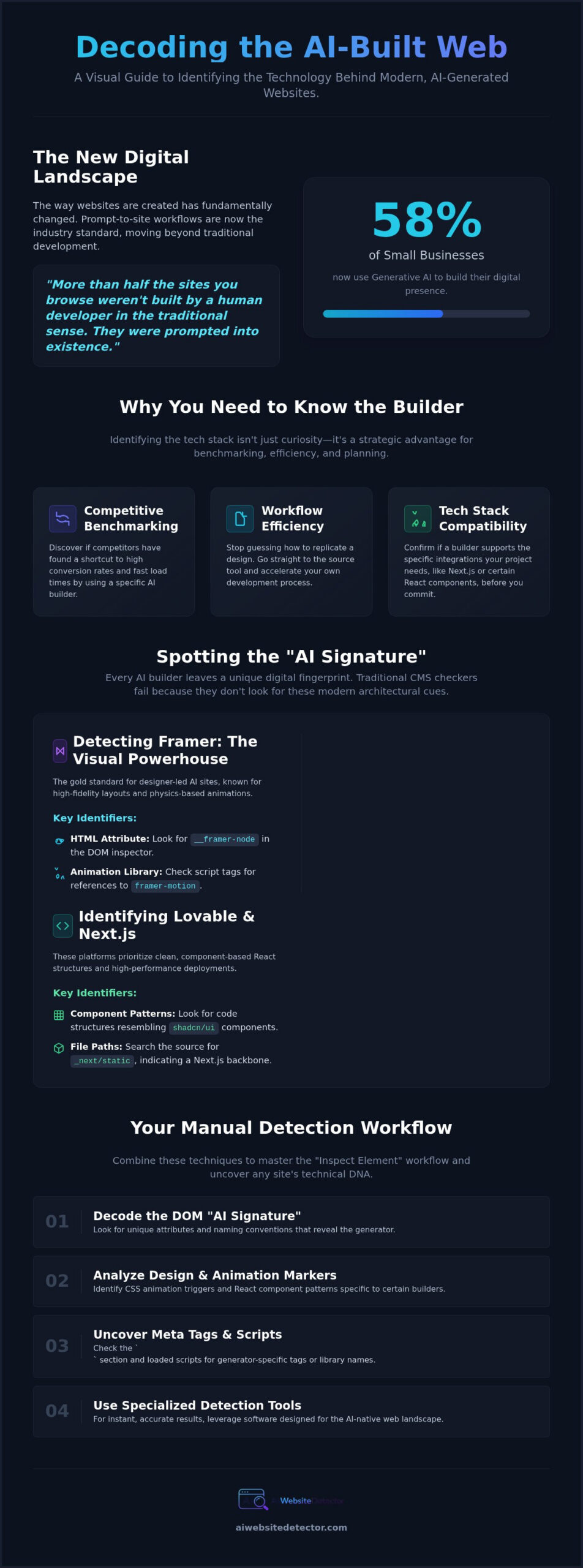
58% of small businesses now use generative AI to build their digital presence. That means more than half the sites you browse weren’t built by a human developer in the traditional sense. They were prompted into existence. You’ve likely landed on a sleek, high-performance page and found yourself asking: what ai builder made this website? Most basic CMS checkers fail here because they aren’t looking for the right signatures. They miss the subtle code patterns that distinguish an AI-native build from a standard template.
It’s exhausting to waste hours trying to replicate a specific look in the wrong platform. You need to know if you’re looking at a Framer masterpiece, a Lovable prototype, or a Wix Harmony deployment. We’re going to fix that. This guide provides the professional detection techniques and specialized software you need to identify hidden tech stacks instantly. We will examine the specific DOM structures and metadata that reveal the exact tools behind any modern site. You’ll gain the insider knowledge to understand if a site is truly scalable and which tool is right for your next project.
Key Takeaways
- Decode the “AI Signature” hidden within modern DOM structures that traditional CMS checkers often overlook.
- Identify specific design markers of platforms like Framer and Lovable by analyzing CSS animation triggers and React component patterns.
- Stop guessing what ai builder made this website by using specialized detection tools designed for the 2026 AI-native web landscape.
- Master the manual “Inspect Element” workflow to uncover meta tags and naming conventions that reveal a site’s technical DNA.
- Transition from discovery to deployment by matching your project’s specific goals to the strengths of design-heavy or functionality-first AI builders.
Cracking the Code: The Rise of AI-Generated Websites in 2026
The web has fundamentally changed. In 2026, the shift from manual coding to prompt-to-site workflows has moved from a niche experiment to the industry standard. You no longer need a team of developers to ship a high-performance landing page; you just need the right prompt. This efficiency is why you often find yourself looking at a competitor’s sleek interface and wondering: what ai builder made this website? Traditional “View Source” methods frequently fail to provide the answer. Modern builders don’t just output static HTML. They generate complex, dynamic components that can look like custom hand-coded work to the untrained eye.
To identify these sites, you have to look for the “AI Signature.” An AI Signature is the unique code footprint left by generative algorithms. Understanding this signature requires distinguishing between AI-assisted and AI-native stacks. Legacy platforms represent the AI-assisted category; they’ve bolted generative features onto an older, existing architecture. In contrast, AI-native tools are built from the ground up to interpret natural language and output optimized code. This evolution is a core part of the broader trend toward AI-assisted software development, where the machine handles the syntax while the human defines the vision.
Why You Need to Know What AI Builder Was Used
Identifying the tech stack isn’t just about satisfying curiosity. It’s about competitive benchmarking. If the top-ranking sites in your industry are all leveraging a specific builder, they’ve likely found a shortcut to high conversion rates and fast load times. Finding the builder also boosts your own workflow efficiency. Instead of guessing how to replicate a layout, you can head straight to the source tool. This ensures tech stack compatibility from day one, helping you confirm if a builder supports the specific Next.js integrations or React components your project needs to scale.
The 2026 AI Builder Landscape: Beyond WordPress
Generic CMS platforms are no longer the default choice for rapid deployment. The landscape has shifted toward specialized AI interfaces that offer more precision. Modern tools have redefined designer-led development by turning visual canvases into production code with zero friction. Some platforms have taken the lead in functionality-heavy builds, producing clean, component-based structures that developers actually want to use. Most of these high-performance sites now utilize Next.js as their backbone. When you ask what ai builder made this website, you’re really asking which platform is currently winning the race for speed, SEO, and design flexibility.
Spotting the AI Signature: How to Identify Top Builders
Every AI builder leaves a digital fingerprint. If you want to know what ai builder made this website, you need to look past the surface aesthetics. Traditional checkers often get stuck on the hosting provider or the CDN. They miss the architectural cues that define modern AI-native sites. By examining specific CSS triggers and script loads, you can unmask the tech stack in seconds. With 63% of “vibe coding” users coming from a non-technical background, the web is increasingly filled with these prompt-generated structures that require a specialized eye to detect.
Detecting Framer: The Visual Powerhouse
Framer has become the gold standard for designer-led AI sites. It is the platform of choice for creators who want high-fidelity layouts without manual coding. To spot a Framer build, open the browser inspector and search for the __framer-node attribute in the HTML source. You will almost always find the framer-motion library referenced in the script tags. These sites stand out because of their fluid, physics-based animations and high-end typography. If the site feels like a polished prototype that actually functions as a production site, it is likely a Framer signature.
Identifying Lovable and Next.js Frameworks
Lovable sites prioritize clean, component-based React structures. While legacy builders often produce messy “div soup,” Lovable outputs high-performance Next.js deployments. Look for shadcn/ui component patterns. These are the standard building blocks for many AI-generated interfaces today. If the code looks like it was written by a senior engineer but follows a very specific, repeatable component logic, it is a Lovable signature. You can also look for _next/static file paths in the source. This indicates a Next.js backbone, which is the preferred framework for modern AI-native tools.
Traces of AI agents are also becoming more common. Wix Harmony, for example, uses the Aria AI agent to handle interactive elements and user guidance. If a site has a deeply integrated chat assistant or a UI that shifts dynamically based on user prompts, you are likely looking at an agentic AI build. Identifying these markers manually is a valuable skill, but it is not always necessary. You can bypass the technical labor by using an AI Website Detector to scan the DOM for you instantly. This tool uncovers the hidden frameworks that basic CMS checkers miss, giving you the insider knowledge you need for competitive benchmarking.
The Best Tools to Detect What AI Builder Made a Website
You can’t rely on general lookup tools anymore. The web moves too fast. Legacy tech stack checkers are often too broad. They provide a massive list of scripts but fail to name the core engine. When you need to know what ai builder made this website, you need a tool that filters out the noise. General tools are built for sales leads and broad marketing data. They lack the specific “AI Builder” categories that modern designers and founders actually need to make quick decisions.
Specialized Detection vs. General Lookup
Broad lookup databases are complex. They are designed for sales teams. For a creator, it is often information overload. You don’t need to see the tracking pixels, the server location, or the CDN details. You want the builder name. A specialized AI detector focuses on the logic of the build. It looks for the specific signatures of Lovable or Framer. In a speed test, a specialized tool wins every time. You get a definitive answer in seconds instead of digging through a report of irrelevant data.
The AI Website Detector Advantage
The AI Website Detector acts as your “Tech-Savvy Detective” for this new era. It is built to identify Lovable, Framer, and Next.js stacks directly. The interface is clean. It prioritizes instant gratification. You enter a URL and get the tech stack immediately. No fluff. It also provides AI Builder Market Share Analytics. This helps you see which platforms are actually gaining ground. This data is vital for choosing a “future-proof” builder. If you are still unsure which path to take, use the AI Builder Recommendation Quiz to find the exact match for your project requirements.
Real-time identification is the next level. Browser extensions allow you to identify tech stacks while you browse. You see a layout you love. You click a button. You have the answer. This is how you build a competitive edge. You aren’t just guessing what ai builder made this website. You’re collecting data. You’re understanding the market share of tools like Webflow (14.1% in 2026) versus Wix (14.8%). This insight allows you to make data-driven decisions for your own digital products without the need for deep technical labor.
How to Reverse Engineer an AI-Built Site Manually
Sometimes the automated tools need a human touch. When a site uses a custom wrapper or a highly obfuscated build, you have to go under the hood. You become the detective. Manual inspection allows you to see the logic that automated scrapers might overlook. If you want to know what ai builder made this website without relying on a third party, you need to master the browser’s developer tools. It is a four-step process that strips away the design and exposes the technical skeleton.
- Step 1: The Head Section. Open the inspector and expand the
<head>. Look for<meta name="generator">tags. Even if the builder name is hidden, look at the font and image URLs. Paths leading toframerusercontent.comorwixstatic.comare immediate giveaways. - Step 2: CSS Naming Conventions. Manual developers use semantic classes like
.main-header. AI builders often use randomized hashes like.css-1abc2dor.framer-1xyz. These are generated by the algorithm to prevent style collisions during the prompt-to-site process. - Step 3: The Network Tab. Refresh the page with the Network tab open. Filter by “Fetch/XHR” to see where the data is coming from. Calls to Vercel edge functions or specific AI platform APIs reveal the backend.
- Step 4: Footer Badges. It sounds simple, but many creators forget to remove the “Built with” badge. Scroll to the very bottom and check the tiny text. It is the fastest way to confirm your suspicions.
Advanced Detective Work: The Network Tab
The Network tab provides the most reliable data. Look for connections to Vercel or Netlify. These are the preferred hosting partners for AI-native tools like Lovable. If you see active WebSocket connections, the site is likely using an agentic AI for real-time features or dynamic content updates. Checking the manifest.json file can reveal a builder origin by exposing the original app name or the developer’s staging URL. This file is often overlooked but contains the metadata that defines the application’s identity.
Decoding CSS and JavaScript Bundles
AI builders bundle code differently than humans. They prioritize speed and component isolation. You will often see generic Tailwind CSS configurations. Prompt-based tools rely on these standard utility classes because they are easy for the AI to generate and predict. Look at the directory structure in the “Sources” tab. A standard React app structure with /_next/static/chunks/ confirms a Next.js backbone. This is a common signature for high-performance AI sites that prioritize SEO and scalability.
Manual inspection is a powerful skill, but it is time-consuming. If you are tired of digging through minified code to find out what ai builder made this website, there is a faster way. You can get the same insider knowledge in a single click. Use the AI Website Detector to scan the DOM and identify the tech stack instantly.
Found the Builder? Here is How to Choose Your Own
Identification is just the beginning. Once you’ve successfully unmasked what ai builder made this website, you have to decide if that same stack fits your specific needs. Replicating a competitor’s choice isn’t always the right move. You need to align the tool’s core strengths with your project’s unique requirements. Every builder has a specialized focus. Some prioritize the “vibe” and visual flair, while others focus on the underlying logic and data structures. You are no longer just building a site; you are selecting a partner for your digital growth.
Framer excels in design-heavy projects. It is the powerhouse for portfolios and landing pages where motion and typography define the brand. Lovable, however, is the better choice for functionality-heavy builds. It generates clean React code that is ready for SaaS scaling and complex integrations. If your focus is long-form editorial content, WordPress remains a strong contender. It offers a depth of SEO plugins and content management features that many AI-native tools are still developing in 2026. Use the data you’ve uncovered to make an informed choice rather than a reactive one.
The AI Builder Selection Framework
Matching your niche to the right tool is critical. A portfolio needs a visual canvas. A SaaS product needs a component-based framework. Evaluate the learning curve before you commit. Some tools use natural language prompts for everything. Others still require a drag-and-drop interface for fine-tuning. Consider the long-term cost. Subscription fees vary wildly, from Hostinger’s $2.99 monthly entry point to Squarespace’s $25+ plans. You must balance these monthly overheads against the speed of deployment and the cost of custom development if the AI builder hits a ceiling.
Take the Guesswork Out of Your Next Project
Avoid the “shiny object” syndrome. It is easy to get distracted by the latest AI feature, but stability matters more. Use market share data to verify a platform’s longevity. In 2026, Squarespace leads with a 16.8% share, followed closely by Wix at 14.8% and Webflow at 14.1%. These numbers represent established ecosystems with reliable support. If you’re still asking what ai builder made this website because you want to replicate its success, let us help you find the perfect match. Take our AI Builder Recommendation Quiz to get a personalized roadmap based on your goals. Ready to start your next build? Detect your first site and find your builder today!
Master the Modern Web Stack
The digital world is no longer a black box. Identifying AI signatures has become a requirement for competitive benchmarking and workflow efficiency. You’ve learned how to spot the difference between AI-assisted legacy builders and AI-native frameworks like Next.js. You’ve mastered the manual detective work needed to uncover hidden DOM attributes and network calls. Now it’s time to stop wondering what ai builder made this website and start building your own edge with precision data.
Speed is your greatest asset. While manual inspection is a valuable skill, automated insights allow you to scale your discovery process. Identify any website builder instantly with our Tech Stack Detector. Our platform provides specialized Lovable and Framer detection alongside real-time 2026 Market Share Analytics. It’s a no-code friendly interface designed for the modern creator who values instant gratification and technical accuracy. Use these insights to demystify the complex web around you and choose the most stable, high-performance tools for your next project. The curtain is open. Go build something incredible.
Frequently Asked Questions
How can I tell if a website was made with an AI builder for free?
You can identify AI-built sites for free by using browser developer tools or free detection extensions. Look for metadata tags in the “Head” section or specific script sources in the “Sources” tab. Many entry-level AI builds also forget to remove default footer credits or branded favicons. If you want a faster result, a free tech stack detector can scan the DOM for you in seconds.
Does “View Source” always reveal the website builder used?
No, “View Source” is increasingly unreliable for modern AI-native builds. While legacy CMS platforms are easy to spot, AI-generated sites often use minified code and randomized CSS class names to hide their origins. You’ll often need to dig into the Network tab or use a specialized detector to find the truth. These tools look for the underlying framework rather than just the surface-level HTML.
What are the most common signs that a site was built with Framer?
Check for the __framer-node attribute and references to the framer-motion library in the source code. These sites stand out because they use design-centric animations and high-end typography that traditional builders can’t easily replicate. You’ll also find assets hosted on framerusercontent.com. If the site feels like a fluid, interactive prototype that functions as a production site, it’s a classic Framer build.
Can AI detectors identify websites built with Lovable or Next.js?
Specialized detectors can identify Lovable and Next.js by scanning for React component signatures and deployment headers. Lovable sites often use shadcn/ui patterns that are easy to spot in minified bundles. If you’re asking what ai builder made this website and find a high-performance Next.js backbone, a modern detector can confirm if it was prompt-generated. These tools look for the specific logic that manual developers rarely use.
Is it possible to hide the fact that I used an AI website builder?
You can mask the builder by using a custom domain and removing footer badges, but the technical footprint usually stays. CSS naming conventions and API call patterns are hard to hide from a tech-savvy detective. Scrubbing the entire signature requires manual code edits that often defeat the purpose of using an AI builder. For most users, the speed of the AI builder is worth the small chance of being identified.
Why should I care which AI builder a competitor is using?
Knowing a competitor’s builder gives you a blueprint for their success. If they are winning with a specific tech stack, it proves that platform is viable for your industry’s SEO and performance needs. It helps you avoid “shiny object” syndrome by showing you which tools are actually delivering results in the real world. Competitive benchmarking starts with the tech stack to ensure your own workflow is just as efficient.
Are AI-generated websites good for SEO in 2026?
AI-generated sites are excellent for SEO in 2026 if they use high-performance frameworks like Next.js. These tools prioritize core web vitals and automatic meta tag generation. With 58% of small businesses now using generative AI, search engines have shifted to ranking sites based on content quality and technical speed. As long as your builder produces clean, responsive code, the AI origin won’t hinder your search visibility or your ranking potential.
What is the best tool to check a website’s tech stack instantly?
A specialized Tech Stack Detector is the most efficient option for instant results. Unlike general tools that show every minor script, specialized detectors focus on the core framework. They identify modern AI-native tools like Lovable and Framer that general checkers often miss. This gives you the insider knowledge you need to benchmark your own projects without digging through minified code or performing manual technical labor.
Disclaimer
This article may contain affiliate links. If you purchase through a link, we may earn a commission at no extra cost to you. See our full Affiliate Disclosure for details.