What Is a Headless CMS and How It Actually Works
A headless CMS is a content repository that stores structured content and sends it through APIs to any frontend, so the same content can power a website, app, kiosk, or other screen. It's called headless because the system doesn't force a built-in presentation layer, which is why so many teams treat it as the modern default.
That default advice is too neat. For many marketing teams, the question is whether headless is newer, it is whether the extra engineering and editorial complexity earns its keep.
Table of Contents
- The Plain-English Answer and the Basic Concept
- How a Headless CMS Architecture Actually Works
- Key Trade-Offs Compared to a Traditional CMS
- Adoption Trends Versus Real Performance Behavior
- Common Platforms and Example Frontend Stacks
- Detecting a Headless Setup in the Wild
- When Headless Is the Right Choice
- Frequent Questions About Headless CMSs
The Plain-English Answer and the Basic Concept
A headless CMS is the part of a CMS that manages content without deciding how that content must look. Editors write and organize content in one place, then the system exposes it through APIs so different frontends can display it however they want.
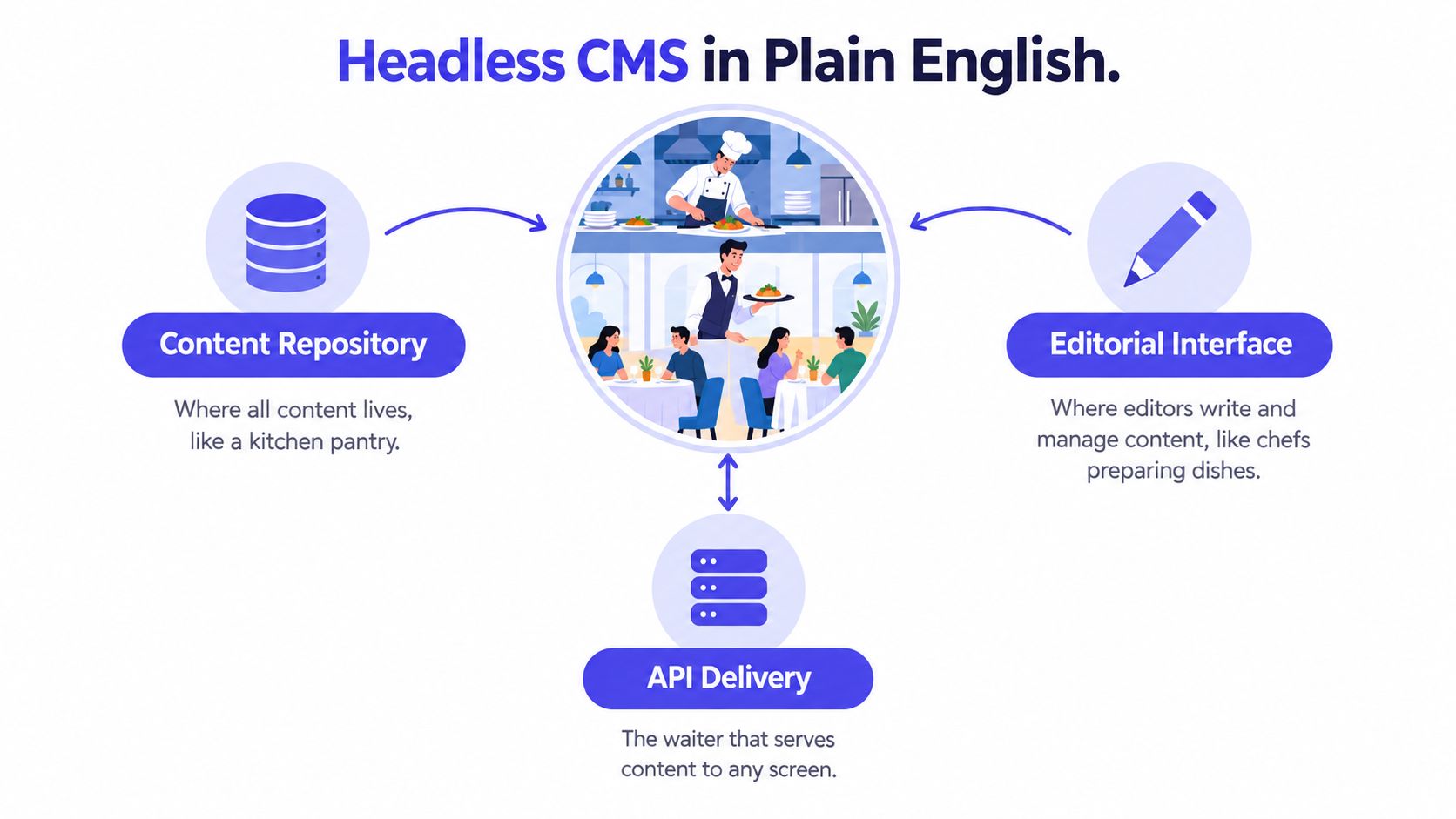
The easiest analogy is a restaurant. The kitchen prepares the food, the waiter carries it, and the dining room changes the experience for the guest. In a headless setup, the kitchen is the content repository, the waiter is the API, and the dining room can be a website, a mobile app, a kiosk, or any other interface.
What “headless” actually means
The word doesn't describe a vendor, language, or framework. It describes the absence of a mandatory presentation layer, which means the CMS doesn't control the theme, template, or final rendered page layout. That's different from a traditional coupled CMS, where content management, templates, database, and rendered site are built as one integrated application, as outlined in the architectural overview from Grid Dynamics.
That separation is powerful because one content model can feed many outputs. It also changes who carries the burden. Developers have to build routing, preview, caching, accessibility, and sometimes search or personalization features, which is why headless feels liberating to some teams and exhausting to others.
Practical rule: if your content needs to live in more than one place, headless starts to make sense. If your content mostly lives on one marketing site, the case is weaker.
The central trade-off is simple. You gain flexibility and reuse, but you also take on more engineering responsibility. That's the story behind headless, not the hype that it's automatically better.
How a Headless CMS Architecture Actually Works
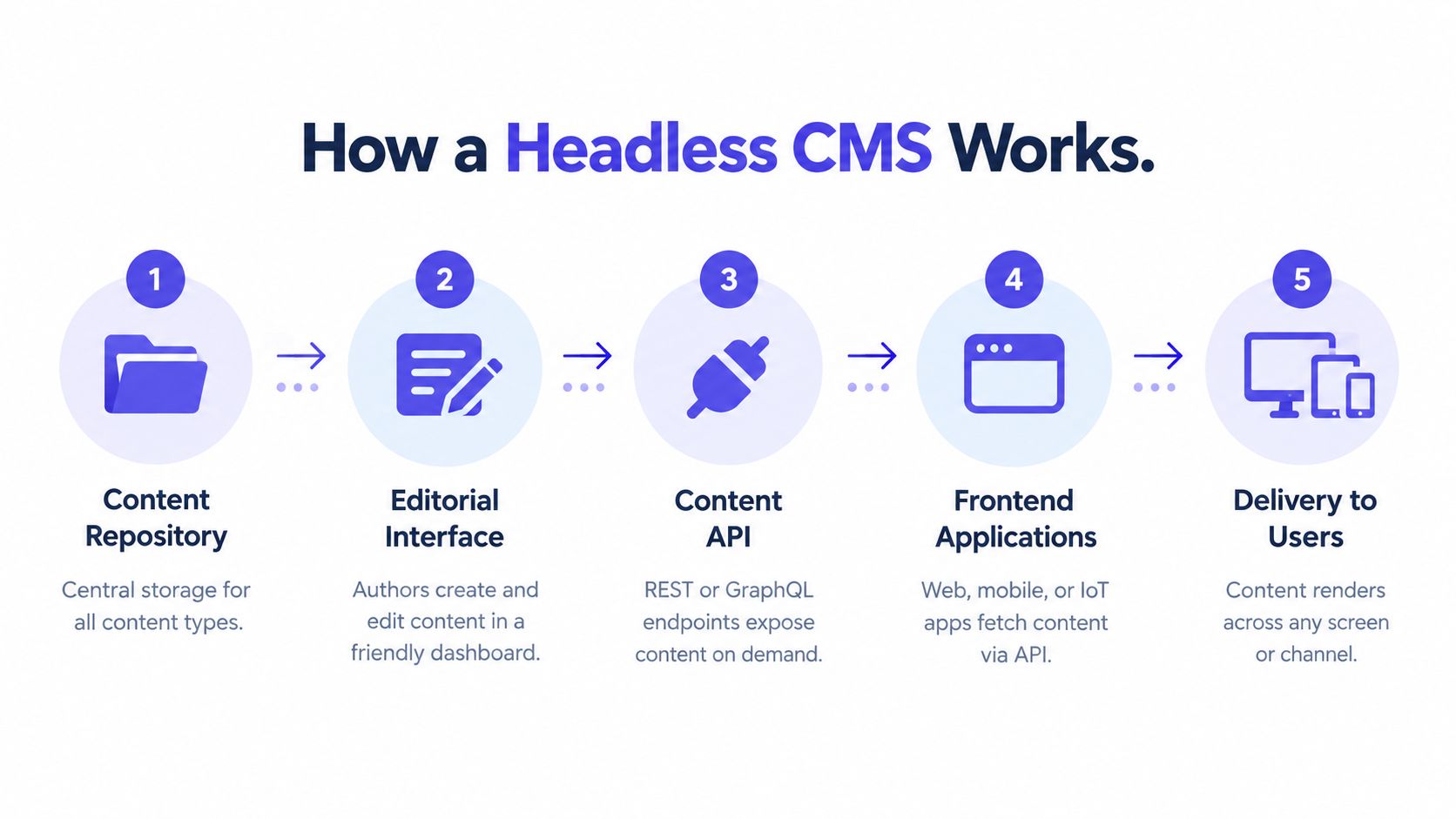
A headless CMS usually has four moving parts, a content repository, an editorial interface, an API, and one or more frontend applications. The repository stores structured content, the interface lets editors create and update it, the API delivers it, and the frontend decides how it appears.
From request to rendered page
In a traditional CMS, a browser requests a URL, the server pulls data and templates together, and HTML is rendered on the backend before it reaches the user. In a headless system, the frontend asks the CMS for content through REST or GraphQL, then renders that content itself. The CMS delivers data, often as JSON, not finished pages, as described in Salesforce's headless CMS overview.
That shift sounds subtle, but it changes the architecture completely. The API becomes the contract, so content types need to stay stable, preview environments have to mirror production behavior, and schema validation matters more than it does in a coupled system. If the frontend and content model drift apart, editors can publish something that looks fine in the CMS and breaks on the live site.
What the data exchange looks like
A product page, for example, might request a title, hero image, summary, related articles, and CTA text from the CMS API. The frontend can then render that content on a web page, on an app screen, or inside a campaign microsite without changing the source content.
That also means each frontend owns its own operational logic. Authentication, caching, error handling, preview rendering, and invalidation all move closer to the application layer. The benefit is freedom. The cost is that your team needs stronger discipline around contracts and deployment.
For a visual overview of how that request flow works, this how websites are built breakdown is a useful companion.
Key Trade-Offs Compared to a Traditional CMS
Headless CMS platforms give developers more control over the frontend and let the same content serve multiple channels. Traditional CMS platforms give editors a more complete out-of-the-box publishing experience, which is why many marketing teams still prefer them for simpler sites.
What you gain, and what you pay for
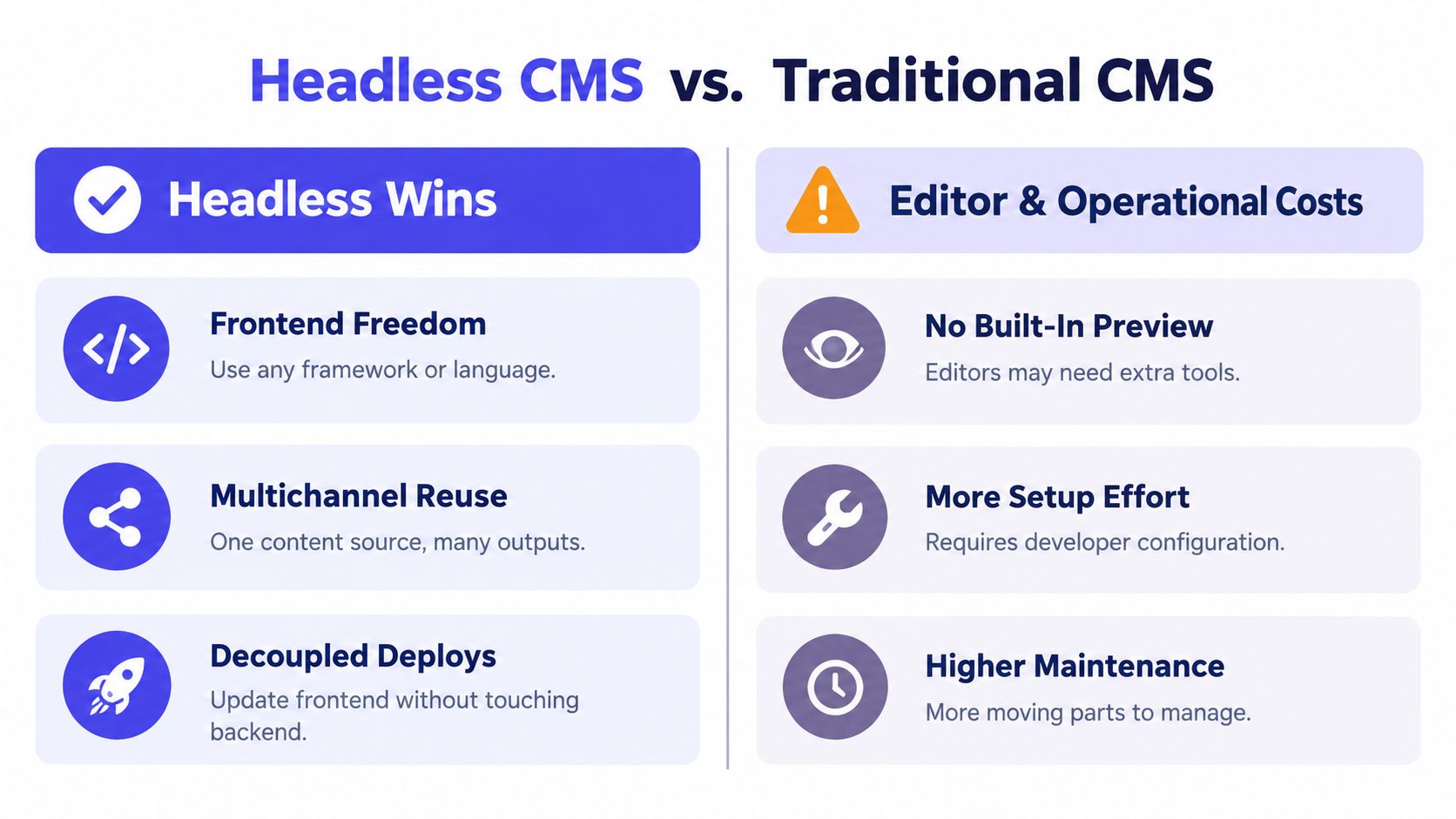
The biggest developer win is frontend freedom. Teams can use different frameworks, ship decoupled deployments, and reuse content across websites, apps, and connected devices. The price is more setup work, more integration design, and more maintenance responsibility when the stack grows.
The editor trade-off is just as important. A traditional CMS usually gives people a more obvious visual path from draft to published page. In a headless setup, preview may need extra tooling, and content authors often have to think in reusable blocks instead of page-shaped documents. That's a better model for structured content, but it's less intuitive for some marketing workflows.
Here's a simple comparison.
| Criterion | Traditional CMS | Headless CMS |
|---|---|---|
| Content modeling | Often page-first | Structured, reusable |
| Multichannel delivery | Usually one main website | Designed for many channels |
| Preview experience | Built in more often | Usually custom or added |
| Security surface | Tightly coupled | More distributed |
| Time to first publish | Faster for simple sites | Slower upfront |
| Required engineering skill | Moderate | Higher |
A useful external comparison is WebinOne's headless CMS breakdown, especially if you want another lens on the operational trade-offs.
The hard part isn't choosing a CMS model. It's deciding whether your team wants to own the extra layers headless moves into the frontend.
Adoption Trends Versus Real Performance Behavior
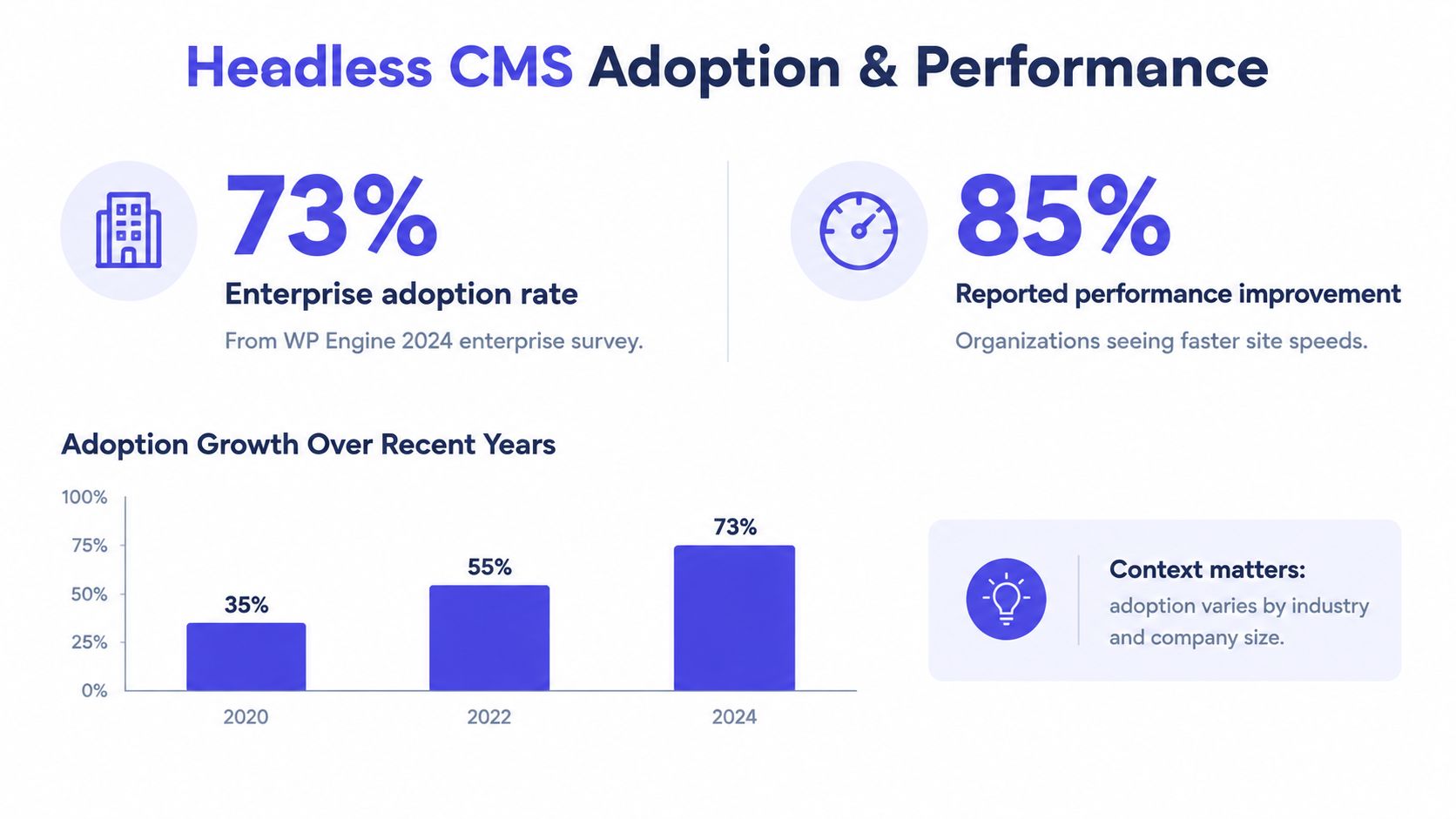
Headless has clearly moved beyond niche adoption, but the headline numbers need context. In a 2024 survey commissioned by WP Engine and conducted by Censuswide, 73% of respondents said they were already using headless website architecture, with 85% in the United Kingdom, 72% in Australia, and 68% in the United States. The same survey also reported that nearly 98% of organizations not yet using headless planned to evaluate it within 12 months, which says a lot about interest even where implementation isn't done yet, according to Business Wire's report on the survey.
Adoption doesn't cancel complexity
The same survey also showed why teams still hesitate. Nearly 70% cited organizational hurdles, 65% budget constraints, and 47% technological challenges. That matters because headless is often sold as a pure efficiency gain, when in practice it can introduce coordination work between content, frontend, hosting, and deployment teams.
Performance claims need the same caution. A reported benchmark under one test setup found Payload CMS at 42 ms p99 query latency and Strapi v5 at 131 ms p99, but those numbers were environment-specific rather than universal. Query shape, cache-hit ratio, region, and preview traffic all change the result, so raw latency figures without context can mislead more than they help, as noted in the benchmark write-up at Johal.in.
If page speed is the issue you are chasing, you need the full delivery stack, not just a different CMS. For a practical route into that part of the problem, fix slow page experience with Otter A/B is a useful companion read.
Common Platforms and Example Frontend Stacks
Headless is less about one product and more about a pattern. Teams usually choose between managed SaaS platforms, self-hosted open-source systems, and hybrid CMSs that can behave in a coupled or decoupled way.
Common categories you'll run into
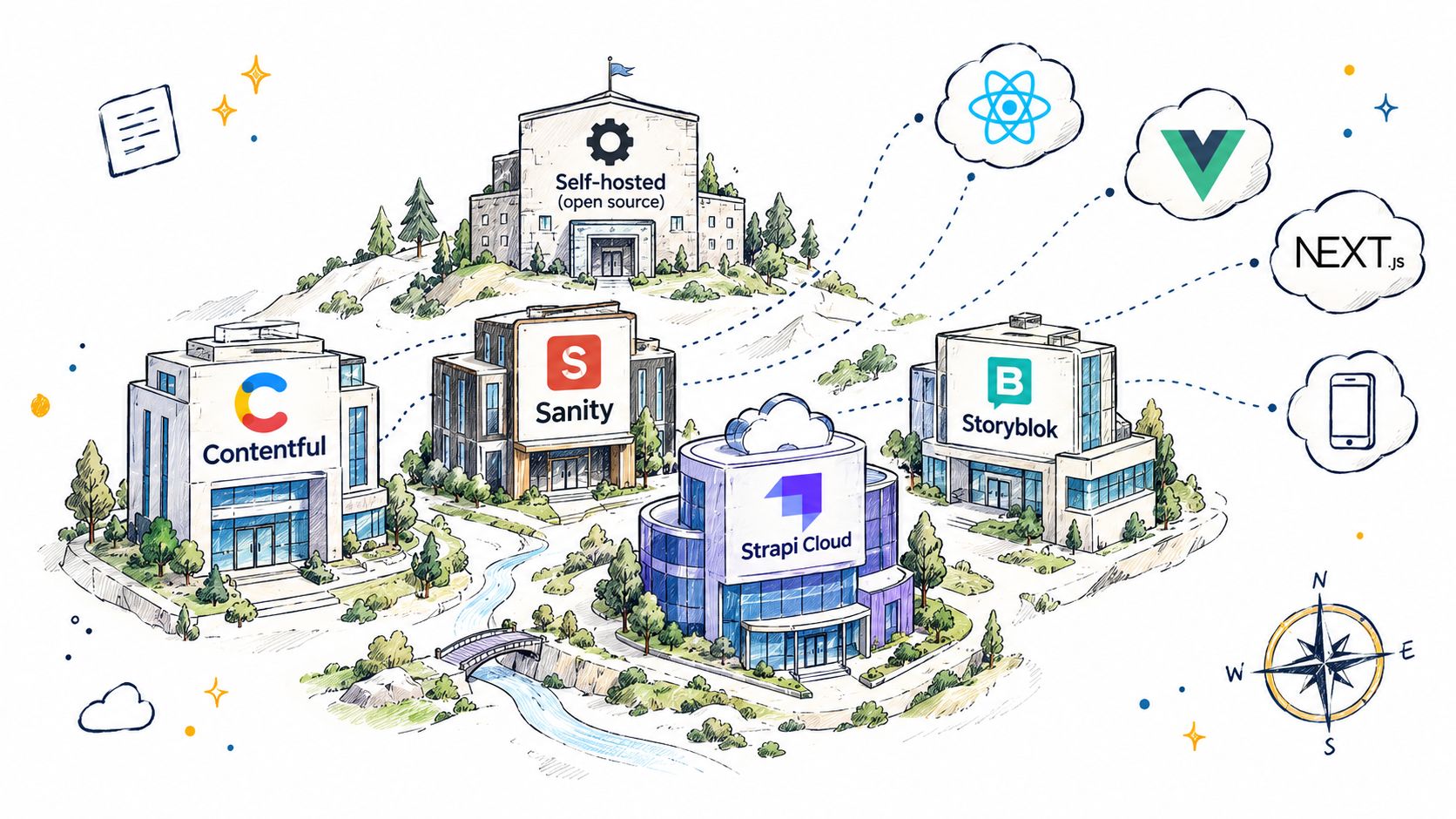
SaaS headless CMSs like Contentful, Sanity, Strapi Cloud, and Storyblok usually appeal to teams that want less infrastructure work. A common stack is Sanity plus Next.js on Vercel, where the CMS handles content while the frontend is optimized separately.
Open-source self-hosted systems like Strapi, Directus, Payload, and KeystoneJS suit teams that want more control over code and deployment. A realistic setup is Payload inside a monorepo with the frontend, which keeps the content model close to the application code but asks the team to own more of the runtime.
Hybrid platforms such as WordPress with WPGraphQL or Drupal with JSON:API sit between the two models. They can keep a familiar editorial layer while exposing content to external frontends, which is why many organizations use them as a gradual step rather than a full rewrite.
For a platform-specific example, Contentful's Stack Builder page shows how one common SaaS option sits inside the broader stack conversation.
The stack choice shapes the workflow
The frontend matters as much as the CMS. A React or Next.js frontend will handle routing, rendering, and caching differently from a mobile app or kiosk, so the CMS decision is only half the architecture. If your team already has strong frontend engineers, that flexibility can be a real asset. If not, it becomes another layer of dependency.
Detecting a Headless Setup in the Wild
You can often spot a headless site by looking for a mismatch between visible pages and underlying delivery signals. The page may look polished, but the HTML, scripts, headers, and network calls tell a different story.
What to look for first
Start with the obvious clues. Look for GraphQL or REST endpoints, preview URLs, JSON payloads embedded in script tags, and frontend framework fingerprints such as Next.js, Nuxt, Gatsby, or Astro. You can also check for CDN patterns from Vercel, Netlify, or Cloudflare, and compare that with the absence of classic WordPress paths like wp-content or wp-includes.
Then inspect the page source and browser dev tools. Headless sites often expose structured content data that the frontend uses to render pages client-side or during static generation. That doesn't prove a setup is headless on its own, but it becomes persuasive when several signals line up.
A faster way to validate the stack
Tools can compress that work. AI Website Detector fingerprints website technologies from multiple signals, including HTML patterns, CSS classes, script tags, CDN domains, HTTP headers, meta tags, and cookies, then returns a probability score and labeled verdict. It's useful when you're auditing a competitor, checking a vendor claim, or trying to identify whether a site is decoupled or just heavily customized.
If the site looks modern but the CMS is hidden, stack analysis usually beats guesswork.
The main point is not to memorize fingerprints. It's to recognize that headless leaves traces in both the frontend and the delivery path, and those traces are often easier to verify than claims on a sales page.
When Headless Is the Right Choice
Headless makes sense when the content has to travel. If you're publishing to a website, a mobile app, a kiosk, or a commerce layer at the same time, the shared content model starts to pay off. It also fits teams that redesign frontends often, because the content layer stays stable while the presentation layer evolves.
The conditions that justify the extra work
A good headless fit usually includes multiple channels, structured content reuse, in-house frontend engineering, and a team that can tolerate a slower first build in exchange for more flexibility later. If your content model is complex, or if different frontends need the same source of truth, that's another strong signal.
The weak-fit cases are just as important. A single marketing site, a small team without dedicated developers, or a project where predictable editorial workflow matters more than frontend freedom often does better with a traditional CMS. Reusing content across normal website sections is already possible in conventional systems, so “omnichannel” can be used as a bigger claim than the business really needs.
For a commerce-specific example of how the idea gets applied, Shopify headless commerce is worth a look if your use case includes storefronts and product content.
A simple decision filter
Ask three questions. Do you need more than one channel? Do you have engineers who can own the frontend layer? Will the extra setup cost be repaid by reuse, faster redesigns, or cleaner integrations?
If the answer is no to most of those, headless is probably more architecture than you need.
Frequent Questions About Headless CMSs
Can WordPress be used as a headless CMS? Yes. WordPress can expose content through APIs and work as the content layer while a separate frontend handles display. That's useful when a team wants to keep familiar editorial tools but move the presentation elsewhere.
What does hybrid or visual headless mean? It usually means the CMS still offers some built-in editorial or preview experience while also exposing content through APIs. In practice, hybrid systems sit between fully coupled and fully headless setups.
How does headless affect SEO? The CMS model alone doesn't decide SEO outcomes. Rendering strategy, structured content, metadata handling, and performance do most of the work, so the frontend implementation matters as much as the CMS choice.
Is headless realistic for a small marketing team? Sometimes, but not always. If the team has no developer support and only needs one site, the extra setup can be a distraction rather than an upgrade.
If you want to see how a site is built instead of guessing from the surface, AI Website Detector can identify the CMS, framework, hosting, and related technologies behind it. That makes it useful for headless research, vendor checks, and competitive audits where the stack matters as much as the design. Visit it when you need a fast, evidence-based read on what's powering a website.