How Websites Are Built: A Complete Walkthrough
You're probably here because a website feels simple from the outside and strangely opaque from the inside. You type a URL, a polished page appears, and somehow that page came from a mix of design decisions, code, hosting, content, and tooling that isn't visible at first glance.
That confusion is normal. A modern website might be hand-coded in Next.js, assembled in Webflow, powered by WordPress, or generated by an AI-first builder, yet the browser still receives familiar building blocks and follows the same loading process. Once you understand that pipeline, how websites are built stops feeling mysterious. You can look at any live site and ask better questions about what produced it.
Table of Contents
- The Journey From Blank Page to Live Site
- How a Browser Turns Code Into a Page
- Static Sites Versus Dynamic Sites
- The Three Languages That Power Every Website
- Builders, CMS Platforms, and Custom Code
- Hosting, Domains, and Going Live
- How AI Builders Changed the Build Process
- Measuring Whether a Website Is Well Built
The Journey From Blank Page to Live Site
A first-time builder usually starts in one of three places. They open a text editor and think, “I guess I need HTML.” Or they pick a template in Wix or Squarespace. Or they type a prompt into an AI builder and wait for something usable to appear.
Different starting points, same journey.
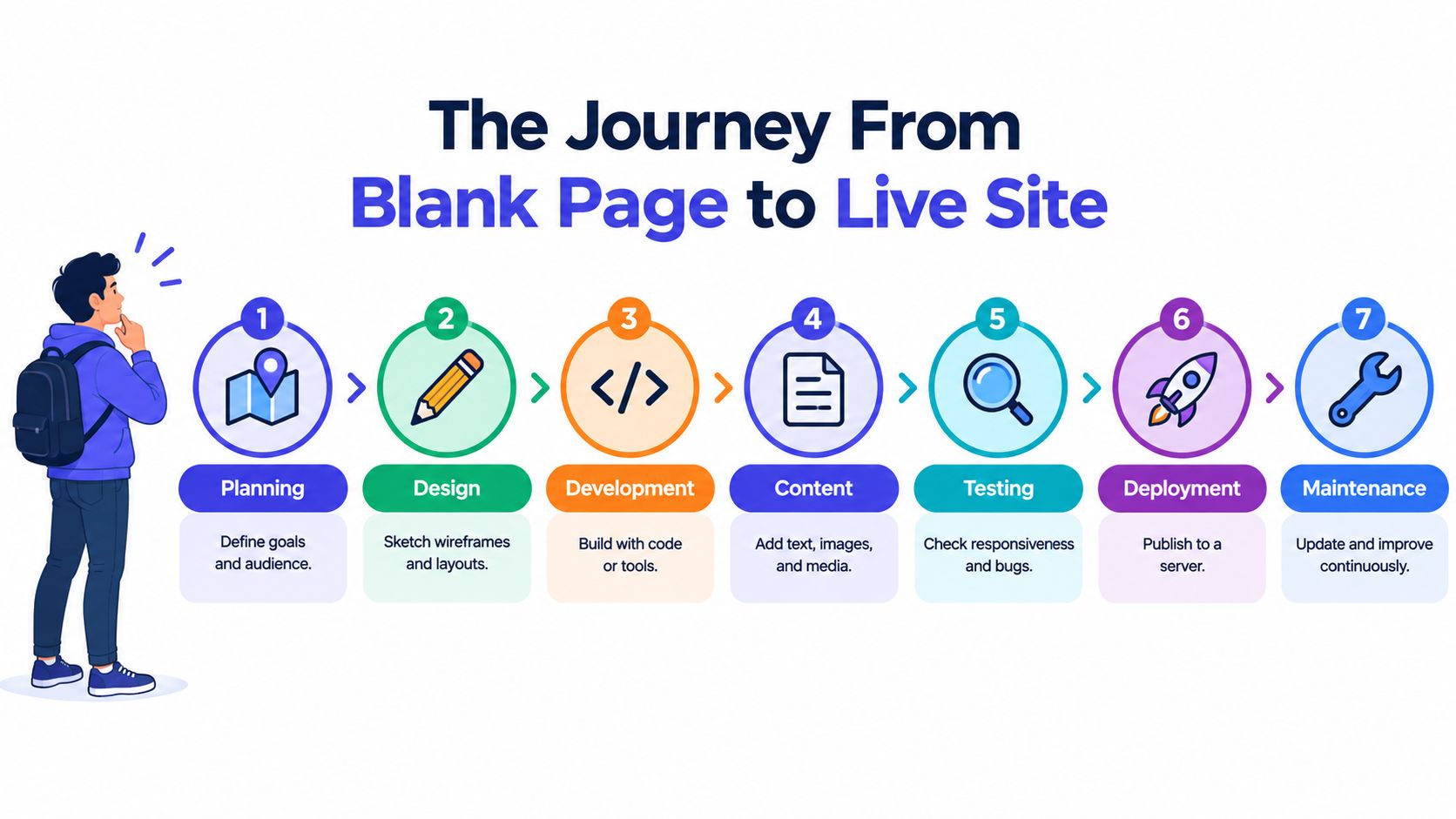
Seven checkpoints every site passes through
Every website moves through seven practical stages, whether one person handles all of them or a team splits the work.
Purpose and audience discovery
Someone decides what the site is for. A plumber needs calls. A SaaS company needs product education and signups. An online store needs product pages, checkout, and trust signals.Information architecture
The content gets organized. Which pages exist, what goes in the navigation, how users move from the homepage to a contact form or product page.Visual design
Layout, spacing, typography, color, buttons, image treatment. A rough page map starts to feel like a brand.Front-end build
The visible interface becomes browser-readable code. That usually means HTML, CSS, and JavaScript, whether they were written directly or generated by a builder.Back-end logic
If the site needs forms, logins, a CMS, products, accounts, or live data, something has to process requests and store information.Content population
Real copy, images, product details, metadata, and structured page content replace placeholder text.Deployment and maintenance
The site goes live on a host, gets connected to a domain, and keeps evolving through updates, fixes, and content changes.
Practical rule: When you look at any finished website, ask which stage produced the thing you're noticing. Slow load time points to build or hosting. Confusing navigation points to information architecture. Generic copy points to content.
That's also where verification gets interesting. A live site leaves traces of the choices made at each stage, from framework patterns and asset bundles to CMS markup and hosting headers.
How a Browser Turns Code Into a Page
Type a URL into your browser and a hidden assembly line starts. This sequence matters because delays early in the process tend to ripple through everything that follows.
According to MDN's explanation of the critical rendering path, the browser performs DNS lookup, fetches assets over TCP, TLS, and HTTP, builds the DOM from HTML and the CSSOM from CSS, parses and executes JavaScript, then creates the render tree, calculates layout, and paints and composites pixels to the screen.
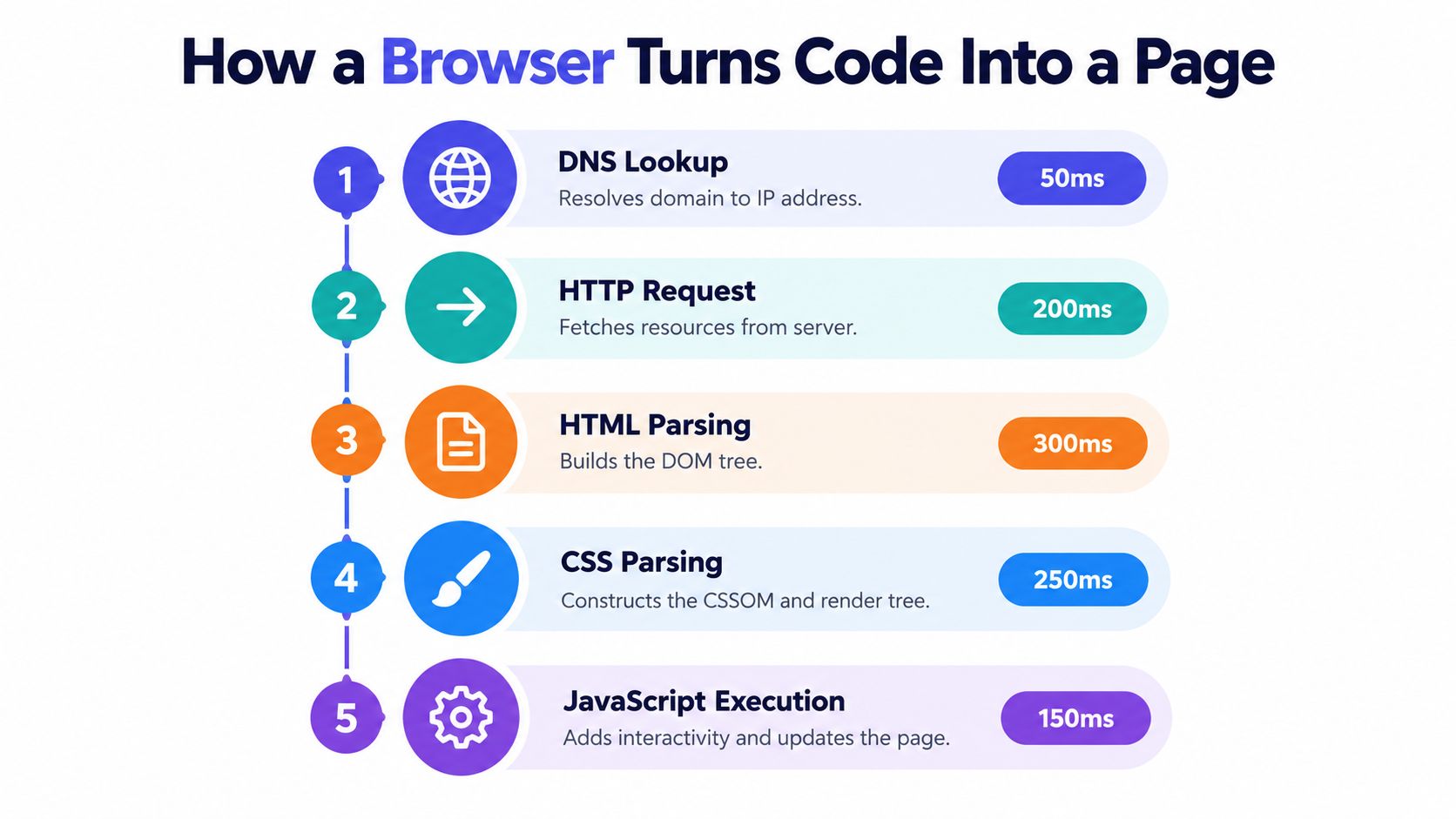
What the browser is doing
Start with the address bar. The browser needs to find where the site lives, then request the HTML document. That HTML is the first blueprint. It tells the browser what this page contains and where to find other pieces like stylesheets, images, fonts, and scripts.
Then the browser starts parsing. It builds a DOM from the HTML and a CSSOM from the CSS. After that, it combines them into a render tree, figures out layout, and paints visible elements.
JavaScript complicates the story. Scripts can add interactivity, fetch data, and change the page after load, but they can also delay parsing and block rendering if handled poorly.
Why beginners notice weird page behavior
A lot of common web annoyances make more sense once you know this pipeline:
- Flash of unstyled content means the browser showed HTML before all styling was ready.
- Buttons that appear but don't respond yet often mean JavaScript hasn't finished loading or executing.
- Jumping layouts happen when assets load late and force the page to reflow.
- Blank screens on heavy apps can come from too much JavaScript before meaningful content appears.
Heavy CSS and JavaScript aren't just “more code.” They change what the browser can do next, and when.
That's why practical optimization usually starts with the basics MDN calls out. Reduce blocking resources, split large bundles, and prioritize above-the-fold CSS and content so the rendering pipeline can finish sooner.
Those same choices also create fingerprints. A detection scanner can often infer whether a site uses a server-first framework, a client-heavy app pattern, or a template-driven builder by looking at scripts, markup shape, asset names, and the order in which resources load.
Static Sites Versus Dynamic Sites
The first big architecture choice isn't visual. It's whether the site mostly serves fixed files or assembles pages at request time.
A static site sends the browser prebuilt HTML, CSS, and assets. Every visitor gets the same starting file for a given page. A dynamic site builds or modifies the response based on data, user state, time, inventory, permissions, or application logic.
Neither is “better.” The trade-off is simplicity versus adaptability.
Static vs Dynamic Sites Key Trade-offs
| Dimension | Static Site | Dynamic Site |
|---|---|---|
| Content updates | Usually rebuilt and republished when content changes | Can update through a database or app logic without rebuilding every page |
| Performance | Often simpler and faster to deliver | Can be fast, but has more moving parts |
| Security surface | Smaller attack surface in many cases | More code paths, integrations, and runtime behavior to secure |
| Hosting requirements | Can live on simple hosting or a CDN | Often needs application hosting, database support, or runtime services |
| Scalability | Excellent for broad content delivery | Better when each user needs a tailored experience |
| Ideal use cases | Brochure sites, portfolios, docs, blogs, marketing pages | Dashboards, ecommerce, membership areas, booking systems |
A plain-English way to choose
If you're publishing pages that look the same for everyone, static is often the cleanest starting point. Think marketing sites, founder portfolios, event pages, product documentation, or landing pages.
Dynamic makes sense when the page changes based on who's visiting or what's happening behind the scenes. Shopping carts, customer dashboards, user accounts, and live inventory need that flexibility.
For verification, this distinction leaves clues. Static sites often expose prebuilt page patterns and predictable asset delivery. Dynamic sites often show app frameworks, API calls, session behavior, or personalized rendering. Tools that inspect a live site can often tell which direction the build leans, even when the design itself doesn't reveal it.
The Three Languages That Power Every Website
No matter what created the site, the browser still works with three core layers.
HTML gives the page structure. CSS controls presentation. JavaScript controls behavior.
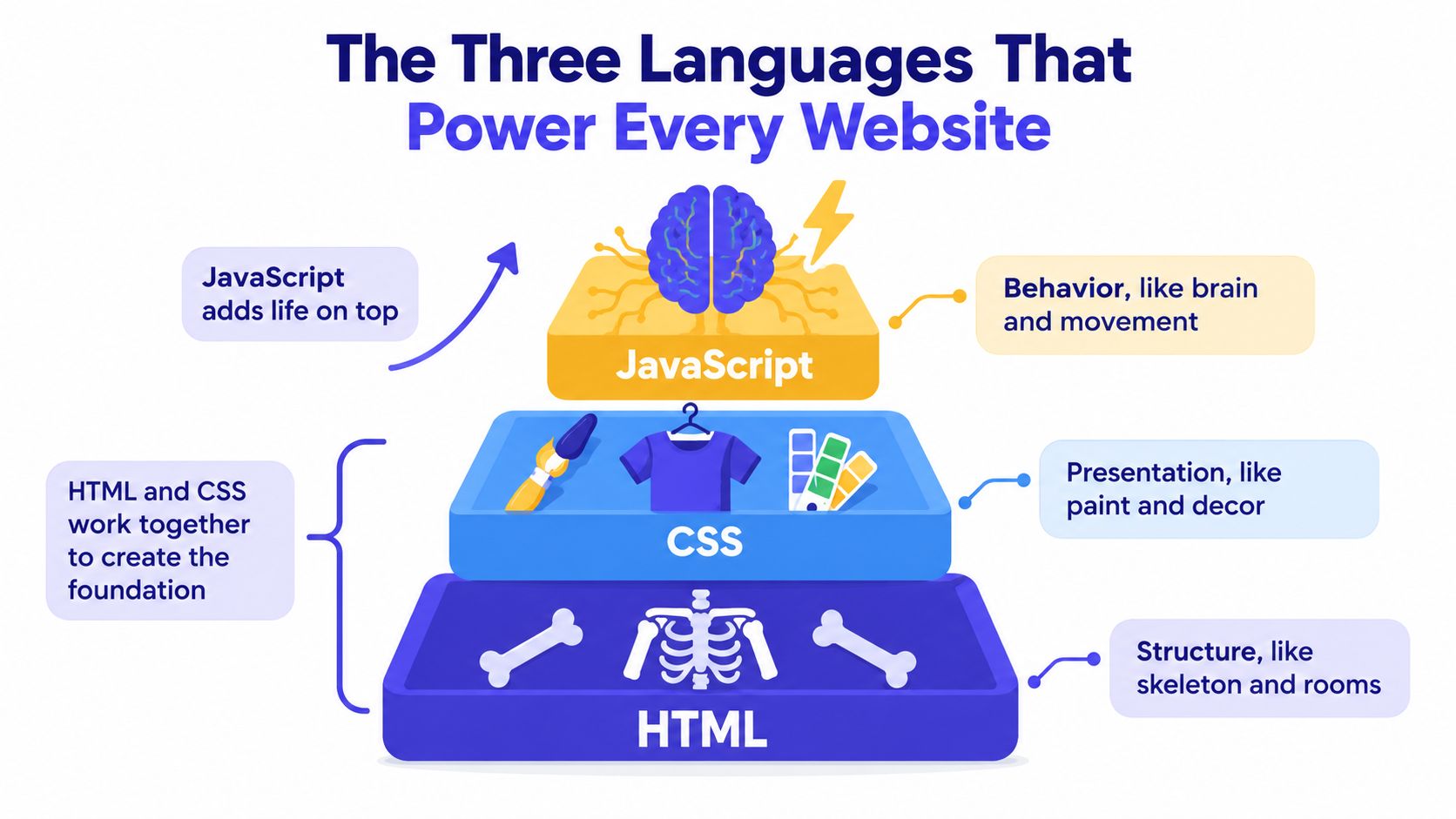
HTML gives the page meaning
Think of HTML as the building's frame and floor plan. It defines the rooms and labels them. A heading is a heading, a paragraph is a paragraph, a link is a link, and an image is an image.
That meaning matters. Browsers use it. Screen readers use it. Search engines use it. AI agents and detection systems also benefit when the structure is clean and semantic.
A page built with proper headings, lists, buttons, forms, and landmarks is easier to read, maintain, and analyze than a page made from generic containers stacked on top of one another.
Here's a helpful visual walkthrough of those layers in action:
CSS makes that structure usable
CSS is the interior design system. It decides typography, spacing, layout, colors, alignment, responsiveness, and visual hierarchy.
Without CSS, a page still exists, but it looks raw. With CSS, the same structure becomes readable and branded. Responsive CSS also lets a layout adapt across phones, tablets, and desktops without changing the underlying content.
This layer is one place where builders and frameworks leave obvious traces. Utility-heavy class patterns often point to systems like Tailwind. More handcrafted naming can suggest a custom or older styling approach.
JavaScript adds behavior
JavaScript is part electrician, part concierge. It opens menus, validates forms, fetches new data, updates interfaces, and lets a page respond without a full reload.
Used well, it makes sites feel alive. Used badly, it can turn a simple page into a slow application.
A useful mental model is this: HTML says what things are, CSS says how they look, and JavaScript says how they respond.
That's true whether the source was handwritten, assembled in Webflow, managed in WordPress, or generated by an AI builder. The tools may differ, but the browser still receives these same three layers.
Builders, CMS Platforms, and Custom Code
Two companies can publish sites that look almost identical on the surface, yet the way those sites were made can be completely different.
One may have been assembled in Webflow over a few days. Another may run on WordPress with a custom theme. A third may be a fully coded application built with Next.js and a headless CMS behind it. The finished page can look similar in a browser, but the workflow, constraints, and live-site fingerprints are different. Those fingerprints are exactly what detection tools read later.
The first real decision is the build path. For beginners, it helps to sort the options into three buckets: builders, CMS platforms, and custom code.
Builders vs CMS vs Custom Code Choosing Your Build Path
| Approach | Best For | Time To Launch | Flexibility | Trade-Off |
|---|---|---|---|---|
| No-code builders | Solo founders, small businesses, brochure sites, quick campaigns | Fast | Moderate | You launch quickly, but platform conventions and design limits appear sooner |
| Traditional CMS | Editorial teams, blogs, publishing operations, marketing departments | Moderate | High for content workflows | Publishing tools are strong, but plugins, updates, and maintenance need attention |
| Custom code | Products, agencies, bespoke experiences, performance-focused teams | Slowest at the start | Highest | You get full control, but you also own more complexity |
A builder works like renting a furnished apartment. The walls, plumbing, and floor plan are already there. You can decorate, rearrange, and publish quickly, but you are still working inside someone else's system. Wix, Squarespace, and Webflow fit here.
A CMS is closer to moving into a house with a solid frame and a lot of replaceable parts. You get an editing interface, user roles, publishing workflows, and extensibility. WordPress, Ghost, and Drupal are common examples. This path suits teams that publish often and need content operations to run well, not just pages to exist.
Custom code is the ground-up build. A team chooses the framework, data model, hosting pattern, component system, and performance strategy. Next.js, Astro, Laravel, and Django often appear in this category. It takes longer to set up, but it gives the team precise control over how the site behaves and scales.
The trade-off is simple. The more speed a tool gives you upfront, the more conventions you usually inherit. The more control you want, the more setup and maintenance you accept.
That choice often remains visible after launch.
A detector can often spot WordPress from theme structures, plugin assets, common directories, or script patterns. It can identify Webflow or Wix from hosted asset paths, injected scripts, DOM conventions, and platform-specific markup. A modern custom stack may reveal itself through framework output, JavaScript bundle patterns, utility-class conventions, response headers, or deployment behavior. AI Website Detector examines those kinds of live signals, including HTML patterns, scripts, CDN behavior, and headers, to infer what likely powered a site.
That is useful context for both builders and reviewers. If you know how a site was made, you can better predict its strengths. You can also read the clues it leaves behind.
Recent practice also helps explain why many sites blur together. Teams often mix tools instead of picking only one. A site might use a custom front end, a headless CMS for editing, and a standardized design system for UI. As noted in Figma's web development trends coverage, modern teams often standardize around component libraries, semantic markup, and repeatable systems. So a site can feel custom while still showing recognizable stack signals to anyone inspecting the live output.
Hosting, Domains, and Going Live
People often say “build a website” when they also mean “publish it.” Those are related, but separate.
The domain is the address people type. DNS is the lookup system that points that address to the right destination. Hosting is where the site's files or application live.
The beginner-friendly sequence
Most beginners buy a domain first because that part feels concrete. It's the name on the front door.
Then they need hosting. For a static site, hosting might just serve files from a CDN. For a CMS or web app, hosting may also run application code and talk to a database.
Deployment is the act of shipping a new version. In many modern setups, a developer pushes code to Git, a platform runs a build, and the output gets published behind a URL. If something goes wrong, a solid platform lets the team roll back.
Common Hosting Patterns Compared
| Hosting Pattern | Who Manages The Server | Typical Cost | Best Fit |
|---|---|---|---|
| Shared hosting | Mostly the host | Lower | Small brochure sites, simple WordPress installs |
| Managed hosting | The vendor handles much of the environment | Mid-range | Teams that want less server work for WordPress or app hosting |
| Serverless or edge platforms | The platform abstracts most server management | Usage-based or platform-based | Modern static sites, front-end apps, globally distributed delivery |
What “live” should guarantee
Going live isn't just “the URL works.”
- HTTPS matters because visitors need an encrypted connection.
- Caching matters because repeat requests shouldn't rebuild or refetch everything unnecessarily.
- Rollback matters because bad deployments happen.
- Consistent delivery matters because the fastest page design in the world still fails if the host is unstable.
A website isn't really finished when it's published. It's finished when people can reach it reliably, securely, and repeatedly.
Hosting choices also leave evidence behind. Response headers, CDN domains, cache behavior, and asset delivery patterns can all hint at the infrastructure underneath.
How AI Builders Changed the Build Process
AI-first builders compress work that used to happen in sequence. Instead of planning, wireframing, styling, coding, populating, and deploying in separate phases, a user can describe a business and get a rough multi-page site almost immediately.
That doesn't remove the underlying stages. It overlaps them.
Traditional Build vs AI-First Build
| Stage | Traditional Build | AI-First Build |
|---|---|---|
| Planning | Human defines goals, pages, and audience | Prompt often combines goals, audience, and page requests |
| Design | Designer creates layouts and visual direction | System proposes layouts during generation |
| Front-end build | Developer implements components and styling | Platform generates code or templates automatically |
| Back-end setup | Developer or platform configures forms, CMS, or integrations | Builder may auto-connect basic workflows |
| Content | Team writes and uploads copy and media | Builder may generate placeholder or first-draft content |
| Deployment | Team configures hosting and publishing | Platform usually publishes with built-in hosting and SSL |
What changed in practice
Independent trend coverage says the shift is measurable. One industry roundup reports that 5% of new websites were created entirely with AI tools in 2026, 59% of website development is outsourced, and 20% of websites face security vulnerabilities during development, according to Hostinger's web development trends roundup. The same roundup cites projections for a global AI-powered website builder market of $2.87 billion in 2025 and $3.41 billion in 2026.
Those numbers fit what many developers are seeing. AI builders are becoming a speed layer on top of familiar web patterns.
What still needs human judgment
The fast part is generation. The hard part is choosing.
Humans still need to decide what the business is saying, which pages deserve prominence, how the brand should sound, and what trust signals matter. AI can scaffold structure and styling. It doesn't automatically know which claims are legally safe, which copy sounds generic, or which information architecture matches real buyer intent.
That's also where verification comes in. AI-first builds often leave recognizable traces:
- Repeated utility-class patterns that suggest generator-heavy styling
- Very similar page metadata across multiple pages
- Generic semantic scaffolds with minimal hand-tuned structure
- Platform-linked assets or scripts that expose the builder
- Standardized component combinations common in AI-augmented stacks
A detector doesn't need access to the source repository to notice those clues. Live HTML, scripts, headers, asset paths, and markup patterns usually reveal plenty.
Measuring Whether a Website Is Well Built
A website can look polished and still be poorly built. The cleanest way to judge technical quality is to look at how the site behaves for real users.
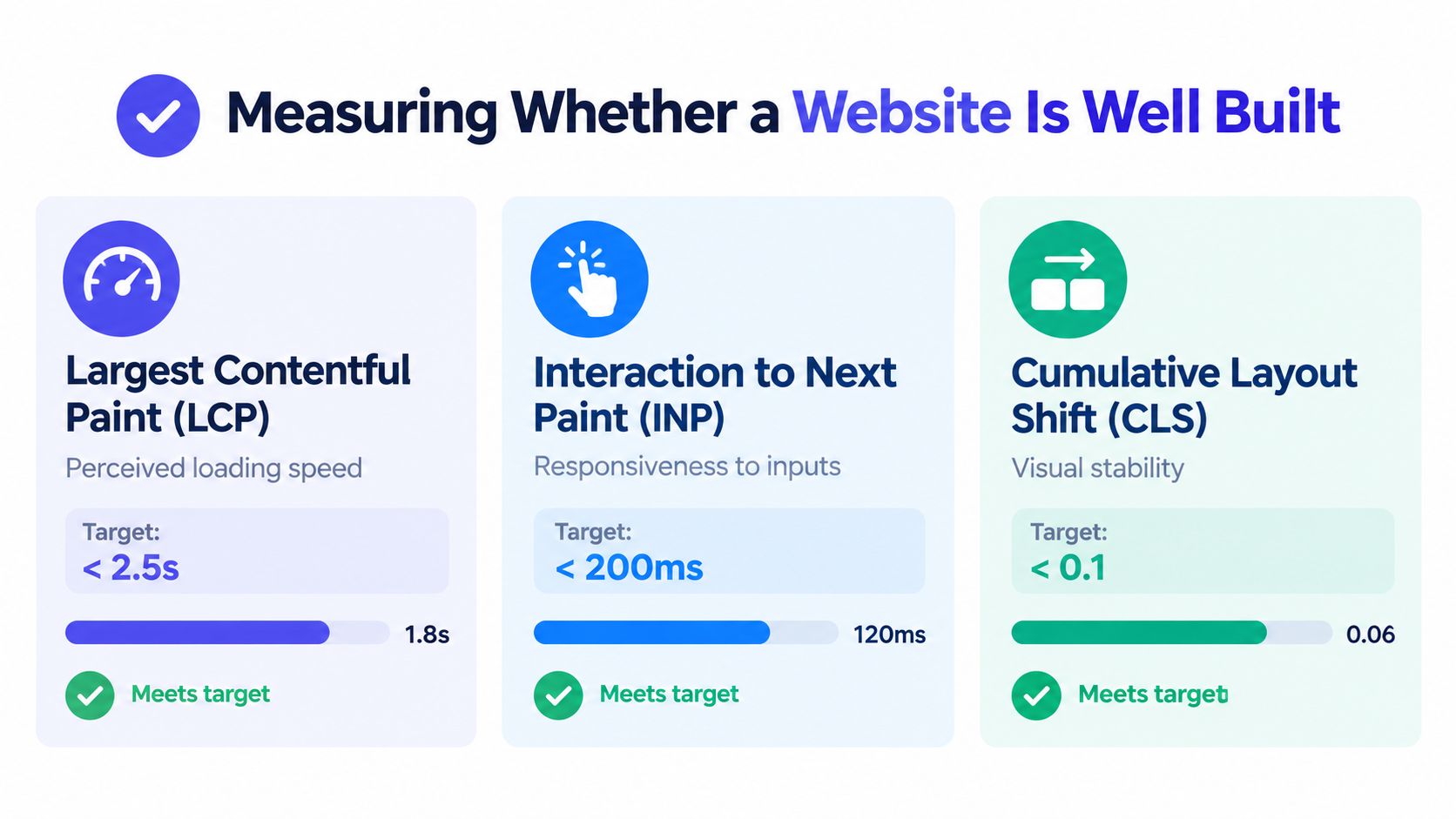
According to Google's explanation of Core Web Vitals, a strong experience means LCP should occur within 2.5 seconds, INP within 200 milliseconds, and CLS should stay at 0.1 or less, and these metrics are based on real user data rather than only lab tests.
What the three metrics mean
Largest Contentful Paint (LCP) is about perceived loading speed. When the main visible content appears quickly, people feel the page is ready.
Interaction to Next Paint (INP) measures responsiveness. When someone clicks, taps, or types, the page should react quickly.
Cumulative Layout Shift (CLS) measures visual stability. If buttons jump while someone tries to tap them, the page feels broken even if it eventually works.
Google also notes that large JavaScript bundles, long main-thread tasks, and unstable layouts tend to hurt INP and CLS, while lighter payloads and stable layout choices improve the user experience used in assessment.
A practical review checklist
Use this before launch, or when auditing a competitor's site.
Check loading behavior
Does the main content appear quickly, or do users wait on oversized assets and render-blocking resources?Test interaction
Do menus, forms, and buttons respond cleanly, or does JavaScript make the page hesitate?Watch for layout jumps
Do images, ads, banners, or embeds push content around after the page starts rendering?Review mobile layout
Does the design reflow naturally on a phone, or does it feel like a desktop page squeezed into a narrow screen?Inspect semantics
Are headings, links, buttons, lists, and landmarks meaningful, or is the page mostly anonymous containers?Confirm HTTPS and delivery quality
Is the connection secure, and does the hosting setup deliver assets consistently?
A well-built site isn't defined by whether it came from code, a CMS, or an AI prompt. It's defined by whether users get a fast, stable, understandable experience.
That's the full craft in one sentence. Good websites aren't magic objects. They're the result of sound decisions at every stage, from planning and structure to hosting and runtime behavior. And because those decisions leave visible traces, you can learn a lot about how a site was made just by studying the live page carefully.
If you want to inspect those traces instead of guessing, AI Website Detector analyzes live websites for builder signals, framework patterns, hosting clues, and AI-first stack fingerprints. It's a practical way to connect what you now know about how websites are built with what a finished site reveals after launch.