SSL Certificate Checker: Verify Site Security in 2026
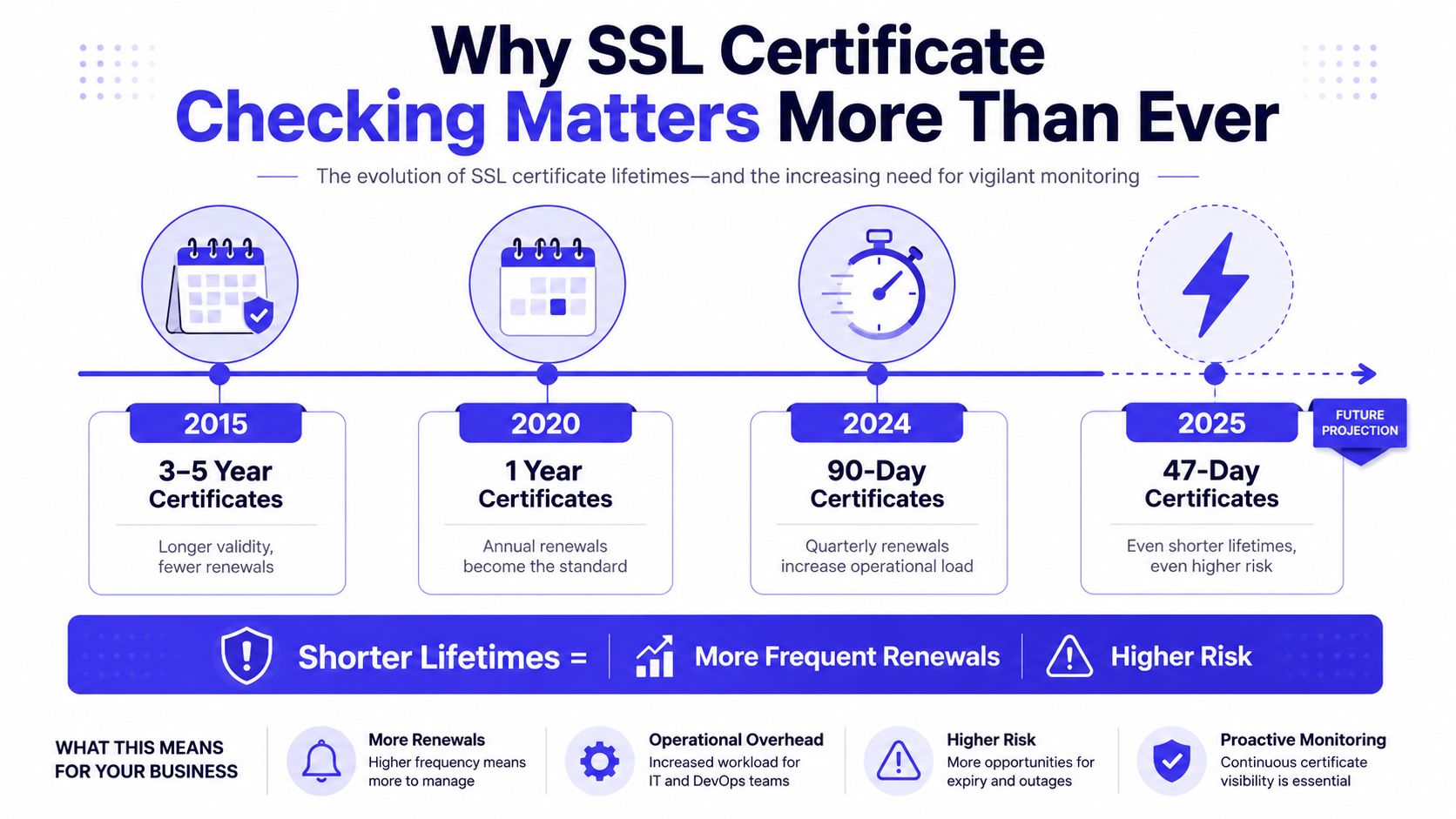
A public TLS certificate can move from a 398-day maximum validity period to 200 days on March 15, 2026, then to 100 days on March 15, 2027, and finally to 47 days on March 15, 2029, under the phased policy approved by the CA/Browser Forum (CA/Browser Forum validity schedule). That change makes the old “install it and remember it later” approach a liability. Certificate renewal is becoming a recurring infrastructure process, and an SSL certificate checker is one of the simplest ways to find failures before browsers, APIs, and customers do.
Table of Contents
- Why SSL Certificate Checking Matters More Than Ever
- What an SSL Certificate Checker Actually Inspects
- How to Run an SSL Check and Read the Results
- Common SSL Errors and How to Fix Them
- Automating Certificate Renewal Before the 47-Day Deadline
- Certificate Transparency and the Future of SSL Monitoring
Why SSL Certificate Checking Matters More Than Ever
Shorter certificate lifetimes turn certificate management into a recurring deployment task. Publicly trusted TLS certificates issued on or after March 15, 2026 are capped at 200 days, while certificates issued before that date must not exceed 398 days, according to the CA/Browser Forum baseline requirements. That affects websites, APIs, staging systems, load balancers, and subdomains that may not have a clear owner.
The next milestones raise the operational pressure. The approved schedule is set to reduce the maximum lifetime to 100 days on March 15, 2027, and 47 days on March 15, 2029, if implemented as planned (CA/Browser Forum reduction schedule). A calendar reminder can work for one carefully managed domain. It becomes a liability when teams use different certificate authorities, deployment pipelines, environments, and service stacks. Set-and-forget monitoring leaves too many opportunities for an expired certificate, incomplete rollout, or forgotten endpoint to reach production.
What a checker tells you
An SSL certificate checker connects to a reachable endpoint, retrieves the certificate presented by the server, and evaluates the data clients use during TLS validation. It reports the issuer, validity dates, domain names, certificate chain, and available revocation or transparency signals.
A green result confirms only what that endpoint exposes at that moment. It may miss an internal certificate, a regional deployment, an inactive load balancer, or an undocumented subdomain. Use the checker as an external service view, then compare it with an internal certificate inventory and automated renewal records.
Certificate Transparency adds another useful view. Public CT logs can reveal current and historical certificates for a domain, including issuers, validity dates, SANs, serial numbers, and certificate history. Independent SSL checker CT documentation describes the historical coverage available from public CT sources. For a broader security review, a security.txt checker can identify whether a domain publishes contact information for reporting vulnerabilities. That check supports security operations, but it does not validate a certificate.
What an SSL Certificate Checker Actually Inspects
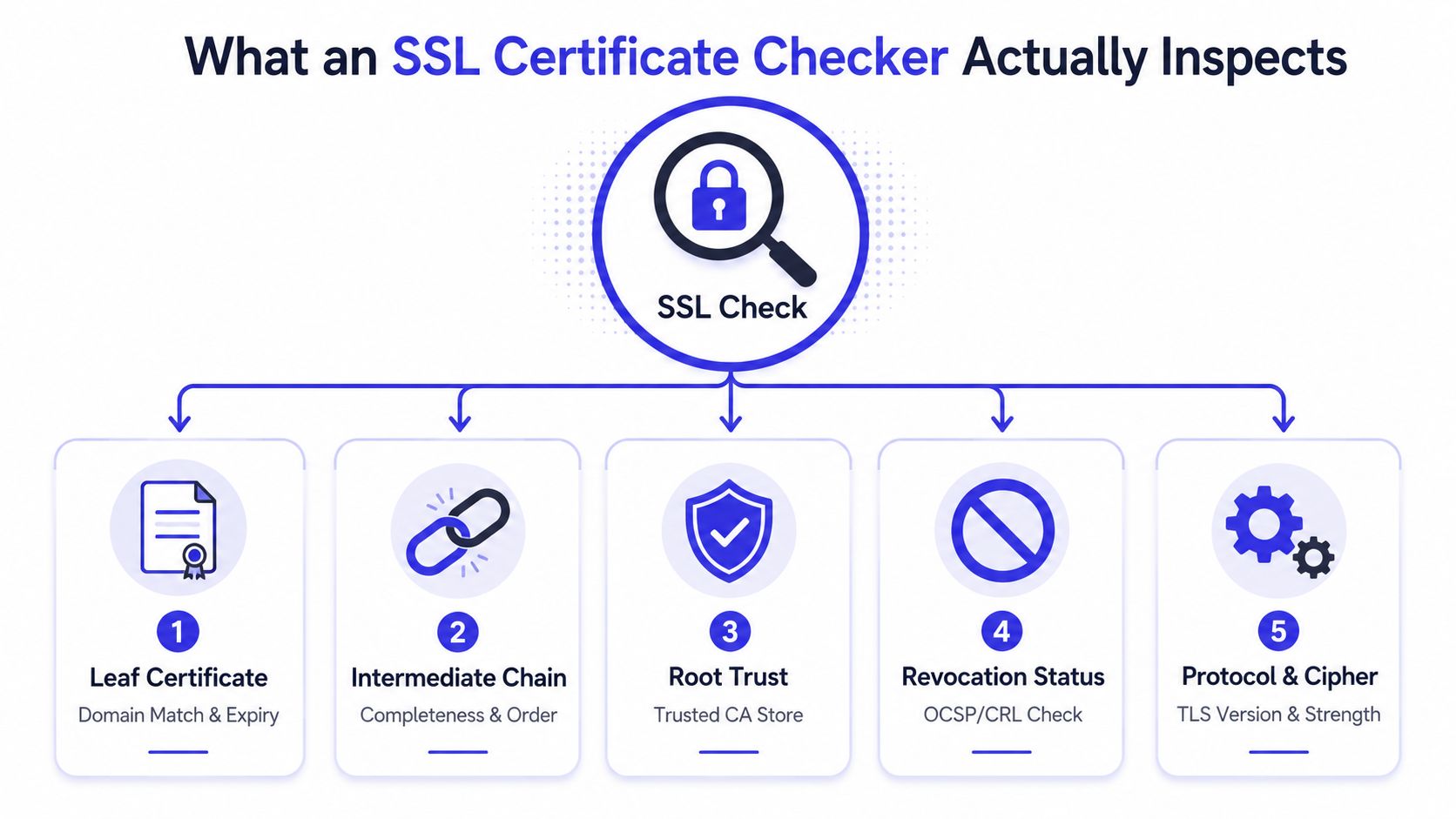
A certificate is only “valid” when several independent checks succeed. The leaf certificate may contain the right hostname and a future expiration date, yet the connection can still fail because the server omitted an intermediate certificate or the client can't build a trusted path.
The five signals that matter
Leaf certificate. The checker reads the certificate presented for the requested hostname. It verifies the validity window and checks whether the requested name appears in the certificate's identity fields, including the Subject Alternative Name list. A hostname mismatch means the certificate may belong to a different service, even if a trusted CA issued it.
Intermediate chain. Browsers build a path from the leaf certificate through one or more intermediate certificates to a trusted root. Each link must be present, correctly ordered, cryptographically signed, and within its validity period. A missing intermediate is a production defect, not a cosmetic warning. Fresh clients may fail while devices with a cached intermediate continue working, which makes this issue particularly deceptive. A clear SSL certificate chain guide is useful when you need to understand how those links fit together.
Root trust. The client compares the chain's root against its local trust store. Trust is therefore partly environmental. A private internal CA can be appropriate inside a controlled network, but a public website using a self-signed or privately trusted root will trigger failures for ordinary visitors.
Revocation status. OCSP was designed to let a client ask about one certificate without downloading a complete certificate revocation list. RFC 6960 describes that certificate-specific status model (OCSP specification). A checker should inspect the presented chain and relevant OCSP or CRL signals, while recognizing that revocation behavior depends on the client, trust store, and deployment.
Certificate Transparency. CT logs are publicly auditable, append-only records of certificates issued or observed for domains. RFC 9162 defines the protocol and its public logging model (Certificate Transparency protocol). CT visibility helps investigators find certificates that weren't expected, including historical certificates and possible misissuance.
For a quick supplementary review of site signals, a header analysis tool can inspect HTTP response headers. That doesn't replace chain validation, but it can add useful context during an incident.
How to Run an SSL Check and Read the Results
Start with the hostname users access. Check the canonical website, important subdomains, API endpoints, and wildcard coverage separately where appropriate. A wildcard certificate can cover a defined name pattern, but it doesn't automatically prove that every service is presenting the intended chain.
Enter the hostname into the checker and start the scan. Read the detailed fields before accepting the summary verdict. A “pass” generally means the endpoint presented a certificate that matched the requested name, remained within its validity period, and formed a path the checker could validate. It doesn't prove that every deployment location or undocumented service is healthy.
| Result Field | What It Means | Healthy Value Example |
|---|---|---|
| Issuer | The CA or certificate authority that signed the certificate | An issuer your organization recognizes |
| Valid from | The beginning of the certificate's validity period | A date before the current check |
| Valid to | The end of the validity period | A future date with renewal already planned |
| Days remaining | The checker's calculation of time before expiration | Enough time for issuance, deployment, and rollback |
| Subject Alternative Names | Hostnames covered by the certificate | The exact production names users request |
| Serial number | The certificate's unique identifier | A value recorded in your inventory |
| Signature algorithm | The algorithm used to sign the certificate | A currently accepted algorithm |
| Chain status | Whether the checker can build a trusted path | Complete, ordered, and trusted |
| Revocation signals | Available OCSP or CRL status information | No indication that the certificate is revoked |
Read warnings by operational impact
An informational field, such as the issuer or serial number, helps with inventory. A short remaining lifetime deserves planning. An expired certificate, hostname mismatch, broken chain, or revoked certificate needs immediate investigation because clients can reject the connection.
Don't rely on the checker's default hostname if your service uses redirects, a CDN, or multiple front ends. Run checks against each public name and record the result with the service owner. You can use broader website analysis tools for surrounding site inspection, but keep TLS findings in your infrastructure workflow.
Common SSL Errors and How to Fix Them
Most certificate incidents aren't mysterious. The server is presenting the wrong object, an essential chain element is missing, the certificate no longer covers the hostname, or the CA has revoked it. The fastest response starts by separating what the checker observed from what the deployment intended.
Expired certificates
Symptom: The checker reports that the validity period has ended, or clients reject the connection because the certificate isn't within its valid period.
Root cause: Renewal didn't run, renewal succeeded but deployment didn't reload the service, or a load balancer still serves the older certificate.
Fix: Issue or renew the certificate, install it on every relevant termination point, reload the service, and run an external check again. Verify the served certificate, not only the file stored on disk.
Incomplete chains
Symptom: The leaf certificate looks correct, but the checker reports an incomplete or untrusted chain.
Root cause: The server sends only the leaf certificate and omits an intermediate, or it sends the wrong bundle order.
Fix: Download the intermediate bundle from the issuing CA and configure the server or platform to present the complete chain. Test from a clean client after deployment. Browsers validate the path through intermediates to a trusted root, so a locally successful test can hide a fresh-client failure (certificate path validation explanation).
Domain mismatches
Symptom: The requested hostname isn't listed in the certificate's SANs.
Root cause: DNS, routing, CDN, or virtual-host selection sends the request to a service using another certificate.
Fix: Reissue the certificate with the required names or correct the service routing. Check the exact hostname users request, including subdomains.
Self-signed or untrusted roots
Symptom: The checker can't connect the certificate to a trusted root.
Root cause: Production is using a self-signed certificate, a private CA unknown to the client, or an incomplete chain.
Fix: Use a publicly trusted certificate for public services. For internal services, distribute the internal CA through managed trust stores instead of disabling verification.
Revoked certificates
Symptom: Revocation signals identify the certificate as revoked, or clients refuse it despite a future expiration date.
Root cause: The CA withdrew trust because of key compromise, misissuance, or another certificate problem.
Fix: Revoke the affected deployment where necessary, obtain a new certificate, replace the old certificate everywhere, and investigate private-key handling. A revoked certificate isn't repaired by restarting the web server.
A visual walkthrough can help less experienced operators recognize the difference between an expiry warning and a chain failure:
Automating Certificate Renewal Before the 47-Day Deadline
Manual renewal becomes a production risk as certificate lifetimes shrink. The approved policy timeline is scheduled to reach 47 days on March 15, 2029, under its phased schedule. A calendar reminder cannot account for lost account access, an unrenewed hostname, or a certificate issued successfully but never deployed to the endpoint serving users.
Choose automation that matches the estate
For a small web server, an ACME client such as Certbot can request and renew certificates without manual issuance. Configure a deployment hook that reloads the service, then run an external check to confirm the endpoint presents the new certificate. Issuance alone does not change production traffic.
Managed hosting can remove much of the certificate handling from your team. Confirm that the platform covers every hostname, renews automatically, and sends a failure alert. Larger estates need lifecycle management tied to inventory, ownership, issuance, deployment, and monitoring. Treating each certificate as an isolated file leaves gaps between teams and systems.
Set alert windows according to the time required to diagnose and deploy. A 30-day renewal window for 200-day certificates and a 10-day window for 47-day certificates are planning recommendations, not universal policy. Extend them when approvals, external CAs, maintenance windows, or multi-region rollouts require more lead time. With 47-day certificates, set-and-forget monitoring becomes a liability because a missed alert can consume a large share of the available service window.
Inventory beats assumptions
Build the inventory from configuration and observation. Include public websites, APIs, mail and database services using TLS, internal certificates, staging environments, wildcard certificates, and certificates attached to old load balancers. CT data can expose certificates absent from the configuration repository, while endpoint scans show what users receive now.
A certificate that isn't in your inventory can still take down a service.
Test the renewal path before an incident. Confirm that automation can obtain the certificate, install the full chain, reload the service, preserve private-key permissions, and alert when any step fails. Review access controls, secret storage, and approval paths for automated workflows. Teams assessing these controls can also consult DevArmor's agentic security guide for broader guidance on automated security work.
Certificate Transparency and the Future of SSL Monitoring
Certificate Transparency (CT) turns certificate discovery into an audit process. Its public, append-only logs help teams find current and historical certificates associated with a domain, instead of seeing only the certificate served during a scan.
That visibility can expose unauthorized issuance. Investigate an unexpected issuer, hostname, serial number, or historical certificate even when the live site still presents a valid certificate. Mozilla Firefox desktop version 135 began requiring CT for certificates issued by CAs in its Root CA Program in February 2025, according to industry commentary on browser and revocation changes (Mozilla CT and revocation commentary).
Revocation checks have limits. OCSP remains a useful signal, but clients do not always evaluate revocation identically. Inspect the presented chain and available OCSP or CRL information, then use CT monitoring as additional evidence rather than a replacement for endpoint testing.
Shrinking certificate lifetimes make this operational shift urgent. With certificates expected to reach 47 days by 2029, a set-and-forget monitor can become a liability. A missed alert leaves less time to diagnose issuance, deployment, chain, or permission failures before service impact.
A practical routine includes:
- Endpoint checks: Validate important public hostnames and deployment paths.
- CT monitoring: Review new certificates and investigate unfamiliar issuers or names.
- Automated renewal: Test issuance, installation, reloads, and failure alerts.
- Certificate inventory: Record ownership, location, issuer, serial number, and renewal method.
- Chain alerts: Escalate incomplete chains because unfamiliar clients may reject them.
Use CT findings to trigger investigation, not automatic replacement. Confirm ownership and deployment before revoking or renewing a certificate.