Grammar Check Free Ginger How to Use It Without Limits
You've finished an important email, assignment, or website draft, and the last thing standing between you and the send button is a handful of awkward sentences. You paste the text into a free checker, accept a few suggestions, and assume the document is ready. Then you notice that the tool only reviewed part of the passage, or that a correction changed the meaning because the surrounding sentence was missing.
That's the central challenge with grammar check free Ginger. Ginger can be useful for quick spelling and grammar repairs, contextual suggestions, and sentence rephrasing, but its free experience has practical limits that affect what it can see and how confidently it can suggest changes. A short email and a long academic paper are not the same test.
Ginger Software says it was founded in 2010, has received $25 million in investments, and has corrected more than 1 billion sentences. The company also says that more than 1 million people worldwide use it weekly, placing Ginger among the larger long-running grammar tools for English writing. These company-reported figures are available on Ginger's About Us page.
This guide treats Ginger like a writing coach rather than a magic “fix everything” button. You'll learn what the free checker can do, where its hidden character and usage limits matter, why splitting text can weaken context, and how to build a careful review routine without upgrading.
Table of Contents
- Introduction to Grammar Check Free Ginger
- What Grammar Check Free Ginger Does
- How to Use Ginger Free Across Your Writing Apps
- Free vs Paid Features and Where The Limits Hit
- How Accurate Is Ginger Free on Real Writing
- Choosing the Right Free Grammar Approach for Your Needs
- Final Takeaways for Using Ginger Free Effectively
Introduction to Grammar Check Free Ginger
A grammar checker is like a second pair of eyes. It can catch a missing article, a misspelled word, or a sentence that follows an unusual grammatical pattern. It cannot reliably judge whether your argument is persuasive, whether your tone fits a professor, or whether a rewrite still sounds like you.
Ginger is useful because it joins basic correction with contextual rewriting. Its free checker suits quick reviews of short writing, including an email, social post, message, or paragraph. That convenience helps when you are working in a browser and want to avoid moving text among several applications.
The limiting word is short. An independent review reports that Ginger's free web checker accepts only about 600 characters, or roughly 450 words, per check. It supports basic grammar and spelling corrections, along with limited punctuation help. Characters provide the clearer warning because a paragraph may reach the limit before it feels like a complete document. The reported limit and its effect on longer writing are discussed in this independent Ginger review.
Why the limit changes the result
Consider this sentence:
Although the survey was small, it provided useful evidence for the proposal.
If you divide the text after the opening clause, Ginger may receive only:
Although the survey was small,
That fragment is like showing a writing coach half of a sentence. The checker cannot fully assess the relationship between the survey and the proposal because the second clause is missing. You can review a longer document in pieces, but divide it at sentence boundaries and keep nearby sentences together whenever possible.
A practical routine is simple: check one focused section, restore the full passage, and then read for meaning, tone, and consistency yourself.
The free version works well for surface corrections in brief passages. Its results require more care as a document grows, uses specialized terms, shifts between regional English conventions, or needs consistent editing across many paragraphs. Splitting text can keep the checker usable, but it also removes context. Treat each result as a suggestion about a visible fragment, not proof that the complete document is ready.
What Grammar Check Free Ginger Does
A sentence can look correct word by word and still sound wrong as a whole. Ginger works like a writing coach for that gap. It examines how words relate within a sentence, then suggests a correction or an alternative. A dictionary confirms that a word exists; Ginger considers whether the word fits its surrounding context.
Its free checking starts with four practical functions:
- Grammar checking: Ginger identifies familiar grammatical problems and proposes replacement wording.
- Spelling support: It can catch misspellings, including mistakes that create another valid-looking word and therefore escape a basic spellchecker.
- Punctuation assistance: The free experience offers limited punctuation corrections. Check commas, sentence boundaries, and paragraph flow yourself.
- Contextual rephrasing: Ginger's Chrome Web Store listing describes AI-based rephrasing alongside contextual grammar checking. The listing also includes synonym lookup, definitions, and translation support for 40+ languages. Ginger's Chrome Web Store description provides these platform details.
The rephraser gives Ginger a wider role than a tool that only marks errors. Its Sentence Rephraser page says one click can produce alternatives using synonyms, antonyms, idioms, and phrases. It also describes adding missing words, completing fragments, and correcting spelling in context. For example, “The report was useful but very long” might receive a shorter alternative. Read that suggestion carefully: a concise sentence is only better if it keeps the emphasis you intended.
Ginger's product pages claim it can correct 5x more mistakes than Microsoft Word can detect. This statement appears on Ginger's official product page, so treat it as a company claim rather than a promise about every sentence.
The broader market explains the attention these tools receive. An independent market report projects growth in the online grammar-checker market from about US$1.22 billion in 2024 to US$2.87 billion by 2033, with a projected 10.5% CAGR. Those figures are cited through the same Ginger product reference.
How to Use Ginger Free Across Your Writing Apps
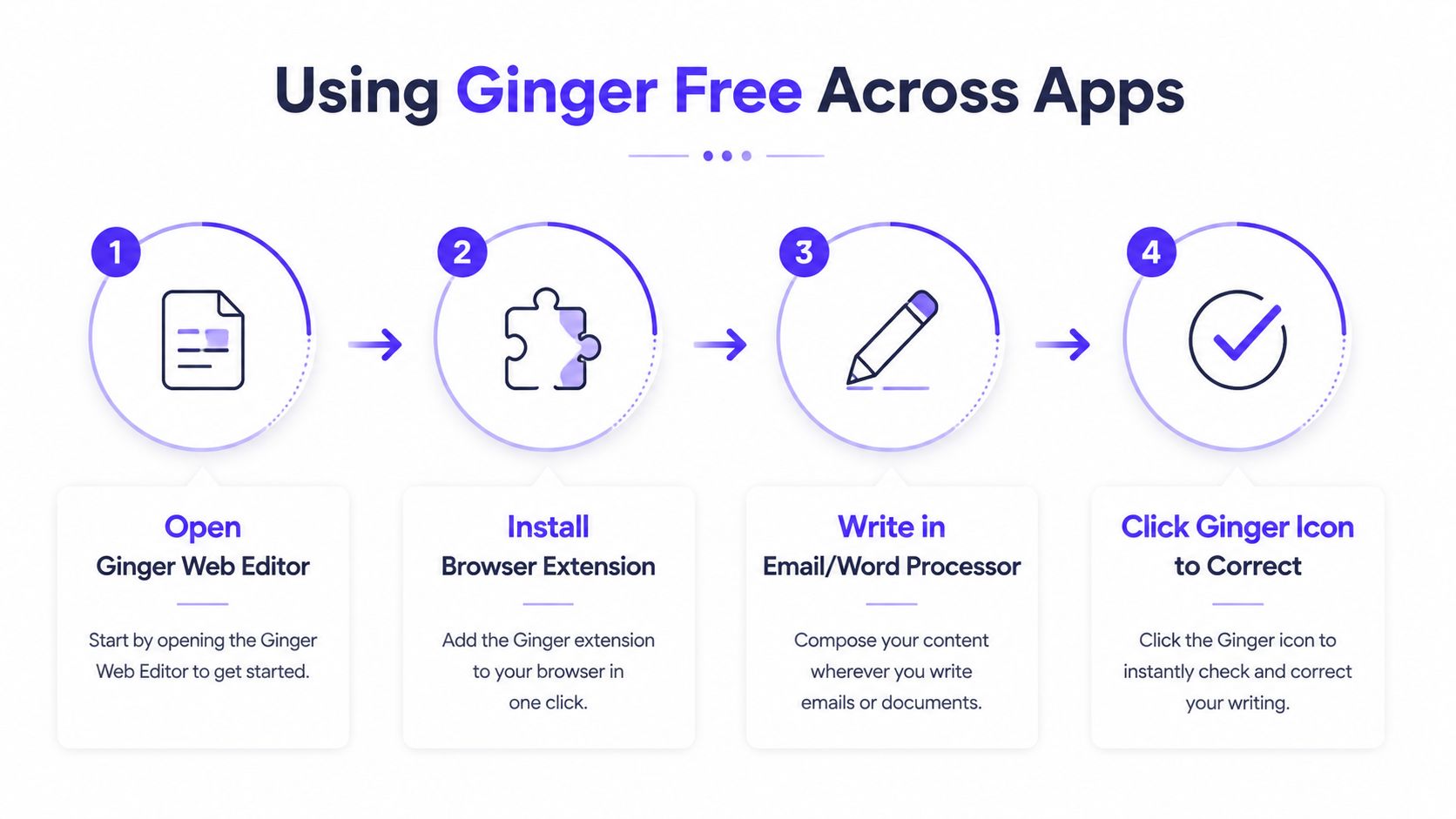
The best workflow depends on where your draft already lives. Use the web editor when you want a controlled review of a short passage. Use an extension when you're composing directly in Gmail, Google Docs, or a social platform.
A simple working routine
Copy a complete passage. Select a paragraph or a few connected sentences, rather than cutting through the middle of a sentence. This keeps the grammatical context intact.
Run the passage through the web checker. Review each suggestion instead of accepting every change automatically. Ask whether the correction fixes an error or merely changes a valid stylistic choice.
Read the revised text aloud. Your ear may catch a stiff phrase, an unintended meaning change, or a repeated word that the checker doesn't flag.
Return the approved version to your original app. Keep the final decision in your own document so the corrected copy remains part of your normal editing history.
Ginger's browser-extension help page says its Chrome and Edge extensions are intended for sites such as Gmail, Google Docs, social media platforms, and other online writing tools. The Ginger extension guidance confirms that the experience is meant to operate inside common web apps, not only in a standalone editor.
Choosing the right surface
A browser extension is convenient for a message you're writing right now. A dedicated writing window is better when you want to compose and review a self-contained passage. A Canterbury University accessibility document describes Ginger's Rephrase function as a way to generate alternate phrases and sentences, while its Write function analyzes punctuation, grammar, and spelling and offers alternatives. It also describes a dedicated writing window with rephrasing, favorites, and clipboard-copy features. You can review those details in the Canterbury University Ginger accessibility document.
For a manuscript or larger project, a specialist explanation of how integrated editing works may help you improve manuscript style. If your writing appears on a website, you can also use the AI text checker as a separate review step, but don't confuse that kind of analysis with grammar correction. Each tool answers a different question.
Free vs Paid Features and Where The Limits Hit
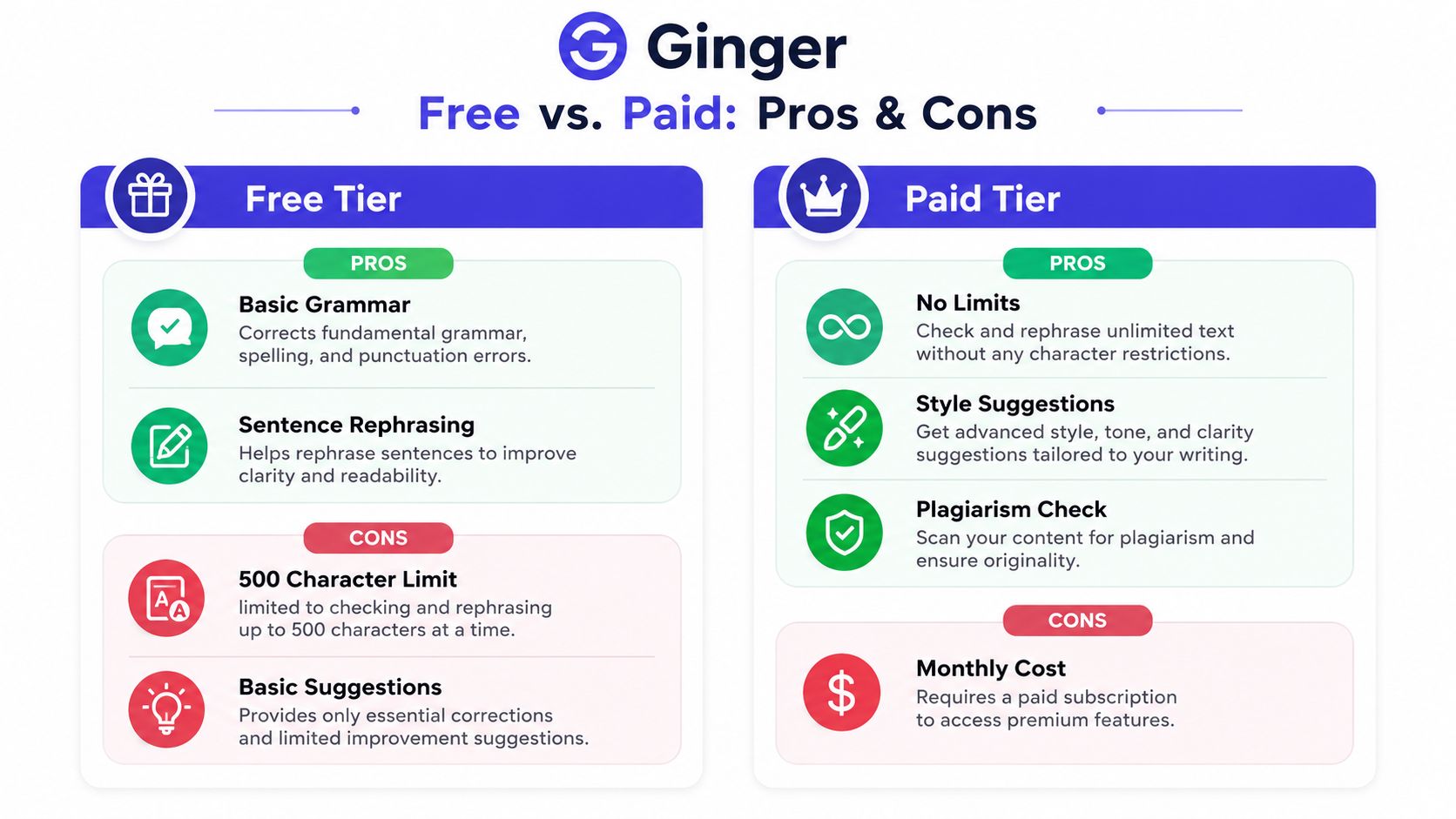
A short email can fit comfortably into Ginger's free checker. A paper cannot. The free tier covers basic grammar and spelling checks, along with some sentence assistance. Independent coverage describes it as more rule-based than a full AI writing platform. Plagiarism detection, advanced rewriting, and broader writing support require paid access, according to this independent Ginger review.
The main free restriction is the input-size ceiling. Reviews report about 600 characters, or roughly 450 words, per check. Some workflows may allow unlimited short checks, while another review reports a possible 14-corrections-per-month cap or other narrow limits. The result can differ between the web product, a browser extension, and another access point. Scribbr's grammar-checker testing documents the correction-limit discussion.
Why splitting text can reduce accuracy
Dividing a long draft solves the size limit, but it also removes context. Grammar works like a chain: a word at the start of a sentence may depend on a subject, verb, or transition several words earlier. If one chunk ends before that relationship is complete, Ginger reviews two fragments rather than one sentence.
For example, a paragraph might end with “The results show that,” while the next chunk begins with “the method needs revision.” Checking those pieces separately can hide the connection that makes the sentence grammatical.
Use a safer process:
- Split by sentence groups: Copy complete paragraphs or closely connected sentences.
- Keep headings separate: Headings follow different capitalization and punctuation conventions.
- Preserve the original: Paste suggested corrections into a duplicate draft and compare both versions.
- Check transitions manually: Ginger may repair each sentence while missing repetition or a weak link between paragraphs.
Context beats convenience: A correct change to an incomplete fragment can still make the full passage worse.
Free Ginger fits short emails, captions, comments, and quick notes. It is less suitable when you need plagiarism detection, document-wide style control, advanced tone feedback, or one dependable review of a long paper. For broader comparisons, consult this guide to best free AI software, then match each tool to the task. If your concern is whether a statement has adequate support, use this AI fact-checking guide. Grammar software can improve wording, but it generally cannot establish whether a claim is true.
How Accurate Is Ginger Free on Real Writing
A draft can look clean sentence by sentence and still contain a problem that depends on context. That is the main limit to keep in mind with Ginger Free. One benchmark found that Ginger identified only 3 of 20 errors and ranked lowest among the free grammar tools tested. Length-related restrictions affected that result, so the finding is better treated as a warning about testing conditions than as a complete verdict on every draft.
Ginger can still catch an obvious spelling mistake or familiar grammar pattern. Its accuracy drops when the issue involves agreement across clauses, an unclear logical connection, or a sentence whose meaning depends on the paragraph around it. Checking one fragment at a time is like judging a puzzle piece without seeing the picture.
What it may miss
Independent coverage describes several limits in Ginger's free offering:
- Nuanced style: It cannot replace an editor who understands the purpose, audience, and voice of a piece.
- Plagiarism review: The free tier does not provide plagiarism detection.
- Regional English: Ginger is mainly oriented toward English and may mishandle British spellings such as “colour.”
- Multilingual writing: Non-English content may not receive reliable support.
- Tone and consistency: Students and professionals may need analysis that goes beyond surface grammar and spelling.
These limits are discussed in this review of Ginger for grammar. If your audience uses British English, do not accept a change from “colour” to “color” automatically. The right spelling depends on the publication, institution, or client standard.
A safer accuracy habit
Use Ginger to identify possible problems, then make the editorial decision yourself. For each suggestion, ask:
- Is the original wording incorrect?
- Does the proposed change preserve the meaning?
- Does it suit the intended audience and regional English style?
Keep connected sentences together whenever the tool allows it. If a long document must be checked in smaller portions, repeat key context around each portion and review the complete draft afterward. This reduces the chance that a locally correct edit weakens the larger argument.
A separate grammar reference can explain why Ginger flagged a sentence. A human read-through remains necessary for argument, tone, citations, and consistency across the document. For another focused perspective, consult this grammar checking resource, then treat every automated suggestion as advice rather than a final ruling.
Choosing the Right Free Grammar Approach for Your Needs
Choose Ginger free when your writing is short, primarily in English, and focused on basic correctness. It works best as a quick checkpoint before you send a message or publish a small piece of text.
Choose a broader editing workflow when your needs extend beyond that. A student may need plagiarism review and formal academic style. A professional may need tone control and consistent terminology. A writer using British English may need a checker that respects regional spelling rather than automatically normalizing it.
Match the tool to the job
| Your writing situation | Sensible approach |
|---|---|
| Short email or message | Run a complete passage through Ginger, then read it aloud |
| Long report or manuscript | Work in complete context-rich chunks and perform a document-level review |
| Regional English | Confirm spelling choices manually before accepting suggestions |
| Academic submission | Add separate checks for citations, originality, and argument quality |
| Website publishing | Review the copy inside the actual CMS and inspect headings, links, and formatting |
Your publishing environment matters, too. If you write in WordPress, a plugin such as Rank Math can support the SEO side of publishing, while Ginger handles a narrower grammar task. Hosting and site-building choices, including WordPress.com, HostGator, or Shopify, address the platform where content appears, not whether each sentence is accurate.
For writers comparing input methods with editing software, this discussion of AI voice typing versus grammar tools offers useful decision context. Voice typing can help you produce a draft, while grammar checking helps you inspect it afterward. They solve different parts of the writing process.
Final Takeaways for Using Ginger Free Effectively
Ginger free is most useful when you give it the kind of text it can evaluate well. Submit complete, connected sentences. Keep each check within the reported character boundary. Review suggestions individually, especially when the tool proposes a rephrase rather than a simple correction.
A practical checklist looks like this:
- Use short passages: Avoid pasting an entire long document into one workflow.
- Protect context: Split at paragraph or sentence boundaries, never mid-sentence.
- Question rewrites: Confirm that synonyms, idioms, and altered phrasing still express your meaning.
- Check regional spelling: Keep “colour” or other regional forms when they match your audience.
- Add human review: Inspect tone, logic, transitions, citations, and document-wide consistency.
- Know when free is enough: Short everyday writing may need no more than a careful Ginger pass.
- Recognize the upgrade point: Longer professional, academic, or multilingual projects may require fuller writing assistance.
The best way to use grammar check free Ginger isn't to ask whether it can replace an editor. Ask whether it can help you notice surface problems faster, then reserve your own attention for the decisions that require context.
If you want to examine whether a website was created with an AI builder and identify its underlying technology stack, visit AI Website Detector. It provides explainable detection results, technology profiles, and evidence that can help you evaluate websites alongside your writing-quality checks.