AI Builder Limitations: Hidden Production Reality
Most advice about AI builder limitations stops at design taste and customization. That misses the core issue. A site can look finished in a demo, ship fast, and still fall apart the moment real users, real traffic, and real operations hit it.
That gap matters because the problem is usually not visual polish. It's whether the build can survive messy inputs, edge cases, uptime pressure, integrations, and the grind of maintenance after launch. Industry synthesis has put the broader pattern bluntly, noting that over 80% of AI projects fail to deliver measurable value and up to 95% of generative AI pilots don't affect business outcomes, which is why production readiness matters more than a slick first draft in the first place (Flatlogic).
Table of Contents
- Why AI Builder Demos Mask Production Failures
- Technical Depth and SEO Shortcomings in AI-Generated Sites
- State Management and Reliability Gaps Under Real Traffic
- Customization Ceilings and Platform Quota Constraints
- Migration Risk and Compounding Technical Debt After Launch
- Evaluating Whether an AI Builder Fits Your Project
- Using AI Builders Strategically Without Inheriting Unmanageable Debt
Why AI Builder Demos Mask Production Failures
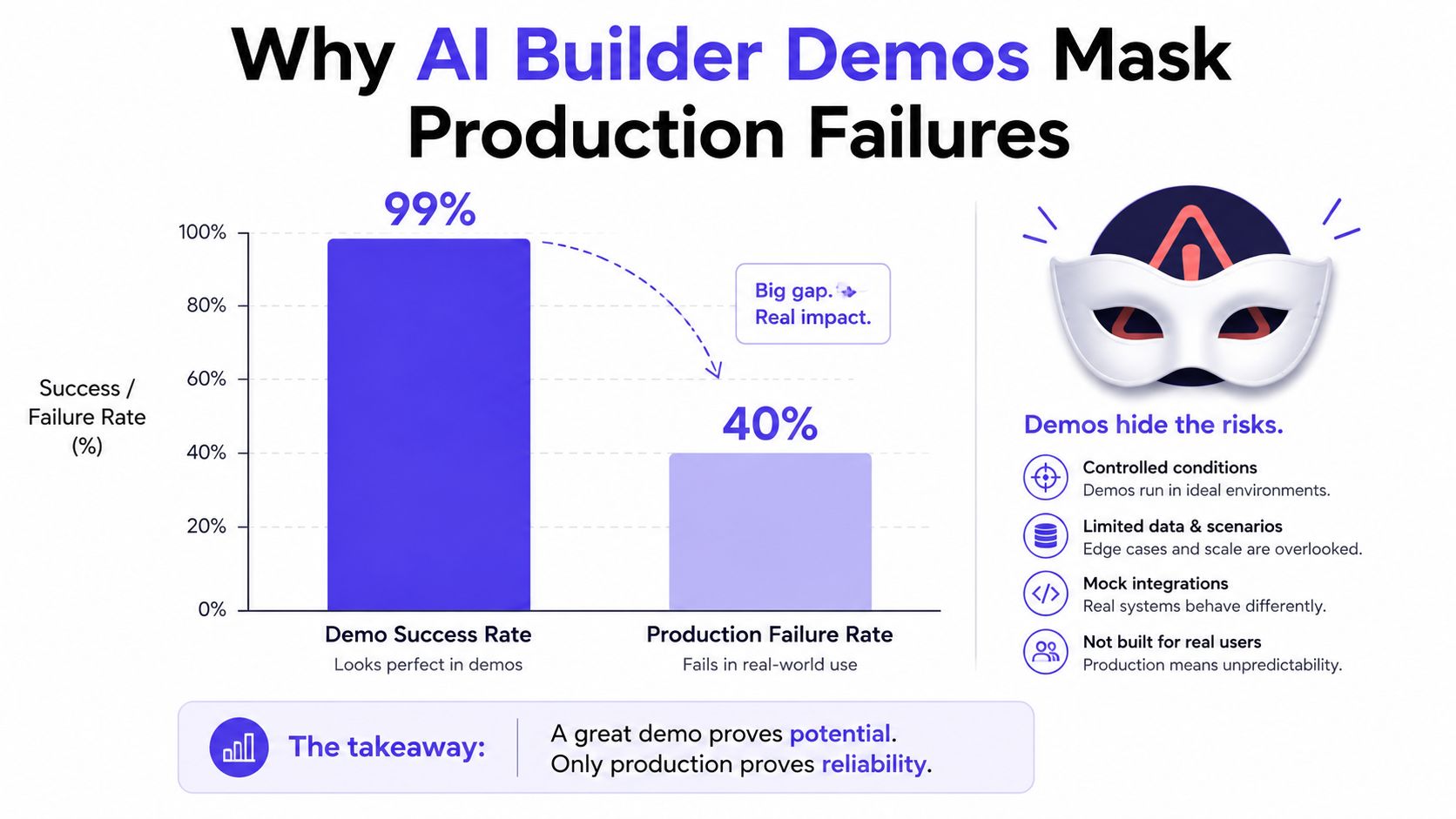
A demo can look polished precisely because it avoids the hard parts of production. Clean inputs, narrow flows, and controlled data make AI builders appear more reliable than they are once a live site has to handle unpredictable users and integrated systems (Flatlogic). That is the first trap in AI builder limitations. The tool isn't only being judged on whether it can generate a page, it's being judged on whether it can keep that page working under pressure.
The demo is optimized for the happy path
The happy path is easy to generate and easy to display. A builder can render a homepage, a signup flow, or a landing page that looks complete in minutes. Production is different because the environment includes authentication, analytics, payments, CMS workflows, monitoring, security controls, and uptime expectations, all of which need to work together continuously (Flatlogic).
Practical rule: if the builder only proves it can assemble screens, it hasn't proved it can run a business-critical service.
That's why “works in the demo” is a weak approval criterion. A site can pass visual review and still fail when a form receives malformed input, when an integration is slow, or when a downstream service behaves unexpectedly. In production, the issue is often less about what the page looks like and more about whether the stack can tolerate messy reality.
What production actually demands
Production-grade software needs reliability, integrations, monitoring, security, and scalability, not just generated output (Flatlogic). That distinction is easy to miss because marketing usually showcases the fastest possible path to a first draft. The operational burden appears later, when teams discover they need durable behavior across edge cases, latency constraints, and uptime requirements.
For teams trying to determine whether a site was built on a brittle AI workflow, the question is often less about surface aesthetics and more about evidence. The AI Website Detector builder scan is one way to check whether the stack shows signs of AI-assisted construction rather than engineered durability.
The uncomfortable conclusion is simple. A fast build is not the same thing as a dependable product. In many cases, the demo succeeds because it has been insulated from the exact conditions that determine whether the site can survive after launch.
Technical Depth and SEO Shortcomings in AI-Generated Sites
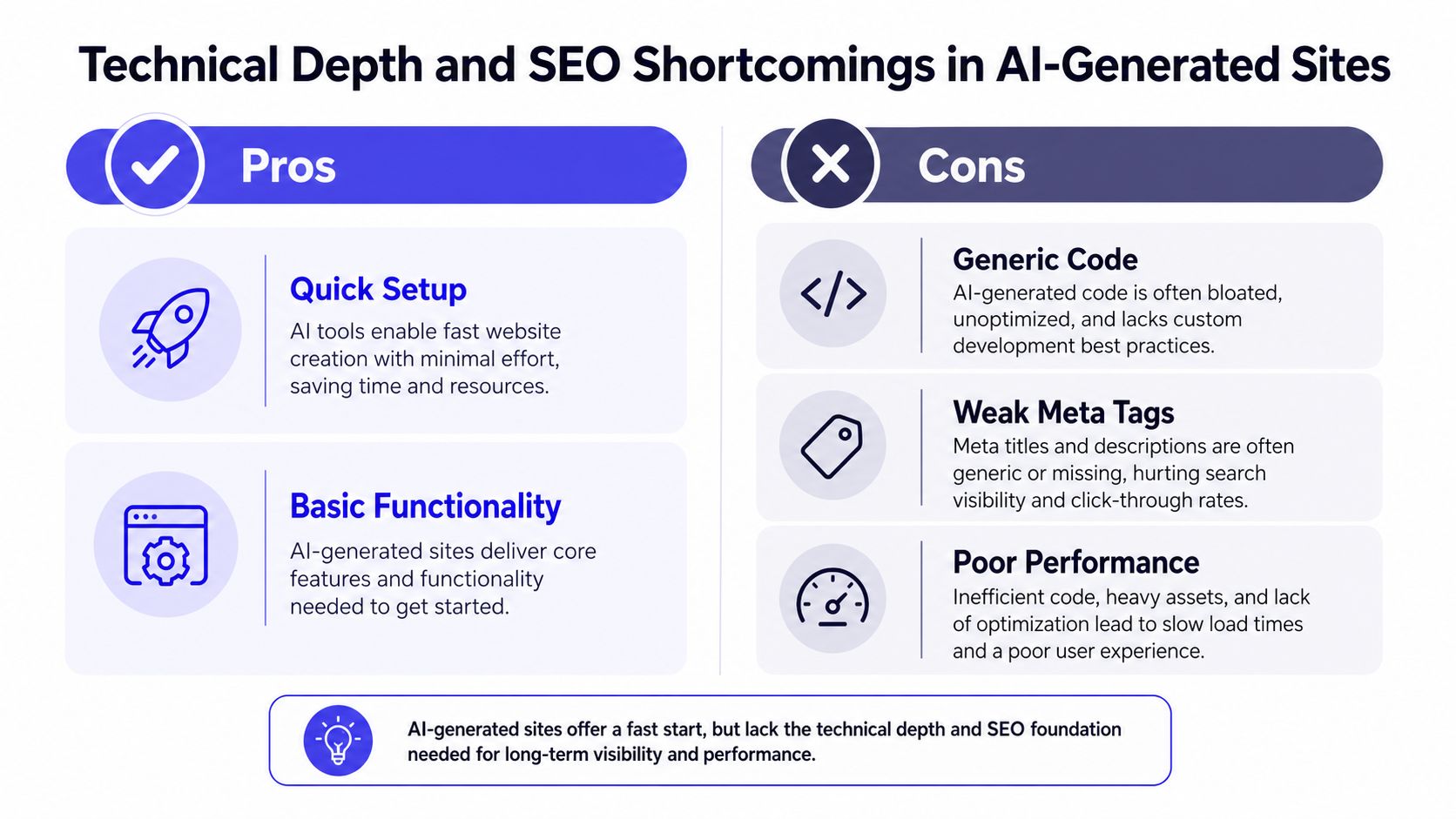
AI-generated sites often clear the visual bar and still fail the technical one. The page looks finished, but the underlying markup can be thin, repetitive, and difficult to extend once the site has real content, real traffic, and real ownership requirements. The problem is not just cosmetic. It is structural, and it shows up first in the parts search engines and maintenance teams rely on most.
A useful outside signal is Flatlogic, whose research found that builders are popular for fast starts, while users still report context loss, pricing opacity, security and reliability concerns, and limited customization. That combination matches what auditors see in production. Teams get a page quickly, then spend time compensating for the missing technical depth that should have been present from the start.
The technical layer is often the weak link
The weak points are usually visible in the source, not the design. Heading hierarchies can be inconsistent, schema markup can be generic or absent, image handling can be inefficient, and pages can ship without the kind of machine-readable structure that search systems and answer engines use to understand content. The issue is not whether the site can be generated. It is whether the builder can express intent clearly enough for other systems to consume it.
That matters most on content-heavy sites. Sloppy headings make a page harder to parse. Generic schema makes it harder to identify what the page is about. Large images slow performance before the user even interacts with the page. Each of those issues creates friction for search visibility and for the teams that will later need to edit, audit, or expand the site.
SEO weakness is a production problem, not a cosmetic one
Technical debt in the HTML layer is rarely isolated. Editors need markup that stays predictable as content changes. Developers need a structure they can extend without patching around generator quirks. Search systems need clean signals, not layout filler that looks polished but says very little. AI builders often produce something that is functional enough to publish and weak enough to create long-term repair work.
Operational visibility matters here as well. The MyMentions guide to LLM monitoring reflects a broader principle that applies to AI-built sites too, generated systems need monitoring, not just deployment. If a site cannot be inspected, tracked, or explained after launch, the team will discover problems only after rankings slip or content starts behaving inconsistently.
The AI txt checker is a practical way to inspect whether a site exposes the sort of machine-readable signals modern systems expect.
The video point is simple, AI-generated sites can look complete while hiding shallow technical architecture, so the first pass should always focus on structure, not polish.
The bottom line is straightforward. AI builders make publishing faster, but they also push more work into the repair phase. A site can appear done and still be underbuilt for search, editing, observability, and long-term technical ownership.
State Management and Reliability Gaps Under Real Traffic
Generated apps often fail for a dull reason, they lose track of what just happened. AI app and website builders are commonly described as stateless or session-based, which means they do a poor job of retaining user or workflow context across requests and tend to break down once an interaction becomes multi-step. That weakness is easy to miss in demos because demos rarely force a system to remember much. Real users do, and production traffic makes that gap visible fast.
When state disappears, the workflow breaks
State is what lets a site track a cart, a form progression, a draft configuration, or a partially completed workflow. Without a durable session model, the application cannot reliably carry context forward, so each new action behaves like a fresh start. Under load, that creates obvious failures. Under normal use, it still creates problems when people return later, switch devices, or move through edge-case paths.
The fragility usually shows up in the same places. A workflow works once, then fails when a user revisits it. A support flow clears out a step too early. A checkout path behaves differently after a timeout. These are not rare technical anomalies. They are the predictable result of systems optimized for quick assembly rather than durable execution.
A one-click build is only impressive until users ask the app to remember something.
Observability is where the pain becomes visible
Generated apps also tend to offer limited monitoring or management at scale. That means when something fails, the team often lacks structured tracing, deployment control, or enough operational context to debug the problem quickly. The software may look functional on the surface while revealing very little about what failed, where it failed, or why it failed.
That gap changes the support model. Engineers spend more time reproducing issues manually because the system does not expose enough telemetry. Product teams get vague bug reports because the app itself does not retain meaningful traces. Over time, reliability problems become harder to separate from user behavior, which is exactly what a production system should help clarify.
The operational cost shows up after launch, not during the demo. Scaling exposes weak session handling, migration work surfaces brittle assumptions in state storage, and incident response gets harder when the app cannot explain its own behavior. Teams that are serious about choosing the right monitoring stack usually notice this early, because the tool choice determines whether they can see failure patterns before users report them.
What production demands
Production needs durable state, clear traces, and enough control to recover from bad paths without guessing. A fast build can still become fragile the moment it has to handle repeated requests, multiple concurrent paths, or any workflow that depends on memory.
Customization Ceilings and Platform Quota Constraints
AI builders work well only when the data and workflow stay inside the platform's assumptions. Microsoft's AI Builder documentation makes that boundary explicit, because some models depend on constrained, layout-specific input, and training can fail when files are invalid, labels overlap, or the document layout does not match the expected structure (Microsoft). That is the trade-off. Speed comes from accepting a narrower input shape.
| Constraint Type | Specific Limit | Impact When Exceeded |
|---|---|---|
| Model input structure | Constrained, layout-specific input | Accuracy and trainability drop when data no longer fits the expected template |
| Document quality | Invalid files or overlapping labels | Training can fail before the model is useful |
| Collection scale | Up to 200 collections per model (Microsoft) | Training can take several hours and, in rare cases, up to 24 hours |
| Throughput | Up to 360 documents per environment every 60 seconds | Processing becomes bounded by explicit capacity ceilings |
| Credit usage | Overage blocks testing, selection, creation, and eventually execution (Microsoft) | Model usage degrades in stages, then breaks under quota pressure |
Platform rules are not the same as custom flexibility
The limits matter because they define where the platform stops adapting. If the data stays neat and repetitive, the system can hold up. Once documents or workflows vary too much, the model class itself becomes the constraint. That is why AI builder customization often looks strong during setup and then starts to break when real-world input introduces heterogeneity.
The quota rules are even less forgiving. When monthly consumption goes beyond available credits, the environment enters overage and users can no longer test or select Use in Apps or Flow on prebuilt model tiles, cannot start new custom models with Customize your model, and cannot view, quick test, or edit existing models (Microsoft). If consumption rises further, running models in flows and apps is blocked, and failures surface as EntitlementNotAvailable and QuotaExceeded errors.
Monitoring has to account for quota mechanics
Those mechanics are why choosing the right monitoring stack matters before the system hits the wall. If visibility is partial, teams cannot tell whether the failure came from data, the model, or quota pressure. A useful reference for that broader operational question is choosing the right monitoring stack, because the point is not only to observe errors, it is to identify what kind of failure is happening.
AI builder limitations become operational, not just functional. The platform may work inside its design envelope, but that envelope is real, documented, and enforced.
Migration Risk and Compounding Technical Debt After Launch
The hardest part of an AI-built product often starts after launch. The first users arrive, edge cases surface, manual fixes accumulate, and feature requests begin to collide with the limits of what the platform can absorb. Practitioner guidance keeps pointing in the same direction, AI app builders fit prototyping and simple apps, while production pressure shows up around auth, databases, scaling, and long-term code ownership (LinkedIn discussion). That is where technical debt stops being abstract and starts becoming operational.
The debt doesn't hit all at once
Teams usually see the problem in stages. The first symptom is a workaround, then another, then a missing testing hook, then a feature that would force a rebuild of a core flow. Generated apps also often lack accessibility, edge-case handling, and testing hooks, which makes every added requirement more expensive as traffic and feature scope increase.
AI Website Detector compare page can help confirm whether a live site still carries the fingerprints of a generated stack, but the more important question is what happens once the first real change request lands.
Practical rule: if the second version of your app already needs a rewrite, the first version was probably a prototype disguised as a product.
Migration risk matters more than the usual customization complaint. A builder can be acceptable if it only supports a short-lived proof of concept. It becomes a liability when the business starts depending on the artifact but the team cannot extract, extend, or fully own what was generated.
Ownership is the real strategic boundary
The long-term question is whether the team can safely move the site, inspect it, test it, and preserve it after launch. If the answer is no, then every new feature deepens vendor dependency and every operational change becomes harder to implement cleanly.
That compounding effect is why some teams pay twice. They pay once for the speed of launch, then again when they need to rebuild around performance regressions, pricing surprises, or features the builder cannot express cleanly. The earlier sections covered the technical and runtime reasons this happens. The migration problem is the business version of the same flaw.
Evaluating Whether an AI Builder Fits Your Project
The right question isn't whether an AI builder can produce a site. It's whether the project can live with the operational shape that follows. AI Website Detector is one option for analyzing whether a live site shows fingerprints of an AI-built stack, and that kind of evidence matters because surface polish alone tells you very little about maintainability or architecture.
Start with the project's future, not its first draft
A prototype and a customer-facing system are not the same decision. If the app is short-lived, disposable, or easy to replace, the builder's speed may be enough. If the app will handle sensitive data, business-critical workflows, or complex integrations, the operational bar rises immediately.
A practical test is to ask what happens after launch. If the next step is more screens, light workflow changes, and minimal integration work, the platform may be a fit. If the next step is ownership, portability, compliance, or scaling, the platform's constraints matter more than its launch speed.
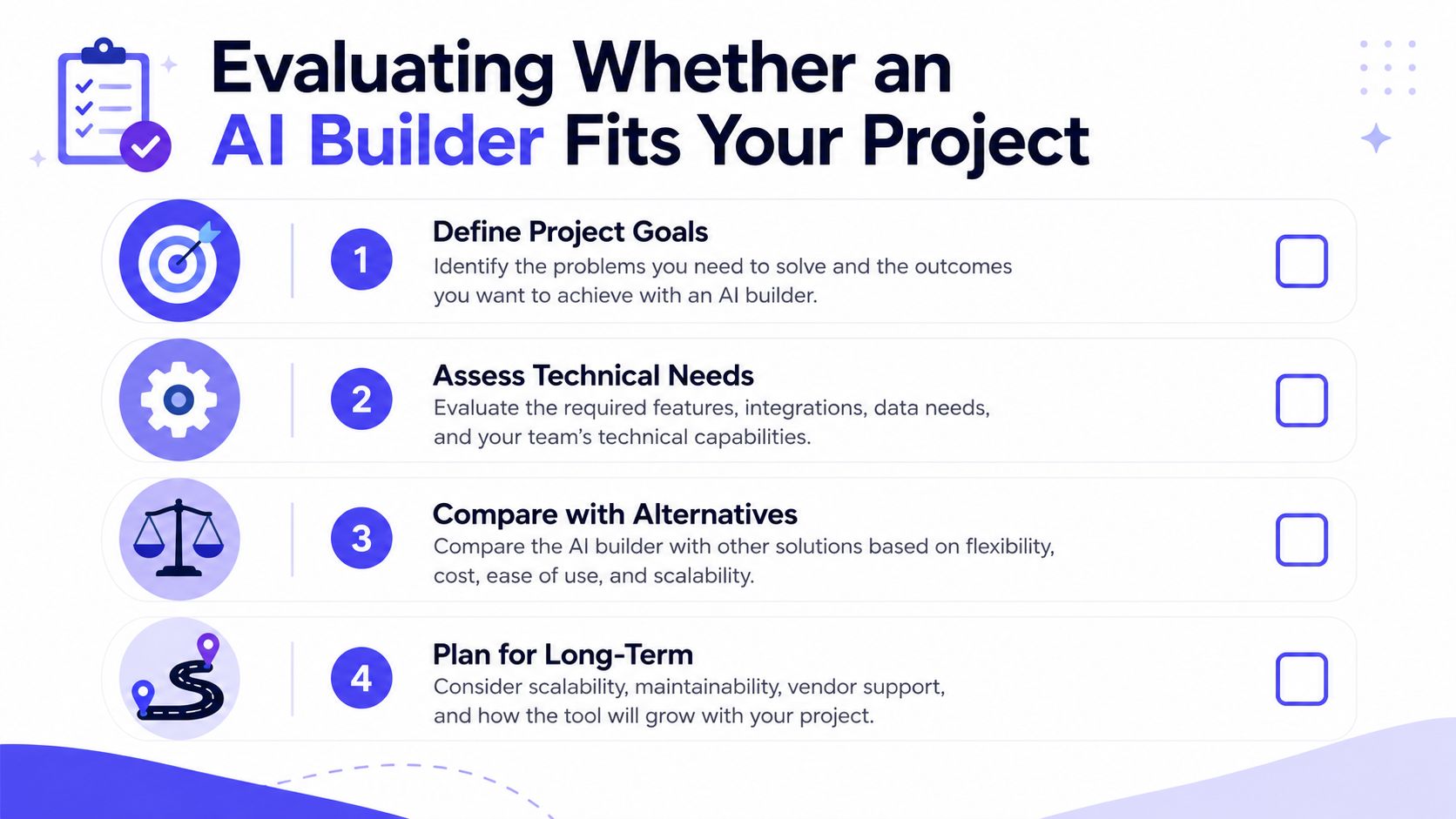
Use a simple decision sequence
- Define project goals. If the goal is validation, AI builders can be a fast path to evidence. If the goal is a durable product, you need to think beyond generation speed.
- Assess technical needs. Auth, databases, monitoring, and edge-case handling are where lightweight builders often start to strain.
- Compare with alternatives. The AI Website Detector compare page is useful if you need a fast way to examine how a site or stack is likely assembled.
- Plan for long-term ownership. If your team can't inspect, test, and move the app later, the short-term gain can become long-term lock-in.
The hidden advantage of this framework is that it forces an honest conversation early. Teams stop asking whether AI can build something and start asking whether they can operate it. That shift saves more pain than any design critique ever will.
Using AI Builders Strategically Without Inheriting Unmanageable Debt
A small product team once used an AI builder to spin up a customer portal in days. The first version helped them validate the flow, but they treated it like a draft, not a foundation. Before launch, they defined what could stay temporary, what needed observability, and what would have to move into owned code if the project got traction. That decision kept the speed benefit without locking the team into a structure they couldn't maintain.
The lesson is not to avoid AI builders. It's to use them where they're strong and contain them where they're weak. The CloudCops GmbH piece on the AI day two ops problem reinforces a point many teams learn too late, operational responsibility starts after the generation phase, not before it.
Treat the builder as a launch accelerator
AI builders are most defensible when they generate the first draft, not the final architecture. That means using them for prototype pages, internal tools, simple workflows, or components that can later be replaced without much friction. The more sensitive the use case becomes, the more you want code ownership, testing hooks, and deployment control outside the builder.
Practical rule: if the generated asset cannot be tested, monitored, and migrated, it should not be treated as finished software.
Put guardrails in place before users arrive
Teams that avoid compounding debt usually do three things early. They keep ownership of the code or content where possible. They define a migration path before launch. They budget for the cleanup work instead of pretending it won't happen. Those steps sound dull compared with instant generation, but they're what separate a useful shortcut from a platform trap.
The safest posture is selective adoption. Let the builder earn its place on speed, then require the rest of the stack to meet normal engineering standards. If it can't, the limitation isn't the team's imagination. It's the platform's ceiling.
If you're evaluating a site and want to know whether the stack looks AI-built, brittle, or lightly engineered, use AI Website Detector to inspect the signals behind the surface. It helps you connect visual output to the underlying technology, which is exactly where AI builder limitations show up after launch.