
Website Tech Stack Checker: Identify Any Builder & Framework Instantly
What if you could peel back the digital skin of any website and see its internal organs with a single click? Most professionals waste hours digging through the Inspect Element tab, trying to figure out if a site was built with Next.js or just a very fast WordPress theme. It’s frustrating to see a sleek site and have no idea what’s actually powering it under the hood. You shouldn’t need to be a senior engineer just to identify a competitor’s framework. That’s exactly why a modern website tech stack checker is no longer a luxury. It’s a fundamental tool for anyone who wants to demystify the web and gain a competitive edge.
You’re about to learn how to instantly uncover the exact tools, hidden AI builders, and frameworks used on any site. We’re moving past the guesswork and giving you the data to benchmark against the best or choose the perfect stack for your own next project. This guide previews how to spot the difference between traditional CMS setups and modern AI-driven architectures. From identifying niche plugins to tracking real-time market share analytics, you’ll see how to gain a complete technical profile of any digital product in seconds.
Key Takeaways
- Stop guessing and start knowing. Use a professional website tech stack checker to identify hidden frameworks and third-party scripts with a single click.
- Discover the digital fingerprints behind modern sites. Learn how source code and CSS naming conventions reveal if a site is custom-coded or built on a visual platform.
- Decode the framework wars. Compare the deep SEO control of WordPress against the rapid visual iteration offered by Framer and modern AI builders.
- Reverse-engineer competitor success. Spot the specific tools and gaps in your rivals’ stacks to improve your own site’s speed and search performance.
- Bridge the gap between insight and action. Transition from identifying technology to selecting the perfect platform for your next project using data-driven recommendation tools.
Why You Need a Website Tech Stack Checker in 2026
You see a competitor’s site that feels years ahead of yours. It’s fast, the UI is crisp, and the animations are flawless. You want that same performance, but you don’t want to spend months in development. This is where a website tech stack checker becomes your most valuable asset. It acts as a digital X-ray; it reveals the exact architecture, CMS, and third-party scripts used to build any site on the web.
Stop wasting time in the “Inspect Element” tab. Most modern sites use minified code and complex naming conventions that make manual detection a nightmare. A dedicated checker provides instant clarity. It tells you if a site is a custom-coded React masterpiece or a high-performance visual build. This insider knowledge lets you understand the design constraints and possibilities of any project before you write a single line of code or hire a developer.
Competitive benchmarking isn’t just about looking at layouts. It’s about understanding the engine. If every top-ranking site in your niche is using a specific framework, there’s usually a reason related to SEO or speed. Identifying these patterns gives you a roadmap to follow or a technical gap to exploit. You can see exactly which tools are powering the leaders in your industry without the guesswork.
The Shift from Traditional CMS to AI Builders
2026 has officially become the year of visual development and AI-driven stacks. While WordPress remains the legacy king for content-heavy sites, newer players like Framer and Lovable are gaining massive ground. These tools allow for rapid visual iteration that traditional CMS setups struggle to match. We’re also seeing a surge in “Headless” architectures. In these setups, the content management is separated from the display layer, allowing for extreme speed and flexibility. If you can’t identify a site’s builder immediately, it’s likely using one of these modern, decoupled approaches.
Speed vs. Complexity: Choosing Your Own Stack
Checking what others use helps you avoid the trap of over-engineering. A tech stack, often referred to as a solution stack, is the combined software ecosystem powering a digital experience. Your goal is to find the “Goldilocks” stack; it shouldn’t be too simple to scale, but it shouldn’t be so complex that it slows down your launch. By using a website tech stack checker, you can see how successful brands balance functionality with performance. You can find the most efficient path to launch by choosing tools that have already proven their worth in the real world.
How Technology Detection Uncovers Hidden Frameworks
Ever wonder how a professional website tech stack checker knows exactly what’s under the hood? It isn’t magic. It’s digital forensics. Every time a browser loads a page, it exchanges headers, scripts, and metadata that act as unique fingerprints. While organizations like the W3C provide technical guidance on Mitigating Browser Fingerprinting to protect user privacy, these same technical signals allow detectors to map out the software ecosystem behind any URL. By scrutinizing the source code, a detector can identify the specific DNA of a website in milliseconds.
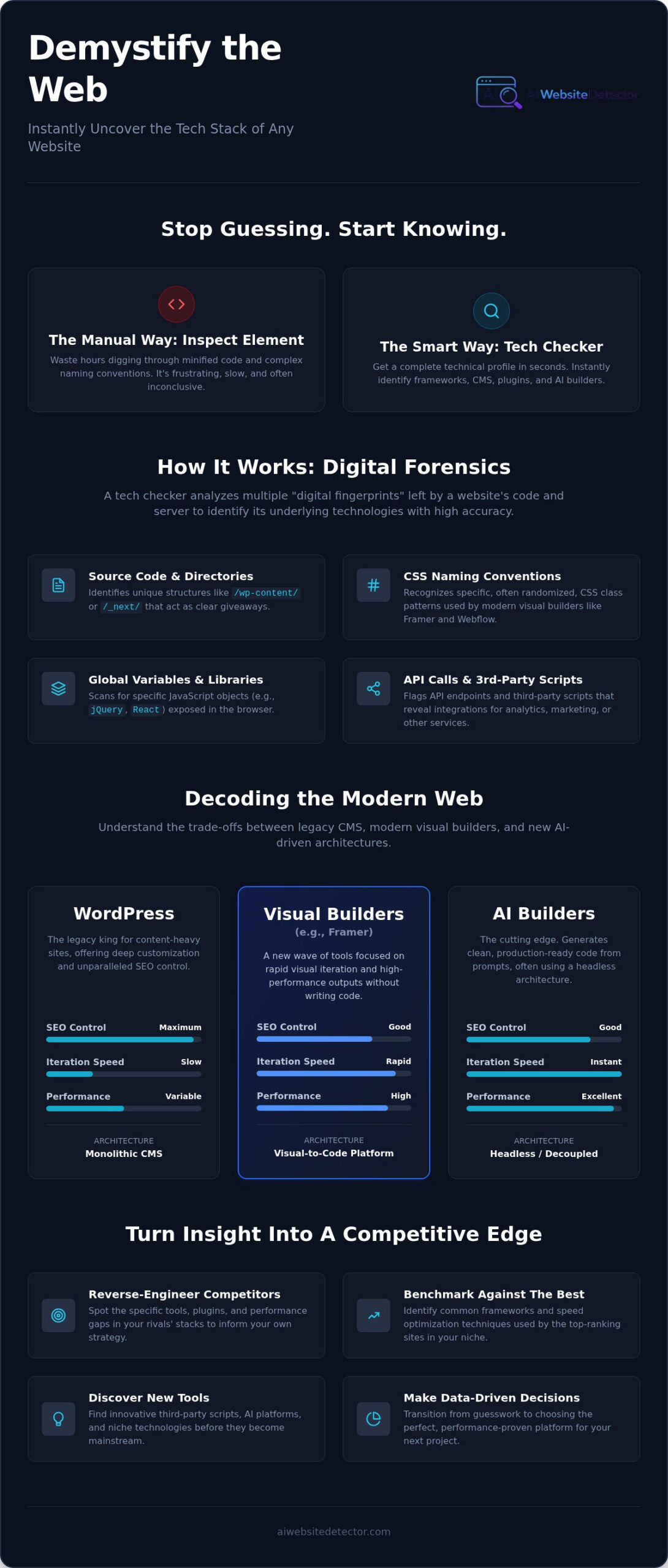
Detectors look for more than just a name in the footer. They scan for unique directory structures, specific API calls, and even the way a site handles its CSS. For example, WordPress sites almost always reveal themselves through standard directories like /wp-content/ or /wp-includes/. Similarly, a Next.js site is identified through its /_next/ directory and specific hydration signals that tell the browser how to turn static HTML into an interactive experience. These signals are nearly impossible to hide completely, making them perfect markers for accurate identification.
Signatures of Modern Web Builders
Modern visual builders like Framer and Webflow leave distinct trails in their output. Framer uses unique script loading patterns and specific CSS naming conventions that are instantly recognizable to an optimized website tech stack checker. If you see class names that follow a very specific, randomized string pattern combined with Framer-specific layout engines, the detection is certain. Identifying sites built with Lovable or other specialized AI generators requires even more precision. These tools often generate clean code that mimics custom development, but they still rely on specific runtime libraries and patterns that a sophisticated detector can flag as AI-driven.
The Role of AI in Tech Detection
Static signatures are no longer enough to keep up with the pace of web development. In 2026, AI-generated code is fluid. It often lacks the rigid, branded markers of old-school CMS platforms. This is why modern detection has shifted toward pattern recognition. Instead of just looking for a specific file name, advanced tools analyze the logic and structure of the code itself. AI Website Detector uses these evolving patterns to spot builders that traditional tools often overlook. It identifies the “intent” of the code structure rather than just matching it against a static database. If you want to see this level of detail for yourself, you can run a scan on your own architecture to see exactly what technical signals your site is broadcasting to the world. This real-time analysis ensures you’re seeing the most current version of a site’s stack, not a cached memory of what it used to be.
WordPress, Framer, or AI? Decoding the Modern Web
The web is fragmenting into distinct technical tribes. It’s no longer a simple choice between a custom site and a template. You need to know exactly which tribe a competitor belongs to before you can compete with their performance. Is that sleek portfolio a hand-coded React project or a high-end visual build? A professional website tech stack checker gives you the answer in seconds. In 2026, the “best” stack depends entirely on your specific goals for speed, SEO, and design flexibility.
WordPress remains the powerhouse for content-heavy domains. It offers deep SEO control that newer visual builders are still trying to replicate. Next.js has become the gold standard for developers who prioritize raw performance and custom logic. Meanwhile, AI builders have moved from experimental toys to the 2026 standard for rapid deployment. Understanding these distinctions is the difference between building on a foundation that scales and one that traps you in technical debt.
When to Stick with WordPress
Legacy doesn’t mean outdated. WordPress is still the robust choice for sites that need the massive plugin ecosystem developed over two decades. If a project requires complex membership tiers, deep archival content, or specific SEO configurations, WP is hard to beat. You can Detect WordPress Websites instantly to see if they are running a standard theme or a headless configuration. The key is spotting the difference between a simple blog and a complex, enterprise-level application powered by the WP core. If you need deep community support and a proven track record, this is your stack.
The Rise of Visual and AI Stacks
Why are boutique brands and high-end agencies moving away from traditional hand-coding? Framer has become the designer favorite for its ability to handle high-end animations and rapid visual iteration without a developer middleman. It allows for a level of polish that used to take weeks to achieve. Then there is the AI revolution. Tools like Lovable are streamlining interface building by generating entire UI structures from simple prompts. These AI builders are now the standard for speed-to-market. While legacy systems still hold the majority of the web, the market share growth for AI-driven platforms is accelerating. A website tech stack checker helps you identify these modern “fingerprints” so you can choose the most efficient path for your own project.
4 Ways to Use Tech Stack Insights for Competitive Analysis
Data is the ultimate competitive advantage. Guesswork is expensive; insight is free. When you use a website tech stack checker, you aren’t just looking at a list of software. You’re uncovering the strategic choices that drive traffic and conversions. Competitive analysis isn’t about copying; it’s about understanding the “why” behind the “what.” Identifying the engine behind a successful site allows you to replicate its strengths while avoiding its technical pitfalls.
There are four primary ways to turn technical data into a business strategy:
- Reverse-engineer success: Identify the exact frameworks and plugins powering the top-ranking sites in your niche.
- Identify technical gaps: See which speed or SEO tools your rivals use that you might be missing in your own setup.
- Perform a self-audit: Ensure your own site isn’t bogged down by redundant scripts or outdated legacy code.
- Track market trends: Use real-time analytics to see which platforms are gaining momentum and which are losing favor in 2026.
Benchmarking Performance and SEO
Performance is a ranking factor. If your competitors are consistently hitting higher Core Web Vitals scores, look at their foundation. Are they using Next.js for superior server-side rendering? Are they leveraging specialized AI tools for design or content optimization? Checking these tech signals allows you to predict a competitor’s next move. If they suddenly switch to a headless architecture, they are likely preparing for a massive scale-up or a pivot into new markets. Stay ahead by knowing what they build on before they launch their next campaign.
Reverse Engineering High-Conversion Designs
Conversion rates often depend on the friction of the user experience. If you find a landing page that feels incredibly smooth, check the builder. Many high-converting pages in 2026 are built on specific AI platforms that optimize layouts based on user behavior. You can find the exact tools used for interactive 3D elements or complex scroll animations without digging through thousands of lines of code. Once you identify a stack you like, use the AI Builder Recommendation Quiz to see if it’s the right fit for your specific goals. It’s the fastest way to move from inspiration to implementation.
Stop leaving your technical strategy to chance. You can run a comprehensive competitive scan now to see exactly how your stack measures up against the industry leaders. Knowledge is power, but only if you act on the data.
Choosing Your Next Platform with AI Website Detector
Information is useless without action. You’ve identified the stack. You’ve seen the frameworks. Now what? Most tools stop at the data. They give you a list of scripts and leave you to figure out the rest. That’s a massive waste of your time. A modern website tech stack checker should be more than a diagnostic tool; it should be a launchpad for your next project. Knowing a site uses React is interesting; knowing if that’s the right choice for your specific budget and timeline is essential.
AI Website Detector bridges the gap between discovery and creation. We don’t just show you what your competitors are doing; we help you decide if you should do it too. Our Market Share Analytics allow you to bet on future-proof technologies. Why build on a platform that’s losing momentum? Use real data to ensure your next project is built on a foundation that will actually be supported three years from now. We prioritize transparency, giving you the insider knowledge required to skip the trial-and-error phase of web development.
Generic “Best Of” lists are usually just a collection of affiliate links. They don’t care about your specific project constraints. Our approach is different. We look at the technical requirements of the sites you admire and match them to your actual capabilities. If you’re a designer who wants high-end polish without code, we’ll point you toward Framer. If you’re a developer seeking maximum scale, we’ll show you why Next.js is the dominant choice in 2026. It’s personalized guidance driven by hard data, not marketing fluff.
The AI Website Detector Advantage
We built this for the modern web. Legacy detectors are great at spotting WordPress installs from a decade ago, but they often choke on Next.js hydration signals or Framer’s unique loading patterns. We focus on the now. Our engine is specifically tuned to detect Lovable, specialized AI builders, and headless architectures that other tools ignore. There is no bloated enterprise dashboard or irrelevant sales lead data here. You get the technical truth you need to build better products, delivered in seconds. It’s fast, direct, and focused on the emerging tools that are currently disrupting the industry.
Your Road Map to a Better Website
Success isn’t about luck; it’s about following a proven path. You can move from curiosity to a live site in three simple steps. First, detect a site that inspires you and uncover its technical DNA. Second, compare its stack against real-time industry trends to see if it’s a sustainable choice. Third, use our recommendation quiz to find your perfect match based on your unique goals. Ready to stop guessing? Try the Tech Stack Detector Now and start building with actual website tech stack checker insights.
Turn Technical Curiosity into Strategic Action
The web is no longer a mystery. You’ve seen how a professional website tech stack checker grants you immediate insider knowledge. From uncovering hidden AI frameworks to benchmarking the SEO strategies of industry leaders, you now have the data to stop guessing. Competitive analysis is your shortcut to better performance. By identifying the exact tools powering high-conversion sites, you avoid technical debt and over-engineering before you even start building.
Ready to look behind the curtain? You don’t need to be a developer to get these answers. Our tool provides specialized detection for modern platforms like Framer, Lovable, and Next.js. You get real-time market share data with zero code required. It’s time to move from discovery to creation. Identify any website stack instantly with AI Website Detector and start building with confidence today. The digital world is yours to demystify.
Frequently Asked Questions
How can I tell what technology a website is built with?
You can identify a site’s technology by using an automated detection tool that scans its source code and server headers. These tools look for unique “fingerprints” like specific script paths, meta tags, and directory structures. Manual inspection is often too slow and complex; a one-click scanner finds these signatures instantly and presents them in a readable format.
Is there a free website tech stack checker available?
Yes, many platforms offer a free version of their website tech stack checker for individual lookups. These tools allow you to scan a specific URL to see its CMS, analytics, and frameworks without any upfront cost. They are perfect for designers and developers who need quick insights into a single site’s architecture during the inspiration phase.
Can I detect if a website was made using AI?
You can detect AI-generated sites by looking for specific runtime signatures and code patterns used by platforms like Lovable or other AI builders. Modern detectors are specifically tuned to spot these emerging design tools. They analyze the structure of the generated code to identify the “intent” and origin that traditional scanners often miss.
What is the difference between a CMS and a tech stack?
A CMS is the specific software used to manage content, while a tech stack is the entire ecosystem of software that powers the digital experience. Your tech stack includes the CMS along with the server, database, front-end frameworks, and third-party scripts. Think of the CMS as the dashboard and the tech stack as the entire engine under the hood.
How accurate are website technology identifiers?
Accuracy depends on the tool’s database and its scanning method. Real-time scanners are highly accurate for identifying front-end frameworks, CSS libraries, and third-party scripts. While some custom back-end configurations can be obfuscated, the vast majority of modern web tools leave behind distinct markers that are nearly impossible to hide from a sophisticated detector.
Why should I care about my competitors tech stack?
Competitor stacks reveal the technical “engine” behind their market success. If a rival has superior load times or better search rankings, their choice of framework or CDN provides a roadmap for your own technical improvements. Benchmarking helps you identify which tools are the industry standard and which ones are outdated legacy systems you should avoid.
Can I check a websites tech stack without knowing how to code?
You don’t need any coding knowledge to use a website tech stack checker. These tools are built for designers, marketers, and business owners to get “insider knowledge” through a simple interface. You just paste a URL, and the tool demystifies the complex code into a clear list of builders and frameworks.
Which website builder is most popular in 2026?
WordPress remains the most popular legacy platform in 2026, but the fastest growth is currently seen in visual and AI builders. Framer and Next.js have become the dominant choices for high-performance boutique sites and custom web applications. The trend is moving away from rigid templates toward more fluid, AI-driven development environments that prioritize speed and iteration.